Sometimes when you try to Pull changes from the server to your local repository you get a “cannot pull because there are uncommitted changes”. This is uncommitted changes messing up your sync
I have been onsite in Athens working with a customer that is moving from StarTeam to Git. When you are moving from one source control system to another there are always difficulties and a difference in workflow between the systems. A workflow that works well in StarTeam might not in TFVC. However when you add that you are moving from a Server version Control System (SVCS) to a Distributed Version Control System (DVCS) you are going to go through a paradigm shift.
However, it can be the simplest of activities that bite you in the ass. For example, in most server based version control systems when you have made a bunch of changes locally and you want check-in to the server it is always prudent to do a “Get” first in order to verify that your local changes work with the latest version of the server. So you dutifully just do a “Get” and if your files locally conflict with the server you resolve the conflicts using the conflict resolution tools.
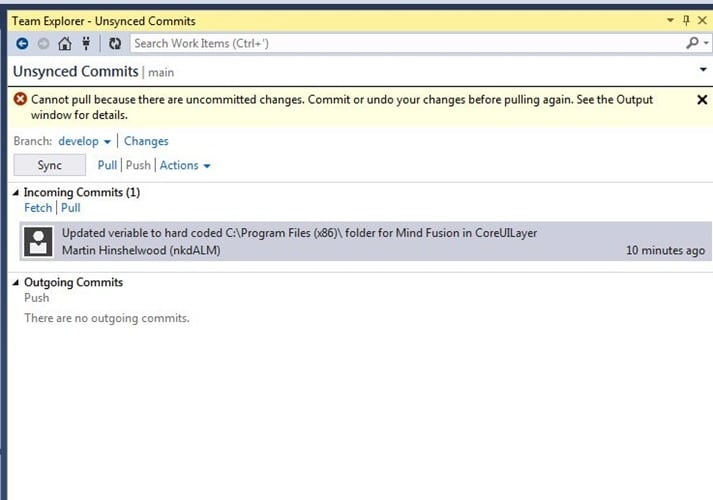
When you try to do this in Git it complains that you have uncommitted changes that you either need to undo the changes and get rid of them, or you can commit them to the local repository.
In our server based scenario we have no choice but to do a merge from the server directly to our live edited files locally. If we complete the merge, and we messed up…. Well that’s just a little bit tough and you should have chosen better. So we have a lossey (or lousey) merge where we can potentially not end up with what we want and have no way back.
Git blocks this potential loss of code by forcing you to choose wither you want to lose the changes or persist them. Once they are persisted they can’t be lost without deliberately resetting the repository or deleting it. Although your workflow is changing it is for the better as you are less likely to have a frustrating issue.
DVCS is just better than SVCS…
Smart Classifications
Each classification [Concepts, Categories, & Tags] was assigned using AI-powered semantic analysis and scored across relevance, depth, and alignment. Final decisions? Still human. Always traceable. Hover to see how it applies.
What to read next
Bug in the Visual Studio Git integration that results in a merge conflict
Explains a Visual Studio Git bug causing merge conflicts during pulls with local commits, its workaround, and best practices for managing …
Migrating source code with history to TFS 2012 with Git-Tf
Guide to migrating source code and preserving history from one Team Foundation Server (TFS) 2012 instance to another using Git-Tf and Git …
Migrating source from Perforce to Git on VSO
Step-by-step guide to migrating source code from Perforce to Git on VSO, covering repository setup, dependency management, build processes, …
TFS Integration Tools - Issue: TF10141 No Files checked in as a result of a TFS check-in failure
Explains how to resolve TFS Integration Tools check-in failures (TF10141), covering conflict identification, manual resolution steps, and …
TFS Build reports Licencies.licx: unable to load type
Explains how mismatched component versions in licences.licx files can cause build errors on TFS servers, and offers solutions for consistent …
Git Flow should have died years ago
Explains why Git Flow is outdated for modern software, highlighting its drawbacks and recommending simpler workflows like GitHub Flow for …
Detecting agile theatre with real delivery signals
Why Most Companies Operating Models Fail in Dynamic Markets
A concise comparison of Predictive and Adaptive Operating Models, explaining why traditional structures fail in dynamic markets and how …
Don’t Manage Dependencies, Remove Them
Explains why dependencies are a sign of poor system design and outlines steps to eliminate them by aligning teams, clarifying ownership, and …
The Estimation Trap: How Tracking Accuracy Undermines Trust, Flow, and Value in Software Delivery
Tracking estimation accuracy in software delivery leads to mistrust, fear, and distorted behaviours. Focus on customer value, flow, and …
Flow of Value vs Flow of Work – Misnomer or Useful Shorthand?
Compares “flow of value” and “flow of work” in Kanban, explaining why only validated outcomes count as value and stressing the need for …
Why Outsourcing DevOps Fails, and How Real Engineering Excellence Starts With Your Team
Avoid DevOps vendor lock-in, discover how true engineering excellence starts with partnership, not outsourcing. Ready to transform your …