When you do a build you can get an “unable to resolve type” message from the licencies.licx file that you have checked in. This prevents you from having a successful build in Team Build.
I have been working with a team of coders in Athens moving them over from StarTeam to TFS with Git. We are now, for the first time ever, trying to configure a build for their 25k file project on an automated build server. The main solution has 66 projects and currently we need to do two passes to get a successful build locally. This is not the best place to be, but it is where we are. There are many things that they are going to have to do to improve their platform over the coming years, but they really need a CI build to help them stay on the right road.
I configured a build server and got one of their coders to install the 10GB of additional components that we need to get the build working. They have Infragistics and Developer Express, along with a plethora of other tools and components for both WPF, WinForms, and Web. After a few builds we got to a seemingly confusing error. There was a licence.licx file referencing version 12.2 of Infragistics that was causing the build server to throw an error. But it built just fine on the local developer workstations.
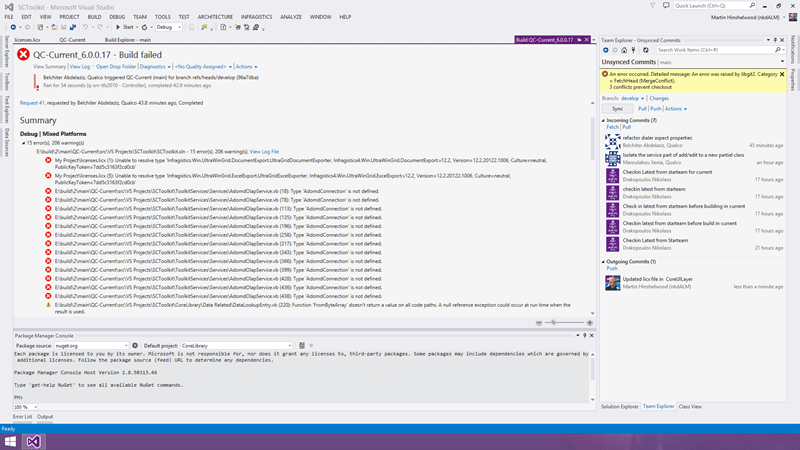
The error looks fairly strait forward but the referenced components were installed on the server. Because they use a lot of components they have a lovely spreadsheet with all of the versions and what component the developers need with a link to the network share where the installers live. It should be a case of walking the list, installing everything, and we are good to go.
My Project\licenses.licx (1): Unable to resolve type ‘Infragistics.Win.UltraWinGrid.DocumentExport.UltraGridDocumentExporter, Infragistics4.Win.UltraWinGrid.DocumentExport.v12.2, Version=12.2.20122.1006, Culture=neutral, PublicKeyToken=7dd5c3163f2cd0cb’
My Project\licenses.licx (5): Unable to resolve type ‘Infragistics.Win.UltraWinGrid.ExcelExport.UltraGridExcelExporter, Infragistics4.Win.UltraWinGrid.ExcelExport.v12.2, Version=12.2.20122.1006, Culture=neutral, PublicKeyToken=7dd5c3163f2cd0cb’
Now if any of you have tried to get a build working for an existing piece of software, you will know that it is an arduous task of building and fixing that makes your hair gray. A build server tends to be a lot more… unforgiving than local Visual Studio. Not only that there are always hundreds of ’ the coders just know how to solve that’ errors that you will have to resolve.
I did find one error where a DLL was missing. The coders, it turns out, all knew to get that specific version of the DLL from an attachment to an email in their inbox and put it in a specific location - Solved that one with ProGet and a NuGet package!
In this case after spending some time scratching my head I noticed that the build numbers in the version did not match. The build numbers in the licence file matched the error, but not the version of Infragistics that was installed. Doh… but I thought that there was a handy dandy spreadsheet?
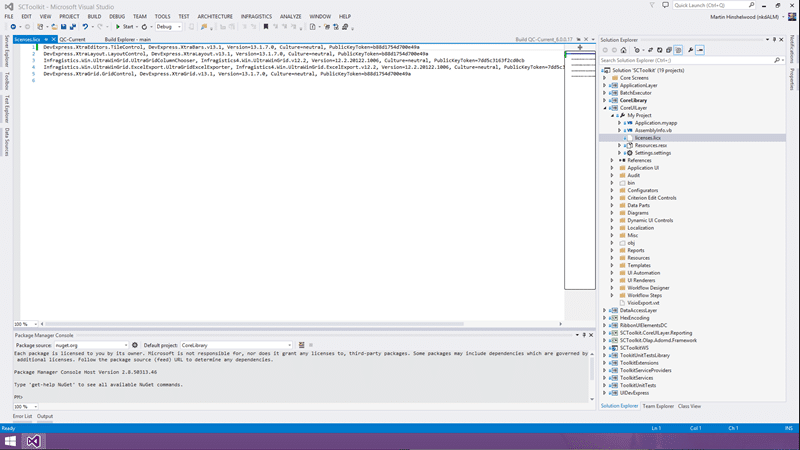
At some point a newer version of 2012.2 was downloaded and dropped onto the network share, but since the developers all likely had the previous version installed as well as the new one, the licence.licx file would resolve for them locally. Since the build server was new, any new developer would have the same problem, this issue reared its ugly head. This is a frustrating problem as it means that something is not getting build correctly for everyone that is just slipping on by.
If only it was easy to reimage developer workstations overnight so that they only had the current versions of all the components. These problems would be found quickly and fixed often.
Moral of the story… always either reimage your workstation often, or uninstall components you don’t need any more. Ideally setup and configure an automated build now if you don’t have one. If its hard then suck it up and take the time to get it working.
Smart Classifications
Each classification [Concepts, Categories, & Tags] was assigned using AI-powered semantic analysis and scored across relevance, depth, and alignment. Final decisions? Still human. Always traceable. Hover to see how it applies.
What to read next
Solution: Getting Silverlight to build on Team Foundation Build Services 2010
Step-by-step guide to resolving build failures when compiling Silverlight 3 projects with Team Foundation Build Services 2010, including …
Team Foundation Build 2012 Issue - The target CleanWorkspacePackageTempDir does not exist
Explains how to resolve the "CleanWorkspacePackageTempDir does not exist" build error in Team Foundation Build 2012 for upgraded ASP.NET MVC …
Do you know the minimum builds to create on any branch?
Explains the essential three build types, Gate, CI, and Nightly, needed per branch to ensure code quality, test coverage, and collaboration …
Who broke the build?
Explains the importance of passing builds, common causes of build failures, how to identify issues and responsible users, and best practices …
Detecting agile theatre with real delivery signals
Why Most Companies Operating Models Fail in Dynamic Markets
A concise comparison of Predictive and Adaptive Operating Models, explaining why traditional structures fail in dynamic markets and how …
Don’t Manage Dependencies, Remove Them
Explains why dependencies are a sign of poor system design and outlines steps to eliminate them by aligning teams, clarifying ownership, and …
The Estimation Trap: How Tracking Accuracy Undermines Trust, Flow, and Value in Software Delivery
Tracking estimation accuracy in software delivery leads to mistrust, fear, and distorted behaviours. Focus on customer value, flow, and …
Flow of Value vs Flow of Work – Misnomer or Useful Shorthand?
Compares “flow of value” and “flow of work” in Kanban, explaining why only validated outcomes count as value and stressing the need for …
Why Outsourcing DevOps Fails, and How Real Engineering Excellence Starts With Your Team
Avoid DevOps vendor lock-in, discover how true engineering excellence starts with partnership, not outsourcing. Ready to transform your …
Why Outsourcing DevOps Fails, and How Real Engineering Excellence Starts With Your Team
Avoid DevOps vendor lock-in, discover how true engineering excellence starts with partnership, not outsourcing. Ready to transform your …
Why Big Bang Rewrites Fail: How Sustainable Change and Engineering Excellence Transform Legacy Systems
Ditch the Big Bang rewrite. Discover why sustainable, in-place change drives true engineering excellence and lasting transformation in your …
Are We Still Pretending Coding Was the Bottleneck?
AI exposes that coding was never the main bottleneck in software delivery; real constraints are in system flow, team practices, and …
Why Azure DevOps Wins for Governance, Security, and Scale, Right Out of the Box
Unlock seamless governance, security, and scale with Azure DevOps, integrated tooling that lets you deliver value, not just manage …
Should You Use One Project to Rule Them All in Azure DevOps?
Explores when to use a single Azure DevOps project versus multiple projects, detailing impacts on flow, visibility, governance, and team …
Stop Guessing: How to Make Work Visible and Drive Real Improvement with Azure DevOps Flow Metrics
Stop guessing, start making data-driven decisions in Azure DevOps. Discover tools, tips, and insights to make your work visible and your …