When doing a PULL from Git from an origin\branch but you have changes locally you may encounter a bug in the Visual Studio Git integration that results in a merge conflict fetching the head of the remote Git repository.
If like me you are new to Git there are a lot of things to learn. This last two weeks I have been onsite in Athens moving source from StarTeam to Git in TFS. As we have just started getting users onto Git we have started hitting workflow issues. In StarTeam they were not really using branching and were doing manual merges. This was for many reasons all of them seemingly perfectly reasonable but it takes up a lot of time. With nearly 50 coders it was well past being manageable and they are currently looking at 100 man-days to do a merge.
I am trying to move them to a much more supportable model and for that I am moving them towards Git. I know this would be a steep learning curve for them but I believe it is the only reasonably way to support the issues that they have in their software strategy.
More on that later, but for now I have been running into an issue with merge conflicts in Git when coders try to Pull from the server. It seems that whatever workflow they are used to when they follow it in Git they get a “libgit2.Catagory = FetchHead (MergeConflict)” message that adds that there are 3 conflicts that prevent a checkout. While my first thought is that they have uncommitted changes locally this is not the case. They maybe have 2-3 local commits and no outstanding uncommitted changes.
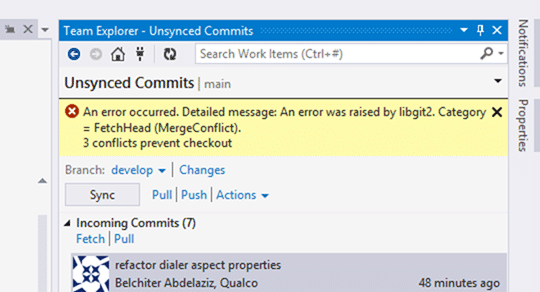
While this should be able to be handled it is not and I have 50 coders hitting it reputedly. The only way I have found so far to resolve the issue is to move their changes onto a temporary branch and rollback the local copy of the server branch. This allows them to do a Pull and then merge their local branch changes across.
https://twitter.com/ethomson/status/520262367616053248
Note: This is a bug in Visual Studio 2013.3 that has been fixed in 2013.4. You can download and install, as we did, the 2013.4 CTP to resolve the issue.
While not ideal it does work. So in order to mitigate this issue permanently, pending an update from the TFS team, I am changing their workflow. When planning on working on an origin\branch all developers will:
- Create a new “feature-[name]” or “hotfix-[name]” branch locally.
- They make all changes on this branch
- Pull regularly from origin\branch and merge to FEATURE or HOTFIX branch
When they are ready to Push to the server they then:
- Pull from origin\branch to bring it up to date
- Merge into “feature-[name]” and get working
- Merge from “feature-[name]” to branch
- Push to origin\branch
- DONE
If they are then done with the feature of hotfix they can delete it, if not they can keep it around for reuse. Simple…and it works for them every time. However sometimes they forget to do the change on the feature or hotfix branch and end up in the position above.
It depends when they figure out what they have done what the solution is. If they have not committed to the branch then they can solve this in a few clicks.
- Create a new “feature-[name]” or “hotfix-[name]” unpublished branch
- Commit to the new unpublished branch
One of the nice features of Git is that I you made a bunch of changes and have not checked in you can just “checkout” another branch and the local changes you have made will be preserved. Simple quick fix.
If they only figure it out after they have committed one or more times to the branch then they have a few extra steps to resolve the committed bits on the published branch.
- Create a new “feature-[name]” or “hotfix-[name]” unpublished branch - This will take a copy of the commits that have not yet been pushed to the server. This preserving the changes they have already made.
- Checkout the branch you want to rollback
- Use “git reset –hard HEAD~[n]” where [n] is the number of commits you want to back peddle
- Pull from origin\branch to bring it up to date
After that they can happily Pull to the published branch and continue to code away on the unpublished local branch. Yes this means that every developer effectively has one or more (they may have more than one set of work on the go) personal branches. While this was a bad practice in a Server Version Control System (SVCS) it is a perfectly good practice for a Distributed Version Control System (DVCS) where merging and branching is cheap and easy.
If you can you should install the Visual Studio 2013.4 CTP that fixes this issue and you can carry on as normal.
Smart Classifications
Each classification [Concepts, Categories, & Tags] was assigned using AI-powered semantic analysis and scored across relevance, depth, and alignment. Final decisions? Still human. Always traceable. Hover to see how it applies.
What to read next
Uncommitted changes messing up your sync in Git with Visual Studio
Explains how uncommitted changes in Git can prevent syncing with the server in Visual Studio, and highlights key workflow differences from …
Migrating source code with history to TFS 2012 with Git-Tf
Guide to migrating source code and preserving history from one Team Foundation Server (TFS) 2012 instance to another using Git-Tf and Git …
Migrating source from Perforce to Git on VSO
Step-by-step guide to migrating source code from Perforce to Git on VSO, covering repository setup, dependency management, build processes, …
TFS Integration Tools - Issue: TF10141 No Files checked in as a result of a TFS check-in failure
Explains how to resolve TFS Integration Tools check-in failures (TF10141), covering conflict identification, manual resolution steps, and …
Guidance - Branching for each Sprint
Explains how using a separate version control branch for each sprint in Scrum improves code stability, release management, and team …
Git Flow should have died years ago
Explains why Git Flow is outdated for modern software, highlighting its drawbacks and recommending simpler workflows like GitHub Flow for …
Detecting agile theatre with real delivery signals
Why Most Companies Operating Models Fail in Dynamic Markets
A concise comparison of Predictive and Adaptive Operating Models, explaining why traditional structures fail in dynamic markets and how …
Don’t Manage Dependencies, Remove Them
Explains why dependencies are a sign of poor system design and outlines steps to eliminate them by aligning teams, clarifying ownership, and …
The Estimation Trap: How Tracking Accuracy Undermines Trust, Flow, and Value in Software Delivery
Tracking estimation accuracy in software delivery leads to mistrust, fear, and distorted behaviours. Focus on customer value, flow, and …
Flow of Value vs Flow of Work – Misnomer or Useful Shorthand?
Compares “flow of value” and “flow of work” in Kanban, explaining why only validated outcomes count as value and stressing the need for …
Why Outsourcing DevOps Fails, and How Real Engineering Excellence Starts With Your Team
Avoid DevOps vendor lock-in, discover how true engineering excellence starts with partnership, not outsourcing. Ready to transform your …
Why Outsourcing DevOps Fails, and How Real Engineering Excellence Starts With Your Team
Avoid DevOps vendor lock-in, discover how true engineering excellence starts with partnership, not outsourcing. Ready to transform your …
Why Big Bang Rewrites Fail: How Sustainable Change and Engineering Excellence Transform Legacy Systems
Ditch the Big Bang rewrite. Discover why sustainable, in-place change drives true engineering excellence and lasting transformation in your …
Are We Still Pretending Coding Was the Bottleneck?
AI exposes that coding was never the main bottleneck in software delivery; real constraints are in system flow, team practices, and …
Why Azure DevOps Wins for Governance, Security, and Scale, Right Out of the Box
Unlock seamless governance, security, and scale with Azure DevOps, integrated tooling that lets you deliver value, not just manage …
Should You Use One Project to Rule Them All in Azure DevOps?
Explores when to use a single Azure DevOps project versus multiple projects, detailing impacts on flow, visibility, governance, and team …
Stop Guessing: How to Make Work Visible and Drive Real Improvement with Azure DevOps Flow Metrics
Stop guessing, start making data-driven decisions in Azure DevOps. Discover tools, tips, and insights to make your work visible and your …