Its hard to migrate source code even from one Visual Studio 2012 Team Foundation Server to another, especially when you also want to have your history. We have been forced in the past to use some hokie migration tools that only really partially work.
- Update Anthony Borton gave me a hard time for not being able to get this working. However I had no problem with second set of code below.
With Git-Tf we can Clone a Team Foundation Server repository and with plane old Git we can do a Pull from one to the other and then push up to our target repository.
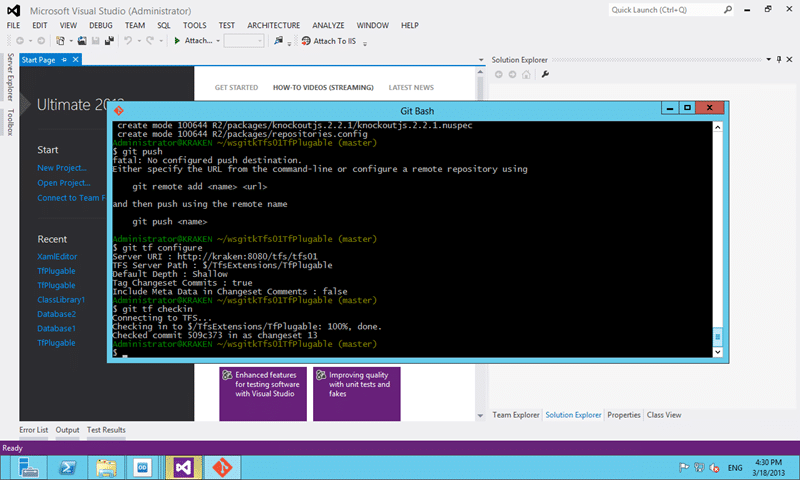
Figure: Running Git from the Command Line
The first thing we need to do in install Git-Tf and its dependencies. This will add the Git Bash command line and the TFS integration required to connect everything up. This is really me first time using Git as I have just not had time to play with it, but it looks solid so far.
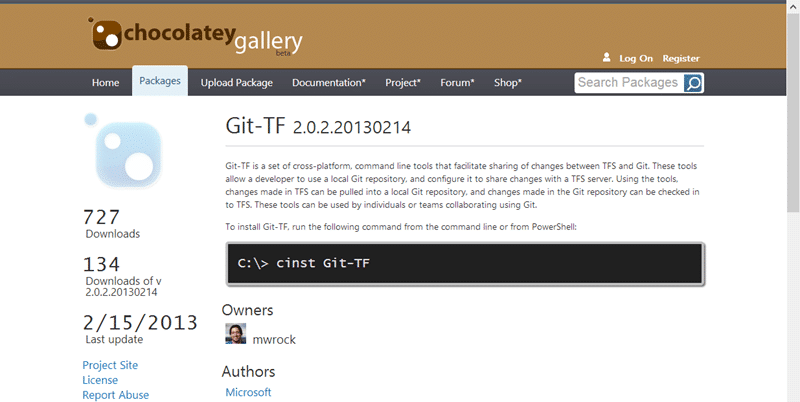
Figure: Install with the cint Git-Tf command line call
When you clone a Team Foundation Server repository you can either get the tip or you can go deep. If you add the –deep parameter on end you will effectively clone the history as well. For this particular task I only need the tip and I am really only need to go one way. You can however push source code back and fourth at will between the two servers or any other environment. A browse of the internet will also show you other source control systems that you can clone to Git. If you can clone you can pull and if you can pull you can checkin…
git tf clone https://mrhinsh.visualstudio.com/DefaultCollection $/TfsExtensions/TfPlugable ~/wsgitmrhinshTfPlugable
git tf clone http://kraken:8080/tfs/tfs01 $/TfsExtensions/TfPlugable  ~/wsgitkTfs01TfPlugable
git pull ~/wsgitmrhinshTfPlugable
git checkin
Figure: Git commands to move from TFS to TFS
git tf clone https://nakedalm.visualstudio.com/DefaultCollection $/TfsExtensions/TfPlugable c:\temp\TfPlugable
cd C:\Users\MrHinsh\Source\Repos\TfPlugable
git remote add tfplugable-tfvc-branch c:\temp\TfPlugable
git pull tfplugable-tfvc-branch master --deep
git checkin
Figure: Git commands to move from TFVC to TFS Git
The result of this is a move from my Team Foundation Service cloud account to my local test Team Foundation Server virtual machine.
If you are trying to move your source code from anything to Team Foundation Server this may be a good option. Its robust and will bring history across. I have not tested this at load but it should support reasonable sized repositories, large however will need some testing…
Smart Classifications
Each classification [Concepts, Categories, & Tags] was assigned using AI-powered semantic analysis and scored across relevance, depth, and alignment. Final decisions? Still human. Always traceable. Hover to see how it applies.
What to read next
Migrating source from Perforce to Git on VSO
Step-by-step guide to migrating source code from Perforce to Git on VSO, covering repository setup, dependency management, build processes, …
Migrating from Codeplex to Github
Step-by-step guide to migrating a Codeplex repository to GitHub, covering tool limitations, using Git-TF for code and history, and …
Migration from TF Service to TF Server with the TFS Integration Platform
Guide to migrating data from Team Foundation Service to Team Foundation Server using the TFS Integration Platform, including user and work …
Configuring Jenkins to talk to TFS 2013
Guide to integrating Jenkins with TFS 2013 using the Team Foundation Server plugin, covering installation, configuration, and key …
VSTS Sync Migration Tools
Open-source tools for migrating work items, test plans, teams, and project structures between TFS and VSTS, supporting consolidation and …
Detecting agile theatre with real delivery signals
Why Most Companies Operating Models Fail in Dynamic Markets
A concise comparison of Predictive and Adaptive Operating Models, explaining why traditional structures fail in dynamic markets and how …
Don’t Manage Dependencies, Remove Them
Explains why dependencies are a sign of poor system design and outlines steps to eliminate them by aligning teams, clarifying ownership, and …
The Estimation Trap: How Tracking Accuracy Undermines Trust, Flow, and Value in Software Delivery
Tracking estimation accuracy in software delivery leads to mistrust, fear, and distorted behaviours. Focus on customer value, flow, and …
Flow of Value vs Flow of Work – Misnomer or Useful Shorthand?
Compares “flow of value” and “flow of work” in Kanban, explaining why only validated outcomes count as value and stressing the need for …
Why Outsourcing DevOps Fails, and How Real Engineering Excellence Starts With Your Team
Avoid DevOps vendor lock-in, discover how true engineering excellence starts with partnership, not outsourcing. Ready to transform your …