This is SSW’s first time using Team Build 2010 to automatically create a Silverlight application. In the past the guys have used Cruse Control, but we want to move to a pure TFS 2010 solution. When one of our developers (Allan ) added a Silverlight 3 project to the Solution our build server spat it out.
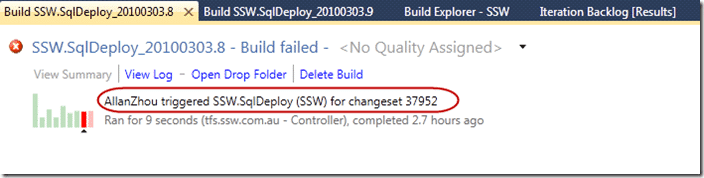
Figure: Build SSW.SqlDeploy_20100303.8 failed when trying to build a Silverlight application.
Usually the person who broke the build should now be the one responsible for babysitting it until the next person breaks the build. In this case we had not agreed that as part of our project prep so I think I will need to wait until the retrospective at the end of our current, and first for this project, sprint.
Problem 1: First time for Silverlight compile on the Build Server.
Because Allan added the first Silverlight 3 application to the Solution the build server hiccupped as only the Silverlight 2 SDK was installed on it and it was a Silverlight 3 project. I have highlighted below where the problem was located.
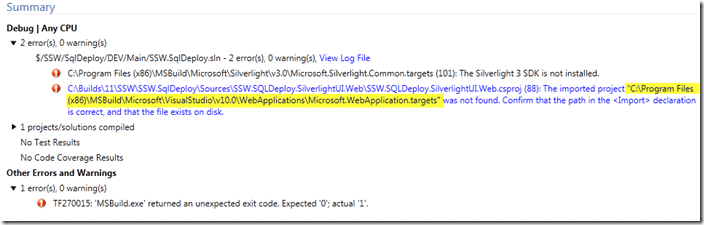
Figure: The Silverlight targets file was not found on the build server.
I downloaded and installed the Silverlight 3 SDK from Microsoft, and hoped all would be well.
But the build failed again…
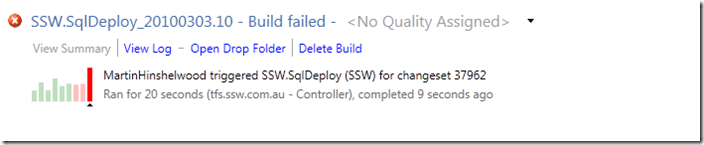
Figure: SSW.SqlDeploy_20100303.10 failed still trying to find targets.
Problem 2: This was due to the web targets not being installed.
At this point I got fed up and copied the contents of my local directory “C:Program Files (x86)MSBuildMicrosoftVisualStudiov10.0” to the same folder on the build server.
Figure: MSBuild could not find the web targets.
But the build failed again…
Figure: SSW.SqlDeploy_20100303.11 failed again trying to build Silverlight.
Problem 3: Can’t build Silverlight 3 projects with MSBuild 64-bit (the default)
There is a nasty bug in the Silverlight SDK that means that you can’t build using the MSBuild 64-bit process. But on a 64-bit OS, the 64-bit MSBuild is used by default… so how to change it.
Figure: Why is it saying that the SDK is not installed… oh, a bug.
This is an easy fix, but a hard to find solution. if you Open up your “build process definition” and expand the Advanced tree you will see that there is a MSBuild Platform option that is set to “Auto”, change this to “X86”.
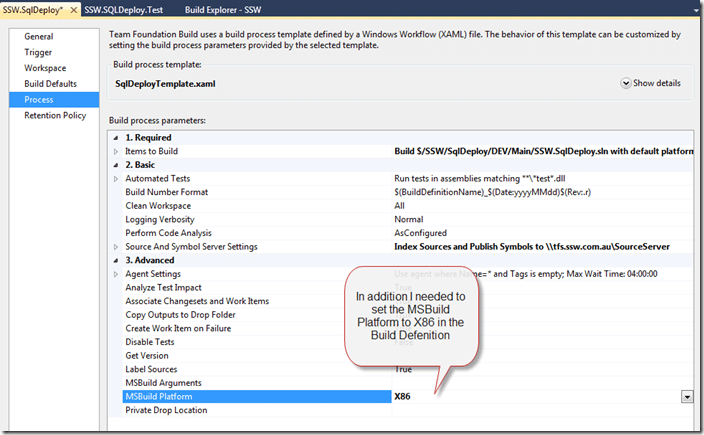
Figure: You MUST set the MSBuild Platform to X86 to build a Silverlight project,
And the build failed again…
Figure: SSW.SqlDeploy_20100304.04 failed again trying to do code analysis.
Note: This was only run 20 or so minutes after the last build, but my build server happens to be in Australia :)
Problem 4: Can’t run Code Analysis on Build Server
Now I get Code Analysis errors…
Figure: Why would I be getting code analysis errors? Could it be that it is not installed?
To fix this one I just bit the bullet and installed Visual Studio 2010 onto the Build server, and…
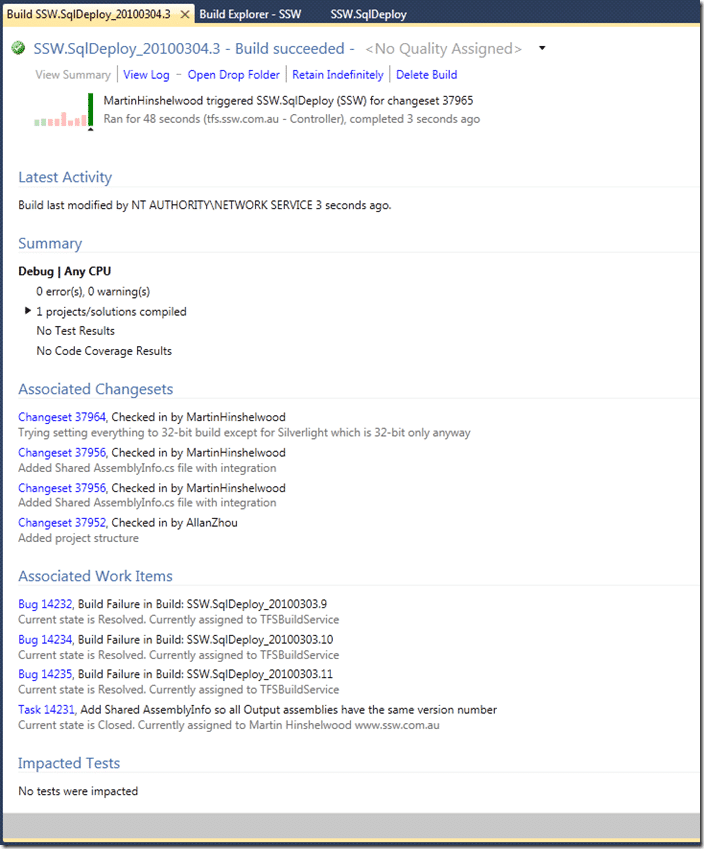
Figure: Successful builds give me a warm fuzzy feeling…
Conclusion
The things that should be installed on the build server are:
- Team Foundation Build Services 2010 or 2008 or 2005
- Visual Studio 2010/2008/2005
- Add-on’s for TFS or Visual Studio that may be required to execute the build.
The options you should set for any Build that has 32-bit dependencies that are causing a problem:
- You MUST set the MSBuild Platform to X86 to build a project that can’t be built in 64-bit MSBuild.
Need Help?

SSW was the first company in the world outside of Microsoft to deploy Visual Studio 2010 Team Foundation Server to production, not once , but twice .
Team Foundation Server
 SSW provides expert Visual Studio ALM guidance including installation, configuration and customisation through our four Microsoft Visual Studio ALM MVP’s in three countries; Australia, Beijing and the UK. They have experience deploying to small development shops all the way through to large blue chips.
Professional Scrum Developer Training
 SSW has six Professional Scrum Developer Trainers who specialise in training your developers in implementing Scrum with Microsoft’s Visual Studio ALM tools.
Technorati Tags: TFBS ALM Silverlight .NET CodeProject TFS 2010 SSW Scrum VS 2010 SP 2010 TFS SharePoint
Smart Classifications
Each classification [Concepts, Categories, & Tags] was assigned using AI-powered semantic analysis and scored across relevance, depth, and alignment. Final decisions? Still human. Always traceable. Hover to see how it applies.
What to read next
Solution: Testing Web Services with MSTest on Team Foundation Build Services 2010
Explains how to configure MSTest for automated testing of web services on Team Foundation Build Services 2010, including handling dynamic …
Who broke the build?
Explains the importance of passing builds, common causes of build failures, how to identify issues and responsible users, and best practices …
Finding the problem on a partially succeeded build on Team Foundation Build Services 2010
Learn how to diagnose and resolve partially succeeded builds in Team Foundation Build Services 2010 by tracing test failures, identifying …
Upgrading from TFS 2010 RC to TFS 2010 RTM done
Step-by-step guide to upgrading from TFS 2010 RC to RTM, including backup, uninstall, install, configuration, SharePoint and build server …
Do you know the minimum builds to create on any branch?
Explains the essential three build types, Gate, CI, and Nightly, needed per branch to ensure code quality, test coverage, and collaboration …
Detecting agile theatre with real delivery signals
Why Most Companies Operating Models Fail in Dynamic Markets
A concise comparison of Predictive and Adaptive Operating Models, explaining why traditional structures fail in dynamic markets and how …
Don’t Manage Dependencies, Remove Them
Explains why dependencies are a sign of poor system design and outlines steps to eliminate them by aligning teams, clarifying ownership, and …
The Estimation Trap: How Tracking Accuracy Undermines Trust, Flow, and Value in Software Delivery
Tracking estimation accuracy in software delivery leads to mistrust, fear, and distorted behaviours. Focus on customer value, flow, and …
Flow of Value vs Flow of Work – Misnomer or Useful Shorthand?
Compares “flow of value” and “flow of work” in Kanban, explaining why only validated outcomes count as value and stressing the need for …
Why Outsourcing DevOps Fails, and How Real Engineering Excellence Starts With Your Team
Avoid DevOps vendor lock-in, discover how true engineering excellence starts with partnership, not outsourcing. Ready to transform your …
Detecting agile theatre with real delivery signals
Don’t Manage Dependencies, Remove Them
Explains why dependencies are a sign of poor system design and outlines steps to eliminate them by aligning teams, clarifying ownership, and …
The Estimation Trap: How Tracking Accuracy Undermines Trust, Flow, and Value in Software Delivery
Tracking estimation accuracy in software delivery leads to mistrust, fear, and distorted behaviours. Focus on customer value, flow, and …
Flow of Value vs Flow of Work – Misnomer or Useful Shorthand?
Compares “flow of value” and “flow of work” in Kanban, explaining why only validated outcomes count as value and stressing the need for …
Why Outsourcing DevOps Fails, and How Real Engineering Excellence Starts With Your Team
Avoid DevOps vendor lock-in, discover how true engineering excellence starts with partnership, not outsourcing. Ready to transform your …
Estimating Better in an Overloaded System Is a Poor Man’s Strategy
High work in progress (WIP) causes delays and unpredictability; improving estimates won’t help. Limiting WIP and focusing on flow is key to …