I received a confusing error from MS Build on Friday. I assumed that it was a GDR version issue for the top level message:
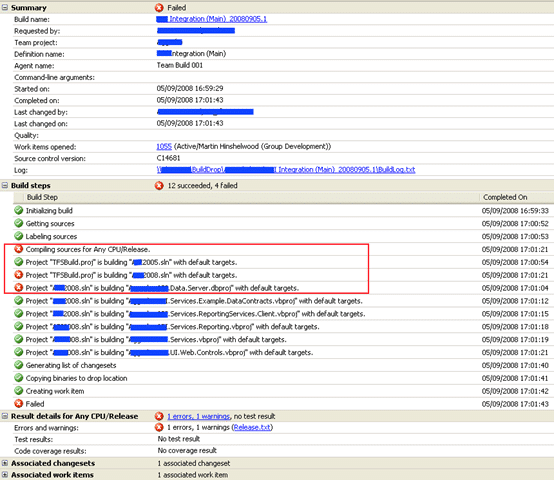
Now, we have the situation with our Business Intelligence system where we have 2 solutions. One for Visual Studio 2005 projects that consist solely of the Business Intelligence Package bits, and a 2008 solution which consists of everything else that is needed to build our solution. We do plan to move everything over to 2008, but we are currently targeting SQL Server 2005.
The problem looks like it is to do with the 2008 solution an not the 2005 one:

But, the error message implies that it is the 2005 solution:
c:WorkingXxxxxXXX Integration (Main)SourcesXXXDEVMainXXX2005.sln(0,0): warning MSB4126: The specified solution configuration “Release|Any CPU” is invalid. Please specify a valid solution configuration using the Configuration and Platform properties (e.g. MSBuild.exe Solution.sln /p:Configuration=Debug /p:Platform=“Any CPU”) or leave those properties blank to use the default solution configuration.
C:Program FilesMSBuildMicrosoftVisualStudiov9.0TeamDataMicrosoft.Data.Schema.SqlTasks.targets(58,5): error MSB4018: The “SqlBuildTask” task failed unexpectedly.
System.NullReferenceException: Object reference not set to an instance of an object.
at Microsoft.VisualStudio.TeamSystem.Data.Tasks.TaskHostLoader.Load(ITaskHost providedHost)
at Microsoft.VisualStudio.TeamSystem.Data.Tasks.DbBuildTask.Execute()
at Microsoft.Build.BuildEngine.TaskEngine.ExecuteInstantiatedTask(EngineProxy engineProxy, ItemBucket bucket, TaskExecutionMode howToExecuteTask, ITask task, Boolean& taskResult)
After reading up, I am none the wiser, but I did find information that implied that installing SP1 for TFS should fix the problem and not require that I update the TFS server. We are using GDR bits, so I will be installing GDR 16 and the SQL Server 2008 Business Intelligence bits.
UPDATE: So after jut updating the GDR, I got the solution to build! Not sure why there was an error in the 2005 solution!
Sources:
Technorati Tags: ALM TFBS VS 2005
Smart Classifications
Each classification [Concepts, Categories, & Tags] was assigned using AI-powered semantic analysis and scored across relevance, depth, and alignment. Final decisions? Still human. Always traceable. Hover to see how it applies.
What to read next
Solution: Getting Silverlight to build on Team Foundation Build Services 2010
Step-by-step guide to resolving build failures when compiling Silverlight 3 projects with Team Foundation Build Services 2010, including …
Finding the problem on a partially succeeded build on Team Foundation Build Services 2010
Learn how to diagnose and resolve partially succeeded builds in Team Foundation Build Services 2010 by tracing test failures, identifying …
Solution: Testing Web Services with MSTest on Team Foundation Build Services 2010
Explains how to configure MSTest for automated testing of web services on Team Foundation Build Services 2010, including handling dynamic …
Who broke the build?
Explains the importance of passing builds, common causes of build failures, how to identify issues and responsible users, and best practices …
TFS Build reports Licencies.licx: unable to load type
Explains how mismatched component versions in licences.licx files can cause build errors on TFS servers, and offers solutions for consistent …
Detecting agile theatre with real delivery signals
Why Most Companies Operating Models Fail in Dynamic Markets
A concise comparison of Predictive and Adaptive Operating Models, explaining why traditional structures fail in dynamic markets and how …
Don’t Manage Dependencies, Remove Them
Explains why dependencies are a sign of poor system design and outlines steps to eliminate them by aligning teams, clarifying ownership, and …
The Estimation Trap: How Tracking Accuracy Undermines Trust, Flow, and Value in Software Delivery
Tracking estimation accuracy in software delivery leads to mistrust, fear, and distorted behaviours. Focus on customer value, flow, and …
Flow of Value vs Flow of Work – Misnomer or Useful Shorthand?
Compares “flow of value” and “flow of work” in Kanban, explaining why only validated outcomes count as value and stressing the need for …
Why Outsourcing DevOps Fails, and How Real Engineering Excellence Starts With Your Team
Avoid DevOps vendor lock-in, discover how true engineering excellence starts with partnership, not outsourcing. Ready to transform your …