
When creating projects one of the only ways that you have of proving that it works and is a viable solution is to build it. This is easy when you only have one developer and that developer will be the only one using a solution. But what if you have 2 developers? How do you prove that one developers code works with the other? The answer is build servers. These build servers take specific code away to another computer and build it there.
Updated 29th March 2010: I was missing an intro for this one.
You should always have three builds on your team project. These should be setup and tested using an empty solution before you write any code at all.
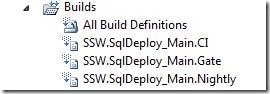
Figure: Three builds named in the format [TeamProject].[AreaPath]_[Branch].[Gate|CI|Nightly] for every branch.
These builds should use the same XAML build workflow; however you may set them up to run a different set of tests depending on the time it takes to run a full build.
- Gate – Only needs to run the smallest set of tests, but should run most if not all of the Unit Test. This is run before developers are allowed to check-in
- CI – This should run all Unit Tests and all of the automated UI tests. It is run after a developer check-in.
- Nightly – The Nightly build should run all of the Unit Tests, all of the Automated UI tests and all of the Load and Performance tests. The nightly build is time consuming and will run but once a night. Packaging of your Product for testing the next day may be done at this stage as well.
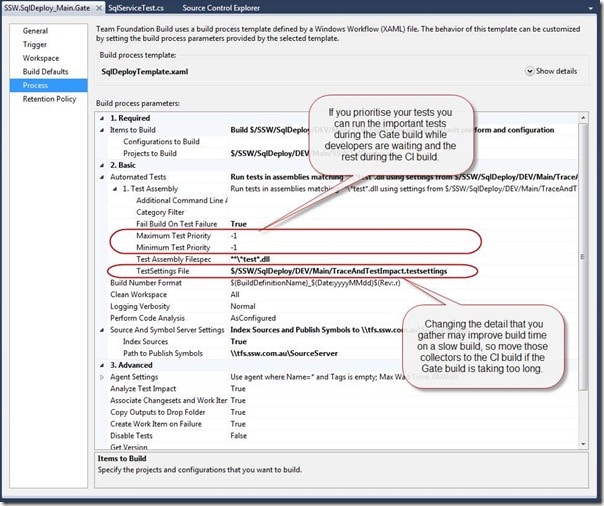
Figure: You can control what tests are run and what data is collected while they are running.
Note: We do not run all the tests every time because of the time consuming nature of running some tests, but ALL tests should be run overnight.
Note: If you had a really large project with thousands of tests including long running Load tests you may need to add a Weekly build to the mix.
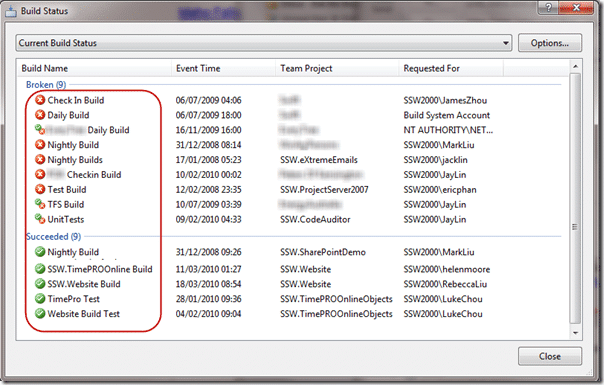
Figure: Bad example, you can’t tell what these builds do if they are in a larger list
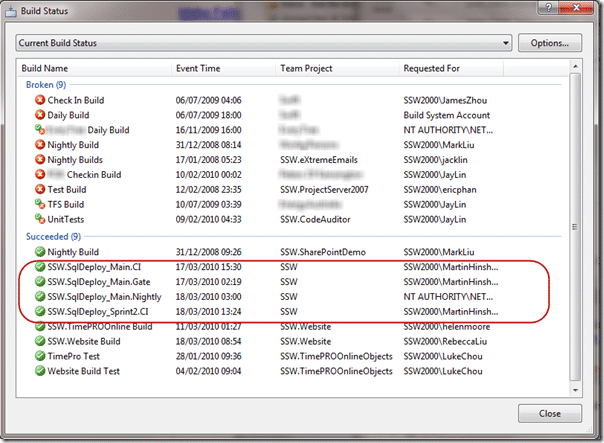
Figure: Good example, you know exactly what project, branch and type of build these are for.
Technorati Tags: SSW SSW Rules ALM TFBS VS 2010
Smart Classifications
Each classification [Concepts, Categories, & Tags] was assigned using AI-powered semantic analysis and scored across relevance, depth, and alignment. Final decisions? Still human. Always traceable. Hover to see how it applies.
What to read next
Who broke the build?
Explains the importance of passing builds, common causes of build failures, how to identify issues and responsible users, and best practices …
Solution: Getting Silverlight to build on Team Foundation Build Services 2010
Step-by-step guide to resolving build failures when compiling Silverlight 3 projects with Team Foundation Build Services 2010, including …
Solution: Testing Web Services with MSTest on Team Foundation Build Services 2010
Explains how to configure MSTest for automated testing of web services on Team Foundation Build Services 2010, including handling dynamic …
Why you need to tag your build servers in TFS
Tagging build servers in TFS helps manage dependencies, assign builds to suitable agents, and streamline workflows across teams and regions …
Finding the problem on a partially succeeded build on Team Foundation Build Services 2010
Learn how to diagnose and resolve partially succeeded builds in Team Foundation Build Services 2010 by tracing test failures, identifying …
Detecting agile theatre with real delivery signals
Why Most Companies Operating Models Fail in Dynamic Markets
A concise comparison of Predictive and Adaptive Operating Models, explaining why traditional structures fail in dynamic markets and how …
Don’t Manage Dependencies, Remove Them
Explains why dependencies are a sign of poor system design and outlines steps to eliminate them by aligning teams, clarifying ownership, and …
The Estimation Trap: How Tracking Accuracy Undermines Trust, Flow, and Value in Software Delivery
Tracking estimation accuracy in software delivery leads to mistrust, fear, and distorted behaviours. Focus on customer value, flow, and …
Flow of Value vs Flow of Work – Misnomer or Useful Shorthand?
Compares “flow of value” and “flow of work” in Kanban, explaining why only validated outcomes count as value and stressing the need for …
Why Outsourcing DevOps Fails, and How Real Engineering Excellence Starts With Your Team
Avoid DevOps vendor lock-in, discover how true engineering excellence starts with partnership, not outsourcing. Ready to transform your …
Detecting agile theatre with real delivery signals
Don’t Manage Dependencies, Remove Them
Explains why dependencies are a sign of poor system design and outlines steps to eliminate them by aligning teams, clarifying ownership, and …
The Estimation Trap: How Tracking Accuracy Undermines Trust, Flow, and Value in Software Delivery
Tracking estimation accuracy in software delivery leads to mistrust, fear, and distorted behaviours. Focus on customer value, flow, and …
Flow of Value vs Flow of Work – Misnomer or Useful Shorthand?
Compares “flow of value” and “flow of work” in Kanban, explaining why only validated outcomes count as value and stressing the need for …
Why Outsourcing DevOps Fails, and How Real Engineering Excellence Starts With Your Team
Avoid DevOps vendor lock-in, discover how true engineering excellence starts with partnership, not outsourcing. Ready to transform your …
Estimating Better in an Overloaded System Is a Poor Man’s Strategy
High work in progress (WIP) causes delays and unpredictability; improving estimates won’t help. Limiting WIP and focusing on flow is key to …