There are a lot of developers using version control these days, but a feature of version control called branching is very poorly understood and remains unused by most developers in favour of Labels. Most developers think that branching is hard and complicated. Its not!
What is hard and complicated is a bad branching strategy. Just like a bad software architecture a bad branch architecture, or one that is not adhered to can prove fatal to a project. We I was at Aggreko we had a fairly successful Feature branching strategy (although the developers hated it) that meant that we could have multiple feature teams working at the same time without impacting each other. Now, this had to be carefully orchestrated as it was a Business Intelligence team and many of the BI artefacts do not lend themselves to merging.
Today at SSW I am working on a Scrum team delivering a product that will be used by many hundreds of developers. SSW SQL Deploy takes much of the pain out of upgrading production databases when you are not using the Database projects in Visual Studio.
With Scrum each Scrum Team works for a fixed period of time on a single sprint. You can have one or more Scrum Teams involved in delivering a product, but all the work must be merged and tested, ready to be shown to the Product Owner at the the Sprint Review meeting at the end of the current Sprint.
So, what does this mean for a branching strategy?
We have been using a “Main” (sometimes called “Trunk”) line and doing a branch for each sprint. It’s like Feature Branching, but with only ONE feature in operation at any one time, so no conflicts 
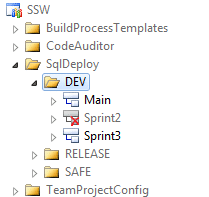
Figure: DEV folder containing the Development branches.
I know that some folks advocate applying a Label at the start of each Sprint and then rolling back if you need to, but I have always preferred the security of a branch.
Like:
- being able to create a release from Main that has Sprint3 code even while Sprint4 is being worked on.
- being sure I can always create a stable build on request.
- Being able to guarantee a version (labels are not auditable)
- Be able to abandon the sprint without having to delete the code (rare I know, but would be a mess if it happened)
- Being able to see the flow of change sets through to a safe release
- It helps you find invalid dependencies when merging to Main as there may be some file that is in everyone’s Sprint branch, but never got checked in. (We had this at the merge of Sprint2)
- If you are always operating in this way as a standard it makes it easier to then add more scrum teams in the future. Muscle memory of this way of working.
Don’t Like:
- Additional DB space for the branches
- Baseless merging between sprint branches when changes are directly ported
Note: I do not think we will ever attempt this! - Maybe a bit tougher to see the history between sprint branches since the changes go up through Main and down to another sprint branch
Note: What you would have to do is see which Sprint the changes were made in and then check the history he same file in that Sprint. A little bit of added complexity that you would have to do anyway with multiple teams. - Over time, you can end up with a lot of old unused sprint branches. Perhaps destroy with /keephistory can help in this case.
Note: We ALWAYS delete the Sprint branch after it has been merged into Main. That is the theory anyway, and as you can see from the images Sprint2 has already been deleted.
Why take the chance of having a problem rolling back or wanting to keep some of the code, when you can just abandon a branch and start a new one?
It just seems easier and less painful to use a branch to me! What do you think?
Technorati Tags: Scrum SSW TFS 2008 TFS 2010 ALM Branching Version Control
Smart Classifications
Each classification [Concepts, Categories, & Tags] was assigned using AI-powered semantic analysis and scored across relevance, depth, and alignment. Final decisions? Still human. Always traceable. Hover to see how it applies.
What to read next
Guidance: A Branching strategy for Scrum Teams
Explains an effective branching strategy for Scrum teams, covering best practices, common pitfalls, and step-by-step guidance for managing …
Branch madness!
Describes a complex source control issue in TFS involving branch mismanagement, its impact on merging, and step-by-step actions taken to …
Guidance: How to layout you files for an Ideal Solution
Learn best practices for organising solution and project files in version control, including folder structure, naming conventions, and …
Avoid the pick-n-mix branching anti-pattern
Explains the risks of the pick-n-mix branching anti-pattern in source control, its impact on code quality, and recommends feature branching …
Why Topic Branches Drive High-Quality Delivery
Explains how short-lived topic branches in source control improve software quality, enable modularity, speed up integration, and support …
Best Branching Strategies for Development Teams Explained
Explains why environment-based branching slows development, and recommends using feature flags and progressive rollouts for simpler, faster, …
Detecting agile theatre with real delivery signals
Why Most Companies Operating Models Fail in Dynamic Markets
A concise comparison of Predictive and Adaptive Operating Models, explaining why traditional structures fail in dynamic markets and how …
Don’t Manage Dependencies, Remove Them
Explains why dependencies are a sign of poor system design and outlines steps to eliminate them by aligning teams, clarifying ownership, and …
The Estimation Trap: How Tracking Accuracy Undermines Trust, Flow, and Value in Software Delivery
Tracking estimation accuracy in software delivery leads to mistrust, fear, and distorted behaviours. Focus on customer value, flow, and …
Flow of Value vs Flow of Work – Misnomer or Useful Shorthand?
Compares “flow of value” and “flow of work” in Kanban, explaining why only validated outcomes count as value and stressing the need for …
Why Outsourcing DevOps Fails, and How Real Engineering Excellence Starts With Your Team
Avoid DevOps vendor lock-in, discover how true engineering excellence starts with partnership, not outsourcing. Ready to transform your …
The Definition of Done is a Commitment to Quality
Defines the Definition of Done in Scrum as a clear, shared standard for quality, ensuring increments are releasable, transparent, and …
Why Your Definition of “Done” Is Holding Back Quality, Agility, and Trust, And How to Raise the Bar
Is your team’s “done” really done? Discover how a clear, objective definition of done boosts quality, agility, and trust in product …
Acceptance Criteria vs Definition of Done: Why Getting This Right Builds Trust and Delivers Quality Faster
Stop confusing acceptance criteria with definition of done, learn the crucial difference to boost quality, speed, and trust in your agile …
How to Evolve Your Definition of Done: Start Small, Grow Smarter, and Build Lasting Momentum
Unlock a smarter Definition of Done, start small, evolve standards, and build team momentum without overwhelm. Discover how progress drives …
Why Most Transformations Fail Without Honest Conversations
Most transformations fail without open, honest conversations that address real issues, making transparency and tough dialogue essential for …
Why Your Definition of Done Is the Secret Weapon for Real Business Impact and Agile Growth
Transform your definition of done into a strategic advantage, deliver real value, reduce risk, and drive business impact with every sprint.