 At SSW we use gated check-in for all of our projects. The benefits are based on the number of developers you have working on your project.
Lets say you have 30 developers and each developer breaks the build once per month. That could mean that you have a broken build every day! Gated check-ins help, but they have a down side that manifests as queued builds and moaning developers.
The way to combat this is to have more build servers, but with that comes complexity. Inevitably you will need to install components that you would expect to be installed on target computers, but how do you keep track of which build servers have which bits?
What about a geographically diverse team? If you have a centrally controlled infrastructure you might have build servers in multiple regions and you don’t want teams in Sydney copying files from Beijing and vice a versa on a regular basis.
So, what is the answer. Its Tags. You can add a set of Tags to your agents and then set which tags to look for in the build definition.
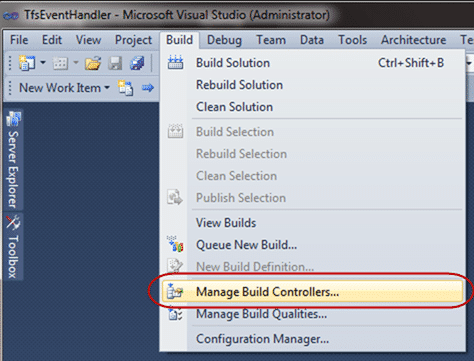
Figure: Open up your Build Controller Manager
Select “Build | Manage Build Controllers…” to get a list of all of your controllers and he build agents that are associated with them.
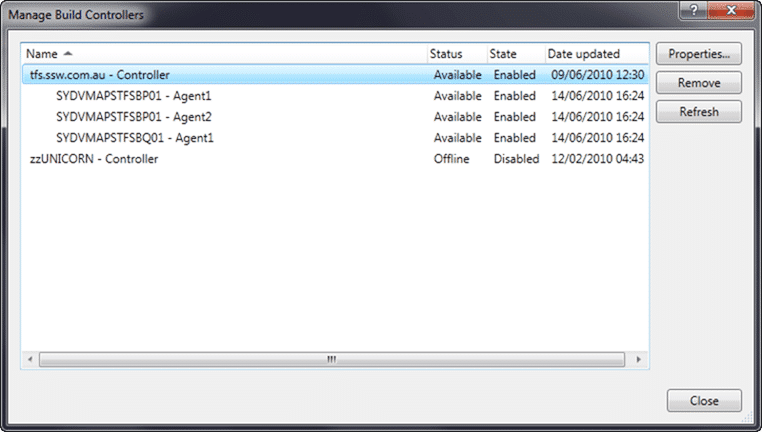
Figure: the list of build agents and their controllers
Each of these Agents might be subtly different. For example only one of these agents has FTP software installed. This software is required for only one of the many builds we have set up.
My ethos for build servers is to keep them as clean as possible and not to install anything that is not absolutely necessary. For me that means anything that does not add a *.target file is suspect, and should really be under version control and called via the command line from there.
So, some of the things you may install are:
- Silverlight 4 SDK
- Visual Studio 2010
- Visual Studio 2008
- WIX
- etc
You should not install things that will not end up on the target users computer. For a website that means something different to a client than to a server, but I am sure you get the idea.
One thing you can do to make things easier is to create a tag for each of the things that you install. that way developers can find the things they need. We may change to using a more generic tagging structure (Like “Web Application” or “WinForms Application”) if this gets too unwieldy, but for now the list of tags is limited.
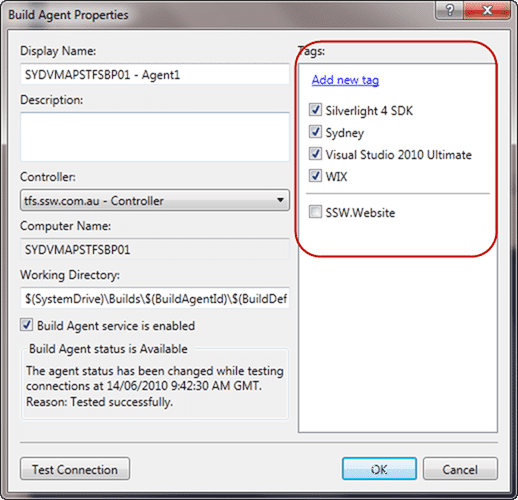
Figure: Tags associated with one of our build agents
Once you have your Build Agents all tagged up ALL your builds will start to fail 
This is because the default setting for a build is to look for an Agent that exactly matches the tags for the build, and we have not added any yet. The quick way to fix this is to change the “Tag Comparison Operator” from “ExactMatch” to “MatchAtLease” to get your build immediately working.

Figure: Tag Comparison Operator changes to MatchAtLeast to get builds to run.
The next thing to do is look for specific tags. You just select from the list of available tags and the controller will make sure you get to a build agent that uses them.
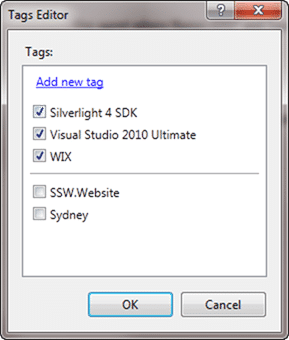
Figure: I want Silverlight, VS2010 and WIX, but do not care about Location.
And there you go, you can now have build agents for different purposes and regions within the same environment.
You can also use name filtering, so if you have a good Agent naming convention you can filter by that for regions. For example, your Agents might be “SYDVMAPTFSBP01” and “SYDVMAPTFSBP02” so a name filter of “SYD*” would target all of the Sydney build agents.
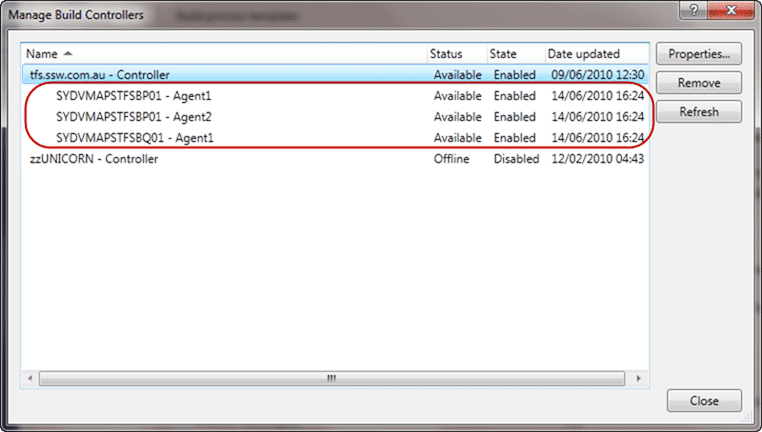
Figure: Agent names can be used for filtering as well
This flexibility will allow you to build better software by reducing the likelihood of not having a certain dependency on the target machines.
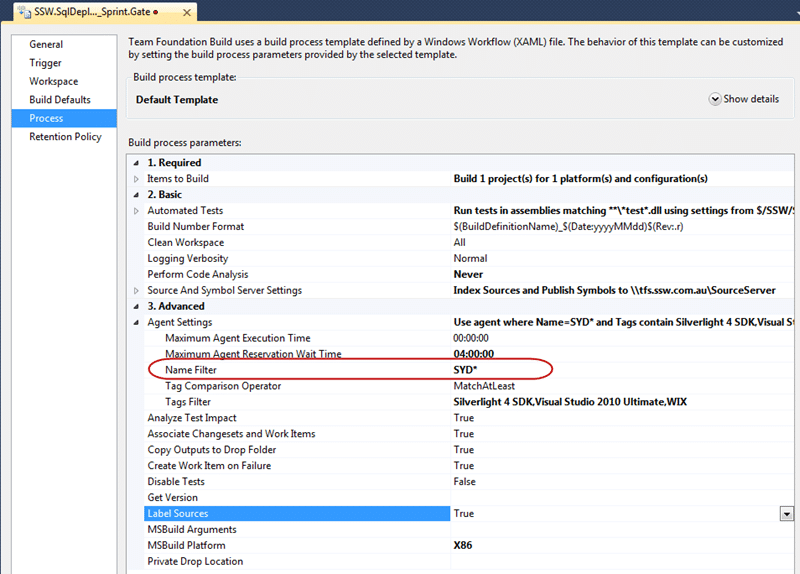
Figure: Setting the name filter based on server location
Used in combination there is a lot of power here to coordinate tens of build servers for multiple projects across multiple regions so your developers get the most out of your environment.
Technorati Tags: ALM ,TFBS ,TFS 2010 ,TFS Admin
Smart Classifications
Each classification [Concepts, Categories, & Tags] was assigned using AI-powered semantic analysis and scored across relevance, depth, and alignment. Final decisions? Still human. Always traceable. Hover to see how it applies.
What to read next
Solution: Getting Silverlight to build on Team Foundation Build Services 2010
Step-by-step guide to resolving build failures when compiling Silverlight 3 projects with Team Foundation Build Services 2010, including …
Reserve an Agent for a special build in Team Foundation Server 2012
Explains how to reserve a build agent in Team Foundation Server 2012 using custom activities, agent tagging, and workflow changes to ensure …
Solution: Testing Web Services with MSTest on Team Foundation Build Services 2010
Explains how to configure MSTest for automated testing of web services on Team Foundation Build Services 2010, including handling dynamic …
Who broke the build?
Explains the importance of passing builds, common causes of build failures, how to identify issues and responsible users, and best practices …
Do you know the minimum builds to create on any branch?
Explains the essential three build types, Gate, CI, and Nightly, needed per branch to ensure code quality, test coverage, and collaboration …
Detecting agile theatre with real delivery signals
Why Most Companies Operating Models Fail in Dynamic Markets
A concise comparison of Predictive and Adaptive Operating Models, explaining why traditional structures fail in dynamic markets and how …
Don’t Manage Dependencies, Remove Them
Explains why dependencies are a sign of poor system design and outlines steps to eliminate them by aligning teams, clarifying ownership, and …
The Estimation Trap: How Tracking Accuracy Undermines Trust, Flow, and Value in Software Delivery
Tracking estimation accuracy in software delivery leads to mistrust, fear, and distorted behaviours. Focus on customer value, flow, and …
Flow of Value vs Flow of Work – Misnomer or Useful Shorthand?
Compares “flow of value” and “flow of work” in Kanban, explaining why only validated outcomes count as value and stressing the need for …
Why Outsourcing DevOps Fails, and How Real Engineering Excellence Starts With Your Team
Avoid DevOps vendor lock-in, discover how true engineering excellence starts with partnership, not outsourcing. Ready to transform your …
Why Outsourcing DevOps Fails, and How Real Engineering Excellence Starts With Your Team
Avoid DevOps vendor lock-in, discover how true engineering excellence starts with partnership, not outsourcing. Ready to transform your …
Why Big Bang Rewrites Fail: How Sustainable Change and Engineering Excellence Transform Legacy Systems
Ditch the Big Bang rewrite. Discover why sustainable, in-place change drives true engineering excellence and lasting transformation in your …
Are We Still Pretending Coding Was the Bottleneck?
AI exposes that coding was never the main bottleneck in software delivery; real constraints are in system flow, team practices, and …
Why Azure DevOps Wins for Governance, Security, and Scale, Right Out of the Box
Unlock seamless governance, security, and scale with Azure DevOps, integrated tooling that lets you deliver value, not just manage …
Should You Use One Project to Rule Them All in Azure DevOps?
Explores when to use a single Azure DevOps project versus multiple projects, detailing impacts on flow, visibility, governance, and team …
Stop Guessing: How to Make Work Visible and Drive Real Improvement with Azure DevOps Flow Metrics
Stop guessing, start making data-driven decisions in Azure DevOps. Discover tools, tips, and insights to make your work visible and your …