According to TFS Integration Tools – March 2012 Release there was a fix for “Resolving VC namespace conflicts results in System.InvalidOperationException: Sequence contains no elements” in the March release. I am using the March release and:
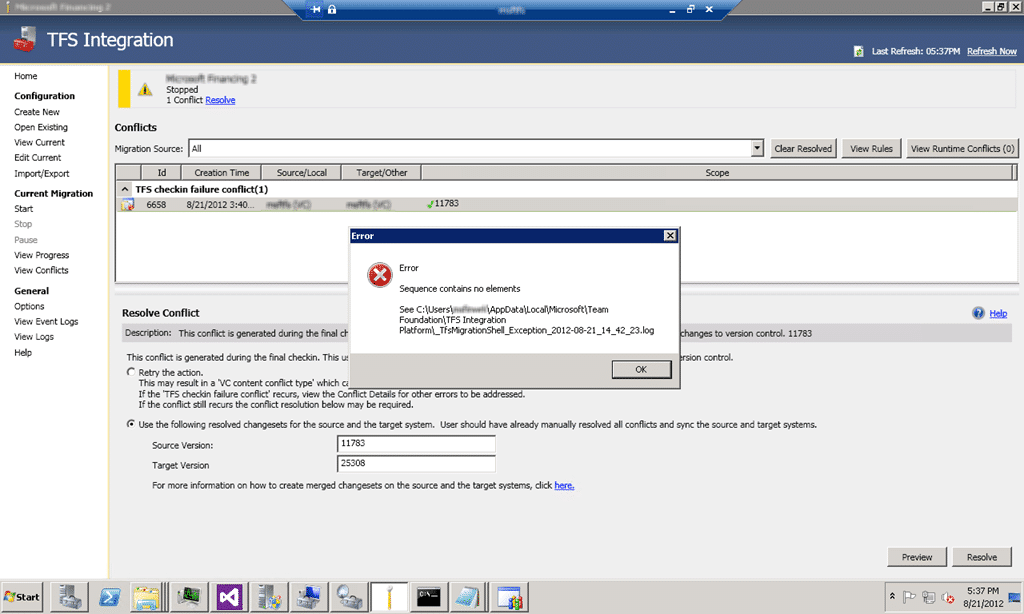
Figure: Sequence contains no elements
Applies to
- TFS Integration Tools (March 2012 Release)
Findings
On examining the log files it looks like the Migration Shell is trying to load the TFS 2008 VC Adapter even though we are using the TFS 2012 VS Adapter. As I do not have anything to do with TFS 2008 installed I get, as you would expect, an “Unable to load one or more of the requested types”.
Application Information: 0 : Microsoft.TeamFoundation.Migration.Shell, Version=2.2.20314.1, Culture=neutral, PublicKeyToken=31bf3856ad364e35
Application Error: 0 : A failure occurred while trying to load the C:Program Files (x86)Microsoft Team Foundation Server Integration ToolsPluginsTfs2008VCAdapter.dll Plugin:
System.Reflection.ReflectionTypeLoadException: Unable to load one or more of the requested types. Retrieve the LoaderExceptions property for more information.
at System.Reflection.Module._GetTypesInternal(StackCrawlMark& stackMark)
at System.Reflection.Assembly.GetTypes()
at Microsoft.TeamFoundation.Migration.Shell.Extensibility.PluginManager.DiscoverPlugins(DirectoryInfo[] probingDirectories)
Application Error: 0 : A failure occurred while trying to load the C:Program Files (x86)Microsoft Team Foundation Server Integration ToolsPluginsTfs2008WITAdapter.dll Plugin:
System.Reflection.ReflectionTypeLoadException: Unable to load one or more of the requested types. Retrieve the LoaderExceptions property for more information.
at System.Reflection.Module._GetTypesInternal(StackCrawlMark& stackMark)
at System.Reflection.Assembly.GetTypes()
at Microsoft.TeamFoundation.Migration.Shell.Extensibility.PluginManager.DiscoverPlugins(DirectoryInfo[] probingDirectories)
Application Error: 0 : [8/21/2012 5:34:01 PM] System.InvalidOperationException: Sequence contains no elements
at System.Linq.Enumerable.First[TSource](IEnumerable`1 source)
at System.Data.Objects.ELinq.ObjectQueryProvider.b__0[TResult](IEnumerable`1 sequence)
at System.Data.Objects.ELinq.ObjectQueryProvider.ExecuteSingle[TResult](IEnumerable`1 query, Expression queryRoot)
at System.Data.Objects.ELinq.ObjectQueryProvider.System.Linq.IQueryProvider.Execute[S](Expression expression)
at System.Linq.Queryable.First[TSource](IQueryable`1 source)
at Microsoft.TeamFoundation.Migration.Toolkit.SqlChangeGroupManager.UpdateConversionHistoryAndRemovePendingChangeGroups(String migrationInstructionName, String deltaTableName, String comment)
at Microsoft.TeamFoundation.Migration.Toolkit.ChangeGroupService.UpdateConversionHistoryAndRemovePendingChangeGroups(String migrationInstructionName, String deltaTableName, String comment)
at Microsoft.TeamFoundation.Migration.TfsVCAdapterCommon.TfsCheckinFailureConflictHandler.updateConversionHistory(MigrationConflict conflict, ConflictResolutionRule rule, IServiceContainer serviceContainer)
at Microsoft.TeamFoundation.Migration.TfsVCAdapterCommon.TfsCheckinFailureConflictHandler.Resolve(IServiceContainer serviceContainer, MigrationConflict conflict, ConflictResolutionRule rule, List`1& actions)
at Microsoft.TeamFoundation.Migration.Toolkit.ConflictManager.ResolveExistingConflict(RuntimeEntityModel context, ConflictResolutionRule newRule, ConflictResolutionResult defaultResult, RTConflict rtConflict, Guid conflictTypeRefName, Boolean newResolutionRule)
at Microsoft.TeamFoundation.Migration.Toolkit.ConflictManager.ResolveExistingConflictWithNewRule(Int32 internalConflictId, ConflictResolutionRule newRule)
at Microsoft.TeamFoundation.Migration.Shell.ConflictManagement.ConflictRuleViewModel.Save()
at Microsoft.TeamFoundation.Migration.Shell.ConflictManagement.ConflictListView.btnResolve_Click(Object sender, RoutedEventArgs e)
Application Error: 0 : [8/21/2012 5:34:33 PM] System.InvalidOperationException: Sequence contains no elements
at System.Linq.Enumerable.First[TSource](IEnumerable`1 source)
at System.Data.Objects.ELinq.ObjectQueryProvider.b__0[TResult](IEnumerable`1 sequence)
at System.Data.Objects.ELinq.ObjectQueryProvider.ExecuteSingle[TResult](IEnumerable`1 query, Expression queryRoot)
at System.Data.Objects.ELinq.ObjectQueryProvider.System.Linq.IQueryProvider.Execute[S](Expression expression)
at System.Linq.Queryable.First[TSource](IQueryable`1 source)
at Microsoft.TeamFoundation.Migration.Toolkit.SqlChangeGroupManager.UpdateConversionHistoryAndRemovePendingChangeGroups(String migrationInstructionName, String deltaTableName, String comment)
at Microsoft.TeamFoundation.Migration.Toolkit.ChangeGroupService.UpdateConversionHistoryAndRemovePendingChangeGroups(String migrationInstructionName, String deltaTableName, String comment)
at Microsoft.TeamFoundation.Migration.TfsVCAdapterCommon.TfsCheckinFailureConflictHandler.updateConversionHistory(MigrationConflict conflict, ConflictResolutionRule rule, IServiceContainer serviceContainer)
at Microsoft.TeamFoundation.Migration.TfsVCAdapterCommon.TfsCheckinFailureConflictHandler.Resolve(IServiceContainer serviceContainer, MigrationConflict conflict, ConflictResolutionRule rule, List`1& actions)
at Microsoft.TeamFoundation.Migration.Toolkit.ConflictManager.ResolveExistingConflict(RuntimeEntityModel context, ConflictResolutionRule newRule, ConflictResolutionResult defaultResult, RTConflict rtConflict, Guid conflictTypeRefName, Boolean newResolutionRule)
at Microsoft.TeamFoundation.Migration.Toolkit.ConflictManager.ResolveExistingConflictWithNewRule(Int32 internalConflictId, ConflictResolutionRule newRule)
at Microsoft.TeamFoundation.Migration.Shell.ConflictManagement.ConflictRuleViewModel.Save()
at Microsoft.TeamFoundation.Migration.Shell.ConflictManagement.ConflictListView.btnResolve_Click(Object sender, RoutedEventArgs e)
Well that sucks…
Workaround
One work around that I found with the help of Bill Essary is to remove the “Tfs2008VCAdapter.dll” files from the folder so that they can’t even be loaded.

Figure: Get rid of the offending adapters
- Create new folder called “NOT NEEDED” under “C:Program Files (x86)Microsoft Team Foundation Server Integration ToolsPlugins”
- Move all files from “Plugins” that have 2008 in the title to this folder.
- Rerun action…
Woot… that solved my issue… did it solve yours?
Smart Classifications
Each classification [Concepts, Categories, & Tags] was assigned using AI-powered semantic analysis and scored across relevance, depth, and alignment. Final decisions? Still human. Always traceable. Hover to see how it applies.
What to read next
TFS Integration Tools - Issue: TF10141 No Files checked in as a result of a TFS check-in failure
Explains how to resolve TFS Integration Tools check-in failures (TF10141), covering conflict identification, manual resolution steps, and …
TFS Integration Tools - Issue: TF14009: Cannot merge source into target because the target is underneath source
Explains the TF14009 error in TFS when merging a source into a subfolder of itself, its causes during migration, and practical workarounds …
Detecting agile theatre with real delivery signals
Why Most Companies Operating Models Fail in Dynamic Markets
A concise comparison of Predictive and Adaptive Operating Models, explaining why traditional structures fail in dynamic markets and how …
Don’t Manage Dependencies, Remove Them
Explains why dependencies are a sign of poor system design and outlines steps to eliminate them by aligning teams, clarifying ownership, and …
The Estimation Trap: How Tracking Accuracy Undermines Trust, Flow, and Value in Software Delivery
Tracking estimation accuracy in software delivery leads to mistrust, fear, and distorted behaviours. Focus on customer value, flow, and …
Flow of Value vs Flow of Work – Misnomer or Useful Shorthand?
Compares “flow of value” and “flow of work” in Kanban, explaining why only validated outcomes count as value and stressing the need for …
Why Outsourcing DevOps Fails, and How Real Engineering Excellence Starts With Your Team
Avoid DevOps vendor lock-in, discover how true engineering excellence starts with partnership, not outsourcing. Ready to transform your …