If you are moving source from one team project to another (I am doing a migration of Source Code from “TeamProjectA” to “TeamProjectBTeamProjectA” in the same collection) you can get a TF14009 if there is a bad check-in in TFS from a previous version. In this case a folder was branched from itself into a sub folder.
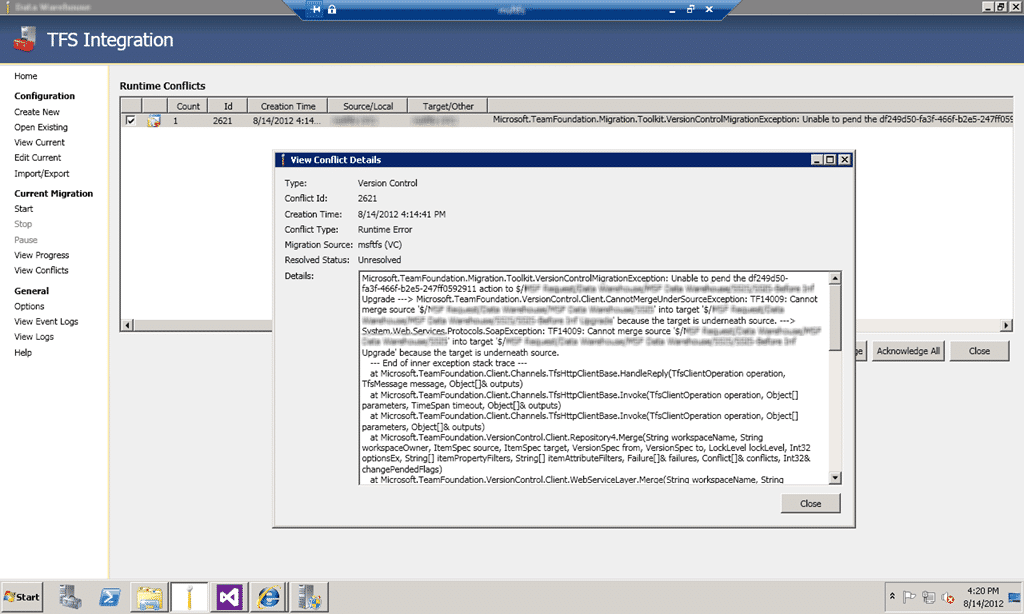
Figure: TF14009: Cannot merge source into target because the target is underneath source
Here is the full error message:
Microsoft.TeamFoundation.Migration.Toolkit.VersionControlMigrationException: Unable to pend the df249d50-fa3f-466f-b2e5-247ff0592911 action to $/TeamProject1/Folder1/Folder2 ---> Microsoft.TeamFoundation.VersionControl.Client.CannotMergeUnderSourceException: TF14009: Cannot merge source '$/TeamProject1/Folder1' into target 'TeamProject1/Folder1/Folder2' because the target is underneath source. ---> System.Web.Services.Protocols.SoapException: TF14009: Cannot merge source 'TeamProject1/Folder1' into target 'TeamProject1/Folder1/Folder2' because the target is underneath source.
--- End of inner exception stack trace ---
at Microsoft.TeamFoundation.Client.Channels.TfsHttpClientBase.HandleReply(TfsClientOperation operation, TfsMessage message, Object[]& outputs)
at Microsoft.TeamFoundation.Client.Channels.TfsHttpClientBase.Invoke(TfsClientOperation operation, Object[] parameters, TimeSpan timeout, Object[]& outputs)
at Microsoft.TeamFoundation.Client.Channels.TfsHttpClientBase.Invoke(TfsClientOperation operation, Object[] parameters, Object[]& outputs)
at Microsoft.TeamFoundation.VersionControl.Client.Repository4.Merge(String workspaceName, String workspaceOwner, ItemSpec source, ItemSpec target, VersionSpec from, VersionSpec to, LockLevel lockLevel, Int32 optionsEx, String[] itemPropertyFilters, String[] itemAttributeFilters, Failure[]& failures, Conflict[]& conflicts, Int32& changePendedFlags)
at Microsoft.TeamFoundation.VersionControl.Client.WebServiceLayer.Merge(String workspaceName, String workspaceOwner, ItemSpec source, ItemSpec target, VersionSpec from, VersionSpec to, LockLevel lockLevel, Int32 optionsEx, Failure[]& failures, Conflict[]& conflicts, String[] itemAttributeFilters, String[] itemPropertyFilters, Int32& flags)
at Microsoft.TeamFoundation.VersionControl.Client.WebServiceLayerLocalWorkspaces.Merge(String workspaceName, String workspaceOwner, ItemSpec source, ItemSpec target, VersionSpec from, VersionSpec to, LockLevel lockLevel, Int32 optionsEx, Failure[]& failures, Conflict[]& conflicts, String[] itemAttributeFilters, String[] itemPropertyFilters, Int32& flags)
at Microsoft.TeamFoundation.VersionControl.Client.Client.Merge(Workspace workspace, ItemSpec sourceSpec, String target, VersionSpec versionFrom, VersionSpec versionTo, LockLevel lockLevel, MergeOptionsEx mergeOptions, String[] itemAttributeFilters, String[] itemPropertyFilters, Int32 operationId)
at Microsoft.TeamFoundation.VersionControl.Client.Workspace.Merge(ItemSpec source, String targetPath, VersionSpec versionFrom, VersionSpec versionTo, LockLevel lockLevel, MergeOptionsEx mergeOptions, String[] itemAttributeFilters, String[] itemPropertyFilters)
at Microsoft.TeamFoundation.VersionControl.Client.Workspace.Merge(ItemSpec source, String targetPath, VersionSpec versionFrom, VersionSpec versionTo, LockLevel lockLevel, MergeOptionsEx mergeOptions, String[] itemAttributeFilters)
at Microsoft.TeamFoundation.VersionControl.Client.Workspace.Merge(ItemSpec source, String targetPath, VersionSpec versionFrom, VersionSpec versionTo, LockLevel lockLevel, MergeOptionsEx mergeOptions)
at Microsoft.TeamFoundation.VersionControl.Client.Workspace.Merge(String sourcePath, String targetPath, VersionSpec versionFrom, VersionSpec versionTo, LockLevel lockLevel, RecursionType recursion, MergeOptionsEx mergeOptions)
at Microsoft.TeamFoundation.VersionControl.Client.Workspace.Merge(String sourcePath, String targetPath, VersionSpec versionFrom, VersionSpec versionTo, LockLevel lockLevel, RecursionType recursion, MergeOptions mergeOptions)
at Microsoft.TeamFoundation.Migration.Tfs2010VCAdapter.BatchingContext.pendBranches()
--- End of inner exception stack trace ---
at Microsoft.TeamFoundation.Migration.Tfs2010VCAdapter.TfsVCMigrationProvider.SingleItemError(Object sender, BatchedItemEventArgs e)
at Microsoft.TeamFoundation.Migration.Tfs2010VCAdapter.BatchingContext.OnBatchedItemError(BatchedItem item, Exception exception)
at Microsoft.TeamFoundation.Migration.Tfs2010VCAdapter.BatchingContext.pendBranches()
at Microsoft.TeamFoundation.Migration.Tfs2010VCAdapter.BatchingContext.pendChanges()
at Microsoft.TeamFoundation.Migration.Tfs2010VCAdapter.BatchingContext.Flush()
at Microsoft.TeamFoundation.Migration.Tfs2010VCAdapter.TfsVCMigrationProvider.Flush(BatchingContext context)
at Microsoft.TeamFoundation.Migration.Tfs2010VCAdapter.TfsVCMigrationProvider.ProcessChangeGroup(ChangeGroup group)
Figure: Error log of TF14009
Applies to
- TFS Integration Platform
- Visual Studio 2012 Team Foundation Server (from TFS 2008 upgrade)
Findings
Looking at the actual check-in it looks like both a Branch and an Add was performed at the same time in TFS 2008. This may have been Pre-SP1 where many of these issues were fixed, but it is still biting me now.

Figure: Changeset and Branch relationships
There does not seams to be an easy solution to this one…
It appears that the customer was a able to pended the new branch and renamed the source branch in the same changeset! This should have been caught by TFS’s internal checks that guard against getting the system into this state. The Integration Platform may be trying to perform these actions in a different order and thus hitting the TFS 2012 rules.
As the system should not be able to get into this state, I am not sure we want to try and force this branch to be migrated to the target server the same way it is on the source server.
Depending on the requirements of the migration, we could try to:
- Cloak this path from this particular migration session
- Destroy the problem branch (if it is a dead branch, that was not used, for instance)
- Attempt to have the migration tool pend the changes in a different order to get the check-in by TFS (target system would then have this unexpected state)
I would not recommend #3, and #2 removes the data from the Source system. In this case I would go with #1.
Workaround #1
You can change the mappings while the migration is running by manually changing the XML. The UI will not let you do it as this is an advanced option but if you go to “Edit Current | Xml” you can add the mapping manually.
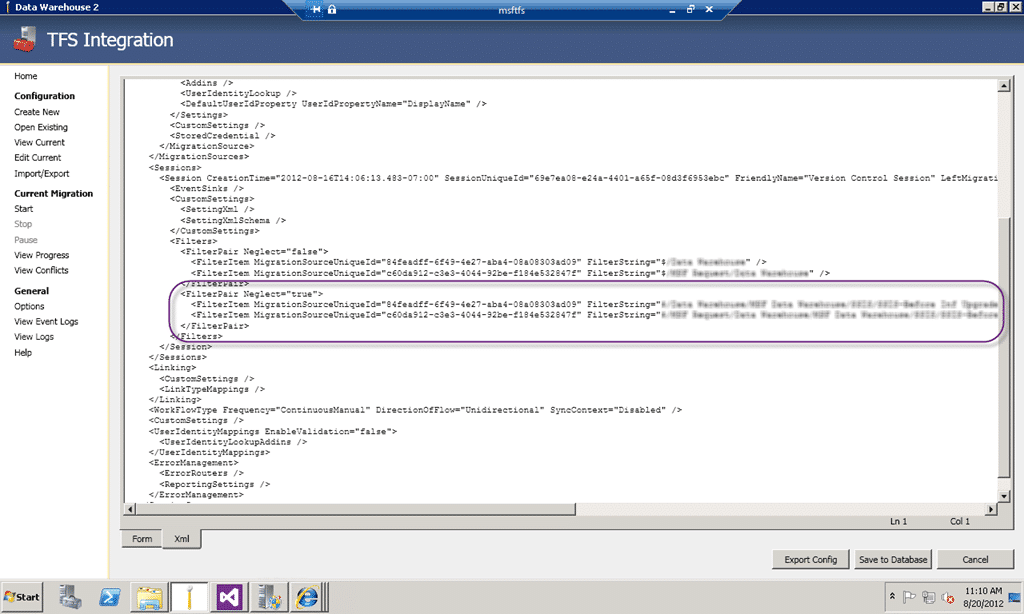
Figure: Manually adding a cloak to a run
Find your filter pair mappings and add one for that path that says Neglect=”true”. Once you swap back to the “Form” tab you should see the new mapping and when you restart the migration the engine will detect the configuration change and will flush all pending migration instructions.
However in my case we had gone too far down the “Resolve” route and we needed to start over. To do that you need to call “tf destroy” to remove the half migrated data from source control and then create a new run with the Cloak already added.
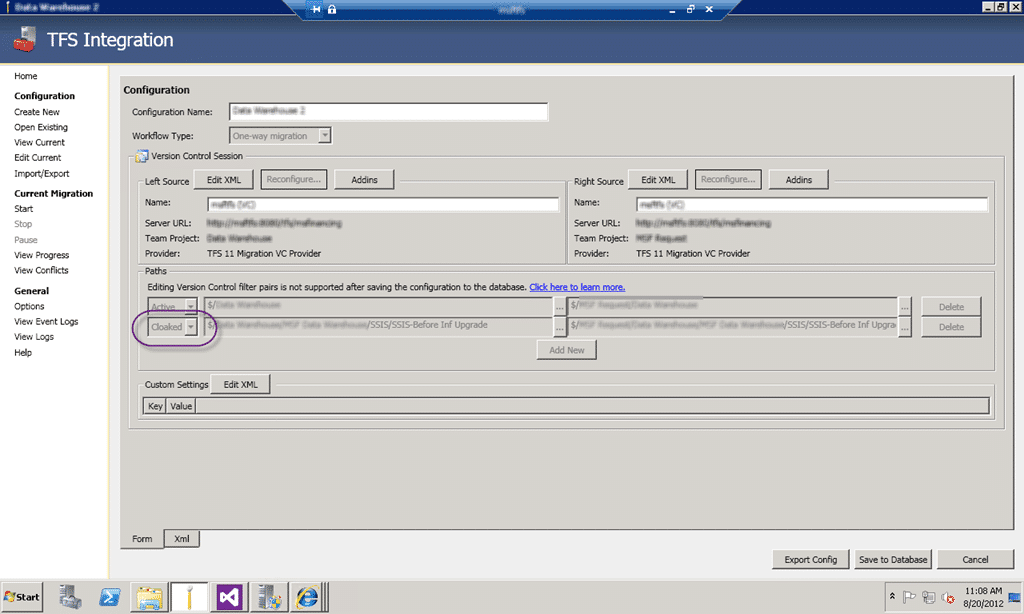
Figure: UI with the Cloak added
Run again and you will then get your source across. If you want you can then manually move that cloaked folder to complete the data and with it no longer being a branch, our target system is then in a working state.
Did this help you?
Smart Classifications
Each classification [Concepts, Categories, & Tags] was assigned using AI-powered semantic analysis and scored across relevance, depth, and alignment. Final decisions? Still human. Always traceable. Hover to see how it applies.
What to read next
TFS Integration Tools - Issue: TF10141 No Files checked in as a result of a TFS check-in failure
Explains how to resolve TFS Integration Tools check-in failures (TF10141), covering conflict identification, manual resolution steps, and …
Subversion to TFS 2010: The migration engine is unable to resolve a conflict where two changes have the same target item
Explains how to resolve case sensitivity conflicts when migrating from Subversion to TFS 2010, including tools and steps to handle duplicate …
One Team Project Collection to rule them all - Consolidating Team Projects
Step-by-step guide to consolidating multiple Team Projects and Collections in TFS 2012 using the TFS Integration Platform, covering …
Maven release perform tries to do a Get to a workspace sub folder in TFS
Explains issues with Maven release perform in TFS workspaces, causes of build failures, and solutions for workspace mapping, concurrency, …
Mastering Azure DevOps Migration: A Step-by-Step Guide for Seamless Project Transfers
Learn how to migrate Azure DevOps projects step by step, including tool setup, configuration, handling common issues, and ensuring a smooth …
Detecting agile theatre with real delivery signals
Why Most Companies Operating Models Fail in Dynamic Markets
A concise comparison of Predictive and Adaptive Operating Models, explaining why traditional structures fail in dynamic markets and how …
Don’t Manage Dependencies, Remove Them
Explains why dependencies are a sign of poor system design and outlines steps to eliminate them by aligning teams, clarifying ownership, and …
The Estimation Trap: How Tracking Accuracy Undermines Trust, Flow, and Value in Software Delivery
Tracking estimation accuracy in software delivery leads to mistrust, fear, and distorted behaviours. Focus on customer value, flow, and …
Flow of Value vs Flow of Work – Misnomer or Useful Shorthand?
Compares “flow of value” and “flow of work” in Kanban, explaining why only validated outcomes count as value and stressing the need for …
Why Outsourcing DevOps Fails, and How Real Engineering Excellence Starts With Your Team
Avoid DevOps vendor lock-in, discover how true engineering excellence starts with partnership, not outsourcing. Ready to transform your …