You may get a TF50309 when configuring features in Team Foundation Server 2013 and you are unable to complete the configuration.
TF50309: The following account does not have sufficient permissions to complete the operation: The following permissions are needed to perform this operation: Manage process template.
Applies to
- Team Foundation Server 2012
- Team Foundation Server 2013
Findings
If you are an Team Project Administrator you would expect to be able to configure the new features for your Team Project but you are prompted for the ‘Manage process template’ permission. This permission is a collection level permission and is grated automatically to Project Collection Administrators but not to Project Admins.
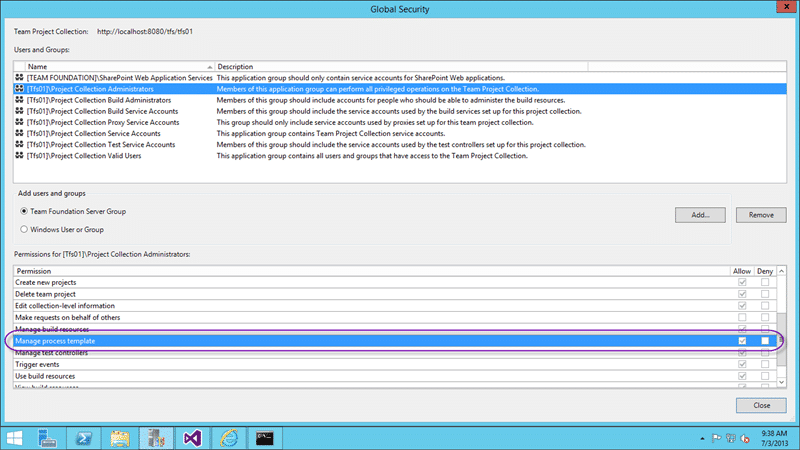
Figure: Manage process template permission
You need to configuring features in Team Foundation Server 2013 with an account that has this permission.
Solution #1 – Give one user access and configure all projects
The first solution is to have someone who is a Project Collection Administrator do the configuration. This would be awkward and boring if you have 200 Team Projects, but for one a few this is the simplest and least invasive solution.
Solution #2 – Create a new Group to give Project Admins permission
If however you have tens or hundreds of Team Project and you need to liaise with each group of users for training for the new features you may want to take a slower approach. I want to be able to delegate this permission out so that I can send an email too each of the Project owners and have them do the training and upgrade at a time that suits them.
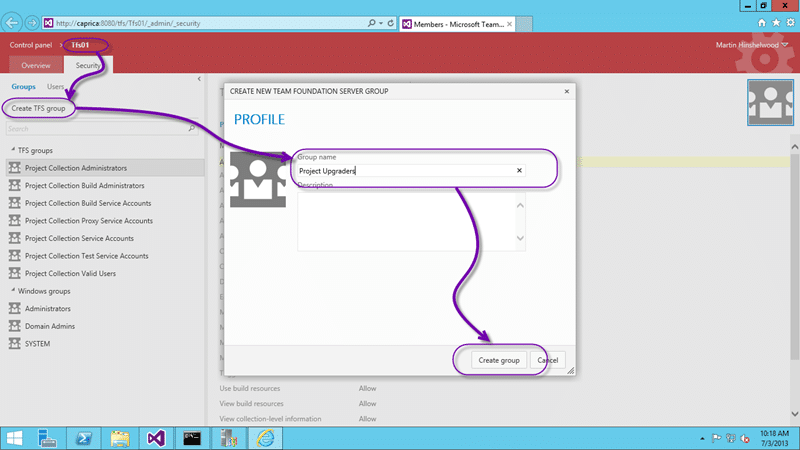
Figure: Create a Project Upgraders TFS Group
You need to create a new TFS Group at the Team Collection level that will contain each of the “owners” or “upgraders” for the individual Team Projects.
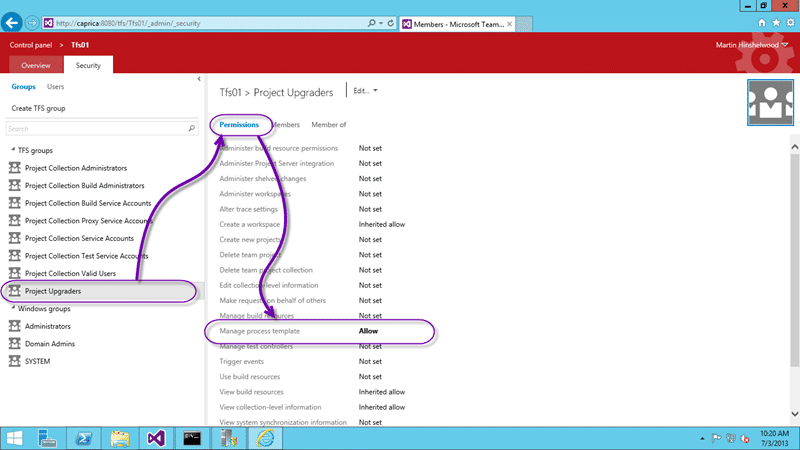
Figure: Set the Manage process template permission only
Now that we have a group we can select it and set individual permissions. In this case we only need the manage process template permission that will allow this user to complete the configuration of the Team Project to enable the new features.
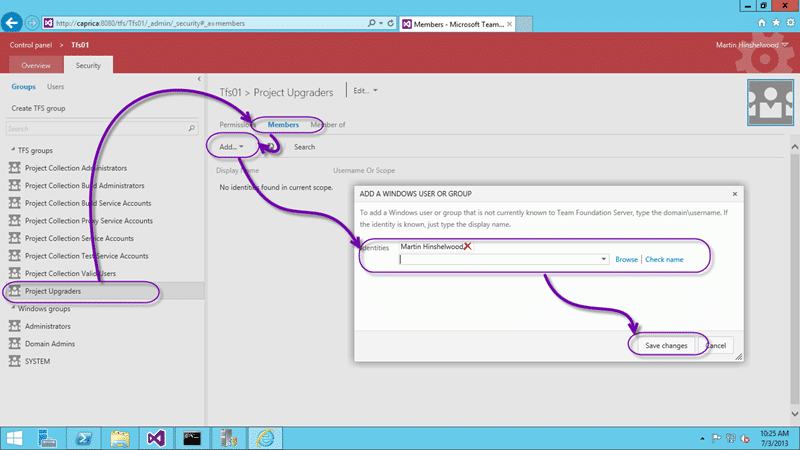
Figure: Add users to the new group
Now we need to add each user that we want to have this permission. It would be awesome if we could add a Team Project group in here… you know.. like the “Project Administrators” group but “[ScrumSandbox]Project Administrators” fails to resolve. Sad, but the workaround is to just add the users we want to have permission..
Smart Classifications
Each classification [Concepts, Categories, & Tags] was assigned using AI-powered semantic analysis and scored across relevance, depth, and alignment. Final decisions? Still human. Always traceable. Hover to see how it applies.
What to read next
TFS 2012 - Issue: Manage Group Membership missing from admin after TFS 2008 to TFS 2012 Upgrade
Explains how to restore missing group membership management in TFS 2012 after upgrading from TFS 2008 by manually adding permissions using …
Detecting agile theatre with real delivery signals
Why Most Companies Operating Models Fail in Dynamic Markets
A concise comparison of Predictive and Adaptive Operating Models, explaining why traditional structures fail in dynamic markets and how …
Don’t Manage Dependencies, Remove Them
Explains why dependencies are a sign of poor system design and outlines steps to eliminate them by aligning teams, clarifying ownership, and …
The Estimation Trap: How Tracking Accuracy Undermines Trust, Flow, and Value in Software Delivery
Tracking estimation accuracy in software delivery leads to mistrust, fear, and distorted behaviours. Focus on customer value, flow, and …
Flow of Value vs Flow of Work – Misnomer or Useful Shorthand?
Compares “flow of value” and “flow of work” in Kanban, explaining why only validated outcomes count as value and stressing the need for …
Why Outsourcing DevOps Fails, and How Real Engineering Excellence Starts With Your Team
Avoid DevOps vendor lock-in, discover how true engineering excellence starts with partnership, not outsourcing. Ready to transform your …