If you have the ‘team field’ enabled you will receive a “TF400654: Unable to configure Planning Tools” when you try to use the automatic configuration.
[Error] TF400654: Unable to configure Planning Tools. The following element contains an error: TypeFields/TypeField[type=‘Team’]. TF400517: The value of this element is set to: HinshLabs.Team. You must set the value to a field that exists in all of the work item types that are defined in Microsoft.FeatureCategory. The field does not exist in the following work item types: Feature.
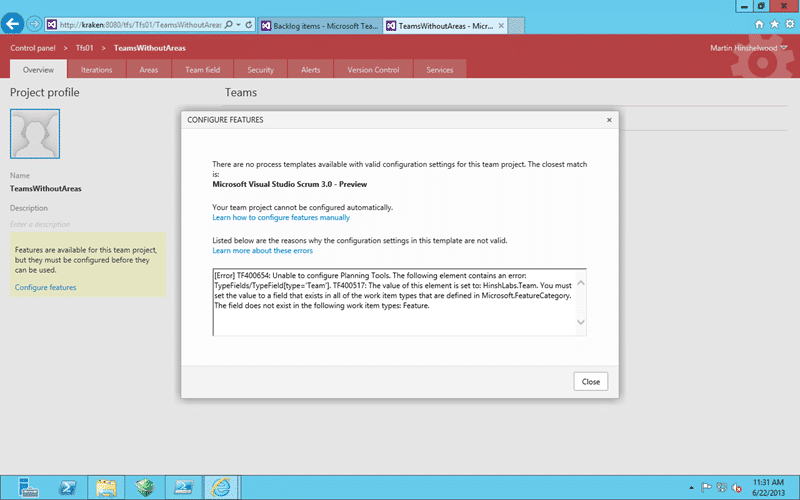
Figure: TF400654 Unable to configure Planning Tools
Applies to
- Team Foundation Server 2013 Preview
Findings
When you get a “TF400654 Unable to configure Planning Tools” error after an upgrade and you are trying to ‘configure’ the new features that have been added to TFS it is because you have customised the Process Template. The “Configure Features” wizard does a really good job of figuring out which process template and
- Changed to use ‘team field’
- Modifying the States
In the case of the ‘team field’ I am really hoping that they will be able to fix this for the RTM. The Field ‘HinshLabs.Team’ is already there in the Collection and if the wizard could just add it to the fields of the vanilla Feature and then pick a known UI point to add it. The customer can always move it later but this would give them a much slicker experience…
Solution
You need to manually update your process template by following the instructions on the link provides or you can follow Upgrading to Visual Studio Scrum 3.0 process template in TFS 2013 .
- Download the Visual Studio Scrum 3.0 Process Template
- Edit Task, Bug, Product Backlog Item, Issue and Feature to have the same custom field… in this case “HinshLabs.Team”
- Re-implement any other customisations that you had
- Import the work items
This process is much easier and less time consuming if you have only One Team Project or use the same Process Template across all of your Team Projects.
Smart Classifications
Each classification [Concepts, Categories, & Tags] was assigned using AI-powered semantic analysis and scored across relevance, depth, and alignment. Final decisions? Still human. Always traceable. Hover to see how it applies.
What to read next
Issue [ TFS 2013 ] Value cannot be null. Parameter name: key
Explains how a missing required Team Field in customised TFS 2013 work item templates causes "Value cannot be null" errors, and how to …
Process Template Upgrade #7 – Rename Work Items and Import new ones
Step-by-step guide to upgrading TFS process templates by renaming and importing work item types, preserving data, updating fields, …
Detecting agile theatre with real delivery signals
Why Most Companies Operating Models Fail in Dynamic Markets
A concise comparison of Predictive and Adaptive Operating Models, explaining why traditional structures fail in dynamic markets and how …
Don’t Manage Dependencies, Remove Them
Explains why dependencies are a sign of poor system design and outlines steps to eliminate them by aligning teams, clarifying ownership, and …
The Estimation Trap: How Tracking Accuracy Undermines Trust, Flow, and Value in Software Delivery
Tracking estimation accuracy in software delivery leads to mistrust, fear, and distorted behaviours. Focus on customer value, flow, and …
Flow of Value vs Flow of Work – Misnomer or Useful Shorthand?
Compares “flow of value” and “flow of work” in Kanban, explaining why only validated outcomes count as value and stressing the need for …
Why Outsourcing DevOps Fails, and How Real Engineering Excellence Starts With Your Team
Avoid DevOps vendor lock-in, discover how true engineering excellence starts with partnership, not outsourcing. Ready to transform your …
The Definition of Done is a Commitment to Quality
Defines the Definition of Done in Scrum as a clear, shared standard for quality, ensuring increments are releasable, transparent, and …
Why Your Definition of “Done” Is Holding Back Quality, Agility, and Trust, And How to Raise the Bar
Is your team’s “done” really done? Discover how a clear, objective definition of done boosts quality, agility, and trust in product …
Acceptance Criteria vs Definition of Done: Why Getting This Right Builds Trust and Delivers Quality Faster
Stop confusing acceptance criteria with definition of done, learn the crucial difference to boost quality, speed, and trust in your agile …
How to Evolve Your Definition of Done: Start Small, Grow Smarter, and Build Lasting Momentum
Unlock a smarter Definition of Done, start small, evolve standards, and build team momentum without overwhelm. Discover how progress drives …
Why Most Transformations Fail Without Honest Conversations
Most transformations fail without open, honest conversations that address real issues, making transparency and tough dialogue essential for …
Why Your Definition of Done Is the Secret Weapon for Real Business Impact and Agile Growth
Transform your definition of done into a strategic advantage, deliver real value, reduce risk, and drive business impact with every sprint.