There is always something new to learn with TFS and today I learned something old. I had a user today that was constantly getting the message “Access denied user needs label permission in TFS”.
Although I have configured “one-team-project” for many organisation my current customer is the first that has insisted on draconian security measures. In this case I have removed contributors from the root of the Team Project and each team is granted rights by sub-folder. If each sub-folder represents an application then this makes perfect sense. Until you try to add a label using the Visual Studio IDE.
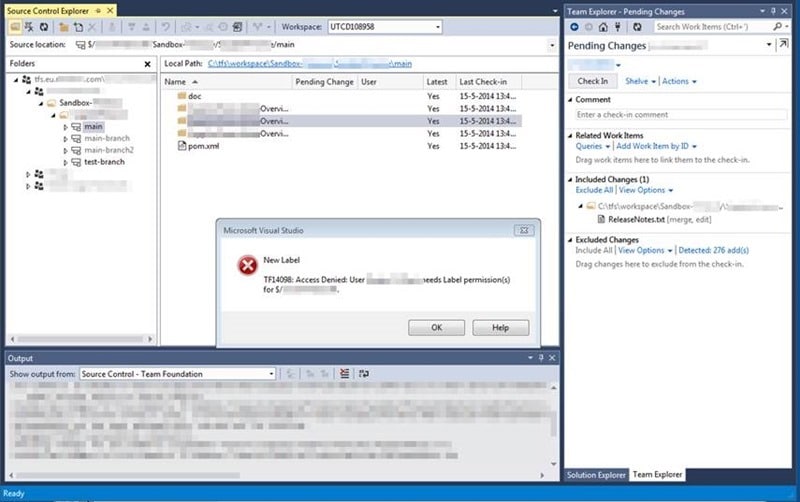
I spent a little while trying to debug this and finding no issues with my configuration I emailed the champs list. In a timely manner Mr Jesse Houwing replied with a “Well duh Martin… that’s how it has always worked”:
Labels created within the graphical user interface are scoped to the root folder of the team project within which they are created. Labels created from the command line are scoped to the longest common path shared by the items specified in the label command. To specify the fully qualified name of a label, you must concatenate the label name, the ‘@’ symbol, and the label scope, as in Beta@$/TeamProject1.
-http://msdn.microsoft.com/en-us/library/ms181439(v=vs.80).aspx
Well… poo… That does not sound like a good idea. And then I realised that the TFS team also have to support the lowest common denominator. Those developers that you meet in 2014 who have no idea what a Unit Test is (or think that it is opening the app and clicking some buttons) or what automated builds are. So if they found that they could create Label with the same name but overlapping scopes!
Mind blown…
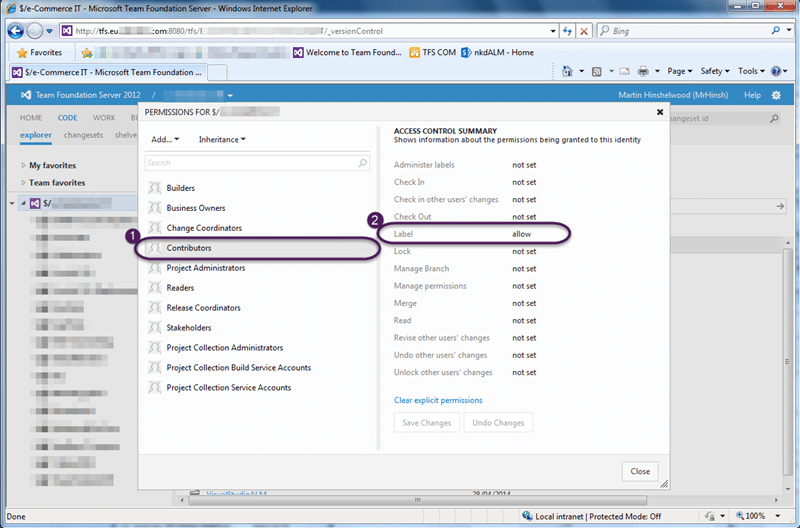
My solution was to just give contributors access only to labels at the root. This stops that pesky error from occurring in the IDE and really does not pose a security risk.
What to read next
Access denied for orchestration plan on Build
Explains how to resolve TFS build errors caused by missing write permissions for the Project Collection Build Service on orchestration …
Branch madness!
Describes a complex source control issue in TFS involving branch mismanagement, its impact on merging, and step-by-step actions taken to …
Maven release perform tries to do a Get to a workspace sub folder in TFS
Explains issues with Maven release perform in TFS workspaces, causes of build failures, and solutions for workspace mapping, concurrency, …
Detecting agile theatre with real delivery signals
Why Most Companies Operating Models Fail in Dynamic Markets
A concise comparison of Predictive and Adaptive Operating Models, explaining why traditional structures fail in dynamic markets and how …
Don’t Manage Dependencies, Remove Them
Explains why dependencies are a sign of poor system design and outlines steps to eliminate them by aligning teams, clarifying ownership, and …
The Estimation Trap: How Tracking Accuracy Undermines Trust, Flow, and Value in Software Delivery
Tracking estimation accuracy in software delivery leads to mistrust, fear, and distorted behaviours. Focus on customer value, flow, and …
Flow of Value vs Flow of Work – Misnomer or Useful Shorthand?
Compares “flow of value” and “flow of work” in Kanban, explaining why only validated outcomes count as value and stressing the need for …
Why Outsourcing DevOps Fails, and How Real Engineering Excellence Starts With Your Team
Avoid DevOps vendor lock-in, discover how true engineering excellence starts with partnership, not outsourcing. Ready to transform your …