I decided that I should have a go at this LINQ thing, so as .NET 3.5 will be RTM at the end of the month I am using LINQ and .NET 3.5 in my new Locator project.
The Locator project is just a small application that will run on a users computer and tell a central server where they are. In Aggreko we have the problem that people are moving about a lot (everyone has a laptop) and when you are looking for someone you need to be able to find them.
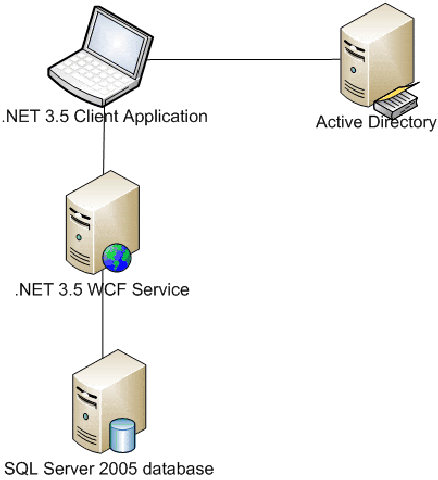
The application sits and poles the IP address of the local computer, and when it get an internal IP (i.e. not localhost) it will send that IP to a Windows Communication Foundation service for identification. If it is an IP that represents an internal company IP it sends back the detected location to the client and stores it in a database. The client then updates the physicalDeliveryOfficeName property in Active Directory and notifies the user of their location.
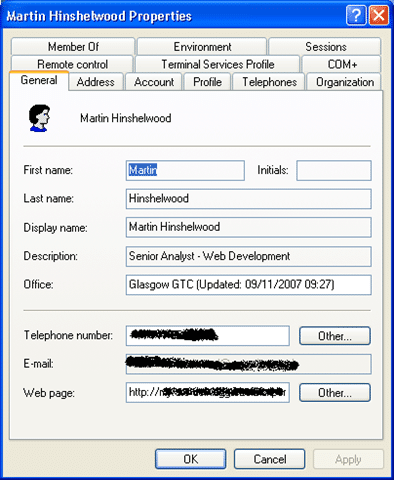
The information updated into Active Directory will then be visible on SharePoint and in any presence display.
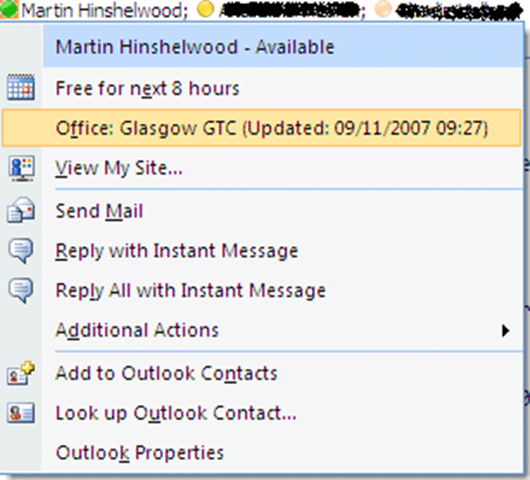
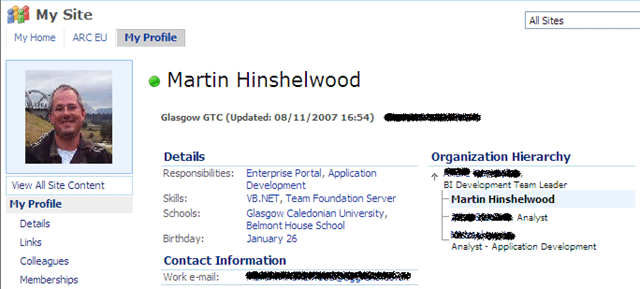
As you can see the SharePoint listing is considerably out of date. This is because of the Schedule associated with its import of profiles. it does not seam as if it can be done any more regularly than once a day 
The LINQ comes to the forefront when I am updating the database from the service. LINQ made this incredibly easy, but produced some strange looking SQL.
 ' Get single value. This will execute the SQL
            Dim wai_Uip = (From val_uip In DataStore.WhereAmI_UserIPs _
                          Join val_ipm In DataStore.WhereAmI_IPMasks _
                            On val_uip.CurrentIP.Substring(0, val_uip.CurrentIP.LastIndexOf(".")) _
                            Equals val_ipm.Data.Substring(0, val_ipm.Data.LastIndexOf(".")) _
                          Join val_off In DataStore.WhereAmI_Offices _
                            On val_ipm.OfficeID _
                            Equals val_off.OfficeID _
                          Where val_uip.UserID = user _
                          Select val_off.Country, val_off.Name, val_ipm.Data).First
Which produces this crazy SQL:
SELECT [t2].[Country], [t2].[Name], [t1].[Data]
FROM [dbo].[WhereAmI_UserIP] AS [t0]
INNER JOIN [dbo].[WhereAmI_IPMask] AS [t1] ON SUBSTRING([t0].[CurrentIP], @p0 + 1,
    (CASE
        WHEN (CONVERT(Int,DATALENGTH(@p1) / 2)) = 0 THEN (CONVERT(Int,DATALENGTH([t0].[CurrentIP]) / 2)) - 1
        WHEN CHARINDEX(@p1, [t0].[CurrentIP]) = 0 THEN -1
        ELSE 1 + ((CONVERT(Int,DATALENGTH([t0].[CurrentIP]) / 2)) - ((CONVERT(Int,DATALENGTH(@p1) / 2)) + CHARINDEX(REVERSE(@p1), REVERSE([t0].[CurrentIP]))))
     END)) = SUBSTRING([t1].[Data], @p2 + 1,
    (CASE
        WHEN (CONVERT(Int,DATALENGTH(@p3) / 2)) = 0 THEN (CONVERT(Int,DATALENGTH([t1].[Data]) / 2)) - 1
        WHEN CHARINDEX(@p3, [t1].[Data]) = 0 THEN -1
        ELSE 1 + ((CONVERT(Int,DATALENGTH([t1].[Data]) / 2)) - ((CONVERT(Int,DATALENGTH(@p3) / 2)) + CHARINDEX(REVERSE(@p3), REVERSE([t1].[Data]))))
     END))
INNER JOIN [dbo].[WhereAmI_Office] AS [t2] ON [t1].[OfficeID] = [t2].[OfficeID]
WHERE [t0].[UserID] = @p4',N'@p0 int,@p1 nvarchar(1),@p2 int,@p3 nvarchar(1),@p4 nvarchar(20)
Now that is nuts 
What to read next
TFS Sticky Buddy layout fun
A developer shares challenges and insights from building a TFS Sticky Buddy UI in WinForms and WPF, comparing layout issues and ease of use …
Some thoughts on .NET 3.0 from LinkedIn
Insights on adopting .NET 3.0 for new applications, its features like WPF, WF, WCF, CardSpace, and comparisons with BizTalk, plus upgrade …
Detecting agile theatre with real delivery signals
Why Most Companies Operating Models Fail in Dynamic Markets
A concise comparison of Predictive and Adaptive Operating Models, explaining why traditional structures fail in dynamic markets and how …
Don’t Manage Dependencies, Remove Them
Explains why dependencies are a sign of poor system design and outlines steps to eliminate them by aligning teams, clarifying ownership, and …
The Estimation Trap: How Tracking Accuracy Undermines Trust, Flow, and Value in Software Delivery
Tracking estimation accuracy in software delivery leads to mistrust, fear, and distorted behaviours. Focus on customer value, flow, and …
Flow of Value vs Flow of Work – Misnomer or Useful Shorthand?
Compares “flow of value” and “flow of work” in Kanban, explaining why only validated outcomes count as value and stressing the need for …
Why Outsourcing DevOps Fails, and How Real Engineering Excellence Starts With Your Team
Avoid DevOps vendor lock-in, discover how true engineering excellence starts with partnership, not outsourcing. Ready to transform your …