I have been getting very interested in the new Azure Services Platform and how I can use it to facilitate WPF development.
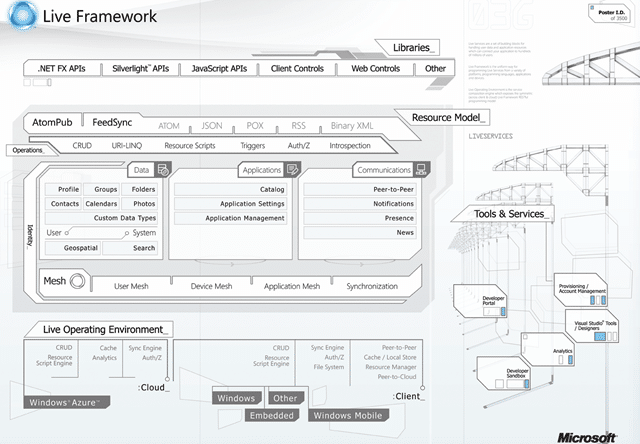
Imagine being able to launch a ClickOnce application from anywhere and for it to have exactly the same configuration and settings in all locations, or imagine being able to chat with other users of the application while you are using it.
This things have been relegated to large companies who can afford to support the infrastructure that you would need to run this. In fact, the only industry that I can think of that currently does this with applications is the Gaming industry. If you look at the capabilities of Xbox Live and think of all the cool things your users could achieve if the same communication and collaboration tools were available within even the simplest application.
For example, if I was to think of a couple of simple things that I would like the TFS Sticky Buddy to be able to do:
- Central storage for configuration (single setup across multiple computers)
- Chat with members of your team to be identified by linking your Team System login and email with you Live ID.
- Presence information on those team members, or anyone you might need to interact with.
Coool…..
Technorati Tags: Azure Live WPF WIT ALM TFS
What to read next
Upgrade to Visual Studio 11 Team Foundation Service - Done
Explains migrating source control and work item tracking to Visual Studio 11 Team Foundation Service, highlighting cloud benefits, …
What about hosting the Tfs Automation Platform
Explores options for hosting the TFS Automation Platform, comparing server-side and client-only setups, and discusses impacts on …
Detecting agile theatre with real delivery signals
Why Most Companies Operating Models Fail in Dynamic Markets
A concise comparison of Predictive and Adaptive Operating Models, explaining why traditional structures fail in dynamic markets and how …
Don’t Manage Dependencies, Remove Them
Explains why dependencies are a sign of poor system design and outlines steps to eliminate them by aligning teams, clarifying ownership, and …
The Estimation Trap: How Tracking Accuracy Undermines Trust, Flow, and Value in Software Delivery
Tracking estimation accuracy in software delivery leads to mistrust, fear, and distorted behaviours. Focus on customer value, flow, and …
Flow of Value vs Flow of Work – Misnomer or Useful Shorthand?
Compares “flow of value” and “flow of work” in Kanban, explaining why only validated outcomes count as value and stressing the need for …
Why Outsourcing DevOps Fails, and How Real Engineering Excellence Starts With Your Team
Avoid DevOps vendor lock-in, discover how true engineering excellence starts with partnership, not outsourcing. Ready to transform your …