I have just finished installing TFS 2010 beta 1 and doing an upgrade of out TFS 2008 data. This did not go well…
Due to a collation mismatch between my original SQL Server 2005 and my new SQL Server 2008 I received an error when upgrading…
[Error @13:57:23.665] TF255184: An error occurred during operation. Message=Cannot resolve the collation conflict between “SQL_Latin1_General_CP1_CI_AS” and “Latin1_General_CI_AS” in the equal to operation.
Transaction count after EXECUTE indicates a mismatching number of BEGIN and COMMIT statements. Previous count = 0, current count = 1.. Exception=.
[Error @13:57:23.681] TF254026: An error occurred during the following operation: Upgrade. The error occurred during the following step group: Upgrade.TfsTeamBuild. It occurred on the following step: Check In Build Process Templates. The following message was returned: Cannot resolve the collation conflict between “SQL_Latin1_General_CP1_CI_AS” and “Latin1_General_CI_AS” in the equal to operation.
Transaction count after EXECUTE indicates a mismatching number of BEGIN and COMMIT statements. Previous count = 0, current count = 1..
[Info @13:57:23.681] CollectionServicingMonitor - [5/25/2009 2:56:55 PM] Servicing step Check In Build Process Templates failed. (ServicingOperation: Upgrade; Step group: Upgrade.TfsTeamBuild)
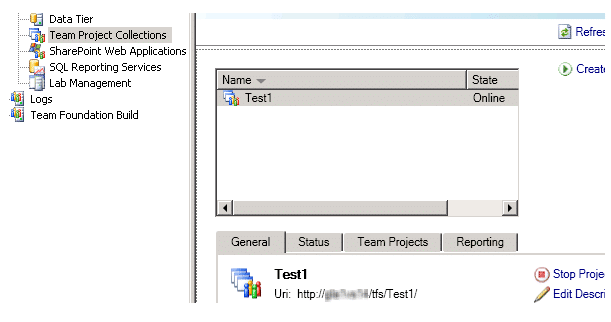
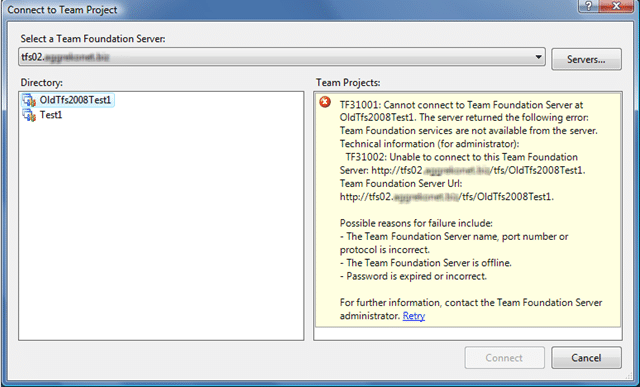
And then the roll back of the transaction did not quite work as expected, so although the TFS Administration does not know about my OldTfs2008Test1 project collection.
My client has it listed but with a TF31001 error.…
Solution? Suck it up and reinstall everything, including SQL and change the collation to the same on both servers. :(
Technorati Tags: ALM TFS 2010 TFS 2008
Smart Classifications
Each classification [Concepts, Categories, & Tags] was assigned using AI-powered semantic analysis and scored across relevance, depth, and alignment. Final decisions? Still human. Always traceable. Hover to see how it applies.
What to read next
Upgrading Team Foundation Server 2008 to 2010
Step-by-step guide to upgrading Team Foundation Server 2008 to 2010, covering database backup, migration, verification, compatibility, and …
In-Place upgrade of TFS 2008 to TFS 2010 with move to new domain
Step-by-step guide to upgrading Team Foundation Server 2008 to 2010, including in-place upgrade, build server update, and migrating to a new …
Detecting agile theatre with real delivery signals
Why Most Companies Operating Models Fail in Dynamic Markets
A concise comparison of Predictive and Adaptive Operating Models, explaining why traditional structures fail in dynamic markets and how …
Don’t Manage Dependencies, Remove Them
Explains why dependencies are a sign of poor system design and outlines steps to eliminate them by aligning teams, clarifying ownership, and …
The Estimation Trap: How Tracking Accuracy Undermines Trust, Flow, and Value in Software Delivery
Tracking estimation accuracy in software delivery leads to mistrust, fear, and distorted behaviours. Focus on customer value, flow, and …
Flow of Value vs Flow of Work – Misnomer or Useful Shorthand?
Compares “flow of value” and “flow of work” in Kanban, explaining why only validated outcomes count as value and stressing the need for …
Why Outsourcing DevOps Fails, and How Real Engineering Excellence Starts With Your Team
Avoid DevOps vendor lock-in, discover how true engineering excellence starts with partnership, not outsourcing. Ready to transform your …