Well, setting up TFS 2008 is pretty easy. I have done an upgrade before, but I have now deployed my first pure TFS 2008 server to a clean environment. I have Reporting Services, SQL and TFS on one box and SharePoint 2007 in my Farm. Word of warning:
RTFM
The first thing I did after a successfully install of TFS was make sure that I could create my first project “Test 1”. This is essential to determine that everything is working and should be done on the server to prevent any other issues getting in the way.
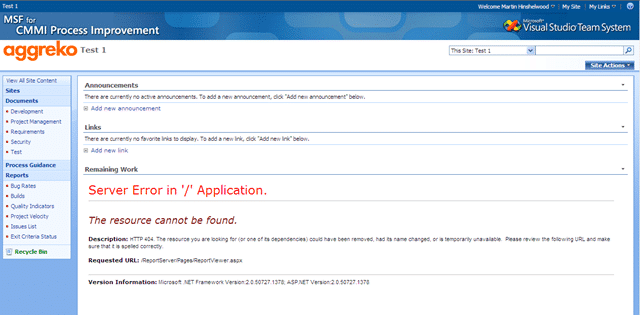
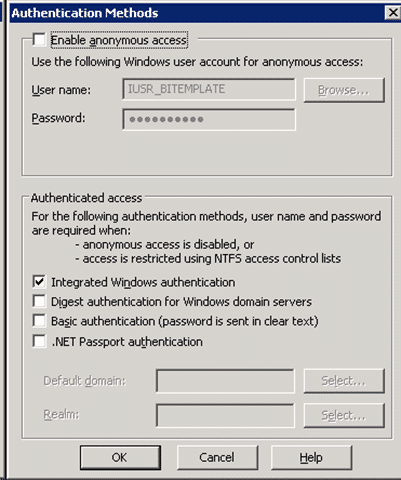
The only problem I had was getting the reporting working. The first issue was authentication. When I checked the “Default Website” config it was set to anonymous only, so I changed that to “Integrated Windows” and that solved the authentication issues.
The second problem was that I changed the reporting server URL, again to the friendly one and it broke SharePoint. I have a SharePoint 2007 Farm where all the TFS portals will be deployed. Even though I ran “TfsConfigWss.exe” located in the Tools folder on the SharePoint server after installing the SharePoint TFS component I still needed to run a register hack to get it to work. The key is under the Local Machine @SoftwareMicrosoftVisualStudio9.0TeamFoundationReportServer and you get a key for each of your SharePoint managed paths.
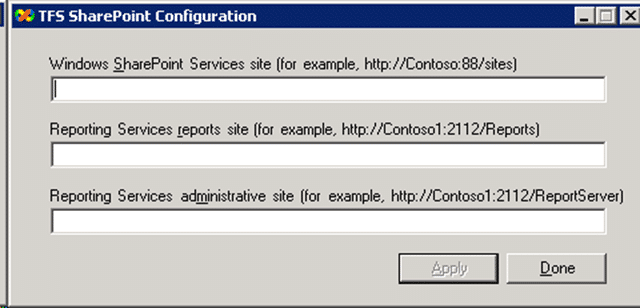
What TFS does now does that is very nice is that you can have multiple TFS servers deploying to the same SharePoint farm. So I created a Managed Path of “TFS01” (my first TFS server at Aggreko, Awww) and pointed TFS at it.
I then changed the name of the server to a friendly name. This is no longer the nasty mess it once was : The TfsAdminUtil.exe now has functionality to change all of the URLs for TFS, SharePoint and RS, so that was easy.
But I still have the old issue of not being able to authenticate when I am on the server once I have changed the “name” of TFS from the server name (default) to a friendly URL.
This is no problem as that was how it worked in my previous environment. I think it is a proxy server issue, but I am not sure. Not much of a problem though…
Technorati Tags: SP 2007 ALM TFS 2008
Smart Classifications
Each classification [Concepts, Categories, & Tags] was assigned using AI-powered semantic analysis and scored across relevance, depth, and alignment. Final decisions? Still human. Always traceable. Hover to see how it applies.
What to read next
Install of TFS 2013.3 with SharePoint 2013 on Windows Server 2012 R2 Update 1
Step-by-step guide to installing TFS 2013.3 with SharePoint 2013 on Windows Server 2012 R2, covering prerequisites, configuration, …
Detecting agile theatre with real delivery signals
Why Most Companies Operating Models Fail in Dynamic Markets
A concise comparison of Predictive and Adaptive Operating Models, explaining why traditional structures fail in dynamic markets and how …
Don’t Manage Dependencies, Remove Them
Explains why dependencies are a sign of poor system design and outlines steps to eliminate them by aligning teams, clarifying ownership, and …
The Estimation Trap: How Tracking Accuracy Undermines Trust, Flow, and Value in Software Delivery
Tracking estimation accuracy in software delivery leads to mistrust, fear, and distorted behaviours. Focus on customer value, flow, and …
Flow of Value vs Flow of Work – Misnomer or Useful Shorthand?
Compares “flow of value” and “flow of work” in Kanban, explaining why only validated outcomes count as value and stressing the need for …
Why Outsourcing DevOps Fails, and How Real Engineering Excellence Starts With Your Team
Avoid DevOps vendor lock-in, discover how true engineering excellence starts with partnership, not outsourcing. Ready to transform your …