I have recently been doing a lot of migrations and Willy asked me to write a white-paper about understanding TFS migrations from on-premise to Visual Studio Online.
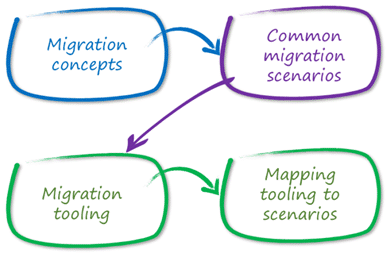
On writing and understanding TFS migrations from on-premise to Visual Studio Online we found that the story was so poor that we broke it into two parts. The first part is ready and focuses on what the options are and the stories for migrating. Its interesting as many people believe that it is Microsoft’s job to provide tools to migrate from any other product into their own product. While I would love to agree there are just way to many products out there to make that a realistic situation.
We kind of looked at a number of scenarios:
- Team Project to Team Project – While not common it is the simplest situation.

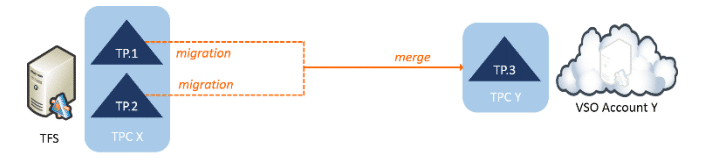
- Consolidating Team Projects – With the move to 2012+ this is the most common ask I have from customers. Wither on-premises or while moving to VSO, many folks are taking the time to pay back the technical cruft that has built up over the years.
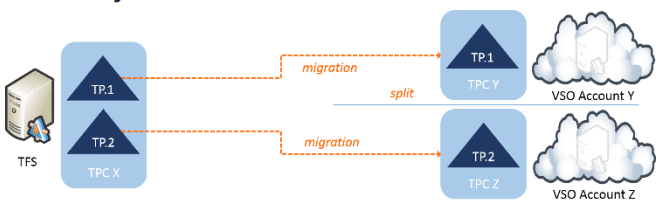
- Splitting Team Projects – While not as common I have seen this as well. Splitting your data is an interesting situation and can be the result of selling parts of your portfolio or just some teams moving on or changing process. Maybe you use it as a staged migration to VSO.
- Consolidating Platforms on VSO - Many customers have Perforce, Git, TFS, SVN, or any of 50 different systems. I have customer that have one of everything.
Like I said the story is not currently that good but you can read about each of the scenarios and see what the main issues are. We have also mapped tools to scenarios so that you can try to get started solving whatever your problems are:
The ALM Rangers will also be releasing a walk-through for the simplest of migrations which is to use Excel for work items and do a tip migration of code. That will be coming real soon.
What to read next
Migration from TF Service to TF Server with the TFS Integration Platform
Guide to migrating data from Team Foundation Service to Team Foundation Server using the TFS Integration Platform, including user and work …
VSTS Sync Migration Tools
Open-source tools for migrating work items, test plans, teams, and project structures between TFS and VSTS, supporting consolidation and …
Mastering Azure DevOps Migration Tools: Your Ultimate Guide to Seamless Migrations
Learn how to use Azure DevOps Migration Tools for efficient, large-scale migrations, including setup, configuration, best practices, and …
Full-fidelity history and data migration are mutually exclusive
Explains why preserving complete historical data and accurate dates is often incompatible with data migration, especially for compliance and …
Detecting agile theatre with real delivery signals
Why Most Companies Operating Models Fail in Dynamic Markets
A concise comparison of Predictive and Adaptive Operating Models, explaining why traditional structures fail in dynamic markets and how …
Don’t Manage Dependencies, Remove Them
Explains why dependencies are a sign of poor system design and outlines steps to eliminate them by aligning teams, clarifying ownership, and …
The Estimation Trap: How Tracking Accuracy Undermines Trust, Flow, and Value in Software Delivery
Tracking estimation accuracy in software delivery leads to mistrust, fear, and distorted behaviours. Focus on customer value, flow, and …
Flow of Value vs Flow of Work – Misnomer or Useful Shorthand?
Compares “flow of value” and “flow of work” in Kanban, explaining why only validated outcomes count as value and stressing the need for …
Why Outsourcing DevOps Fails, and How Real Engineering Excellence Starts With Your Team
Avoid DevOps vendor lock-in, discover how true engineering excellence starts with partnership, not outsourcing. Ready to transform your …