
 Running into problems when migrating a Subversion Repository to Team Foundation Server is what to so with conflicts resulting from SVN being Case Sensitive and TFS not.
note: Case Sensitivity is mostly a bad idea for files, url’s and code.
On of the problems with Subversion is that it treats “/trunk/a.txt” and “/trunk/A.txt” as two different files. This can cause conflicts during the migration that need to be resolved.
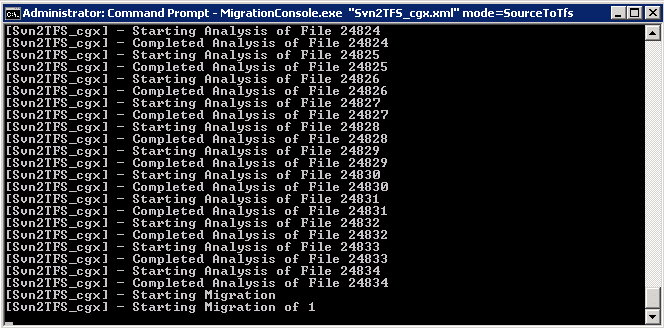 Figure: The migration runs smoothly for a while.
For the smaller sets that I migrated to test this tool it worked just fine, but the larger the data set, the more likely you are to encounter errors. The first set was 1700+ changes, but this one is 24000+ which mean that it is more than 10 times more likely to encounter a conflict.
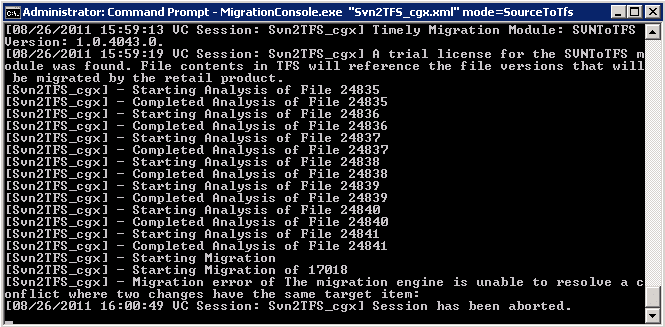 Figure: Unable to resolve conflict where two changes have the same target item
Dam, but conflicts suck. This particular conflict is due to two changes from Subversion are being applied to the same file in a single changes. We need to be able to resolve this as you will not be able to make changes to what is migrated and then rerun that portion.
LogicalOperationStack=Migrate, Main
DateTime=2011-08-26T16:21:57.8098771Z
[8, 4532, 8/26/2011 9:21:57 AM, Migrate] Stopping (overall: 00:00:01.1687929)
MigrationConsole.exe Warning: 0 : The migration engine is unable to resolve a conflict where two changes have the same target item:
LogicalOperationStack=Main
DateTime=2011-08-26T16:21:57.8108537Z
MigrationConsole.exe Information: 0 : Microsoft.TeamFoundation.Migration.Toolkit.UnresolvableConflictException: The migration engine is unable to resolve a conflict where two changes have the same target item:
   at Microsoft.TeamFoundation.Migration.Toolkit.ChangeOptimizer.detectConflicts()
   at Microsoft.TeamFoundation.Migration.Toolkit.ChangeOptimizer.Resolve()
   at Microsoft.TeamFoundation.Migration.Toolkit.BatchingContext.Flush()
   at Microsoft.TeamFoundation.Migration.Toolkit.VC.SourceToTfsMigrationEngine.Flush(BatchingContext context)
   at rlEDq7v0Ex0lXcB8eF.3RBgRNXCby0G0kR3Z1.Flush(BatchingContext context)
   at Microsoft.TeamFoundation.Migration.Toolkit.VC.SourceToTfsMigrationEngine.ProcessChangeGroup(ChangeGrouping group)
   at rlEDq7v0Ex0lXcB8eF.3RBgRNXCby0G0kR3Z1.ProcessChangeGroup(ChangeGrouping )
   at kKnILa3qW3UW4h2H4L.f8pB0cQoQnxV42wuir.ProcessChangeGroup(ChangeGrouping )
   at Microsoft.TeamFoundation.Migration.Toolkit.VC.VCMigrationEngine.MigrateEach()
   at Microsoft.TeamFoundation.Migration.Toolkit.VC.VCMigrationEngine.Run()
   at Microsoft.TeamFoundation.Migration.Toolkit.VC.SourceToTfsMigrationEngine.Run()
   at rlEDq7v0Ex0lXcB8eF.3RBgRNXCby0G0kR3Z1.Run()
   at OjkZA5fW18B01Gf9op.bKFnHGSRxN5AAInIof.vonZTPjT0()
LogicalOperationStack=Main
DateTime=2011-08-26T16:21:57.8118303Z
MigrationConsole.exe Information: 0 : Svn2TFS_cgx: The migration engine is unable to resolve a conflict where two changes have the same target item:
LogicalOperationStack=Main
DateTime=2011-08-26T16:21:57.8118303Z
MigrationConsole.exe Warning: 0 : Thread was being aborted.
LogicalOperationStack=Main
DateTime=2011-08-26T16:21:57.8235495Z
MigrationConsole.exe Information: 0 : System.Threading.ThreadAbortException: Thread was being aborted.
   at System.Threading.Thread.AbortInternal()
   at System.Threading.Thread.Abort()
   at OjkZA5fW18B01Gf9op.bKFnHGSRxN5AAInIof.eY3TcUpOH(Thread )
LogicalOperationStack=Main
DateTime=2011-08-26T16:21:57.8264793Z
Figure: Well, this is going to be fun
Luckily Timely Migration have a little Support tools to help us. Fire up “Migration Support”, which is in the install folder, and have a bunch of tools to make things easier.
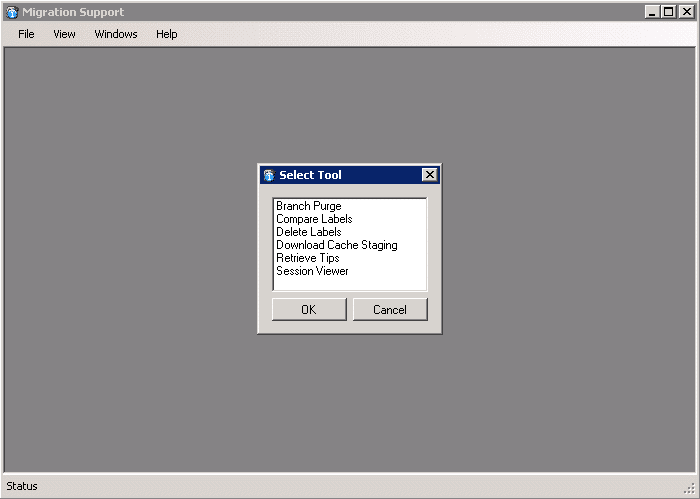
Figure: Which support tool would you like to use
Most migration tools forget about this bit and I have only really seen it in Timely and in the Integration Platform. What I need to be able to do is open the Session Analysis and make a couple of changes to fix the issue. Luckily there is a “Session Viewer” which will open the TfsTimelyMigration database that you created as part of your configuration.
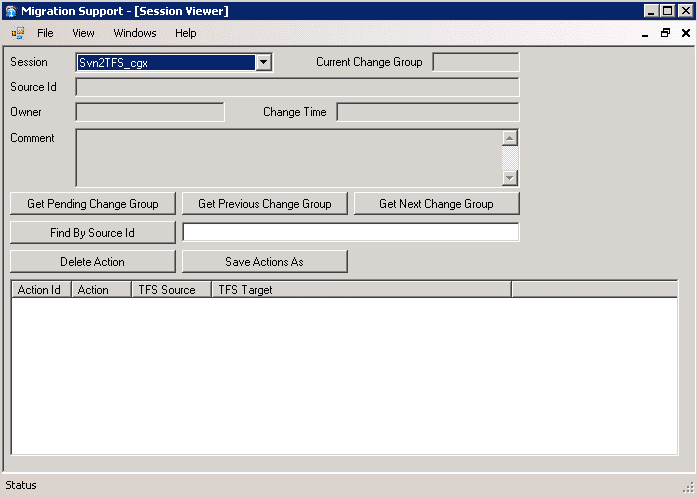
Figure: There are a bunch of features to edit the “Session” data
The first thing we need to do is find out where we are. Clicking the “Get Pending Change Group” will load up that pesky 17018 item that is causing the block.

Figure: You can edit the change group to bypass the problem
It is now a case of figuring out what the problem actually is. There are no “Rename”’s so it is not a case of a Rename causing a conflict, but what is the problem…
I could not figure it out from just scrolling through this list so I though to use the “Save Actions As”, but the output from that provided to be NASTY. Real nasty:
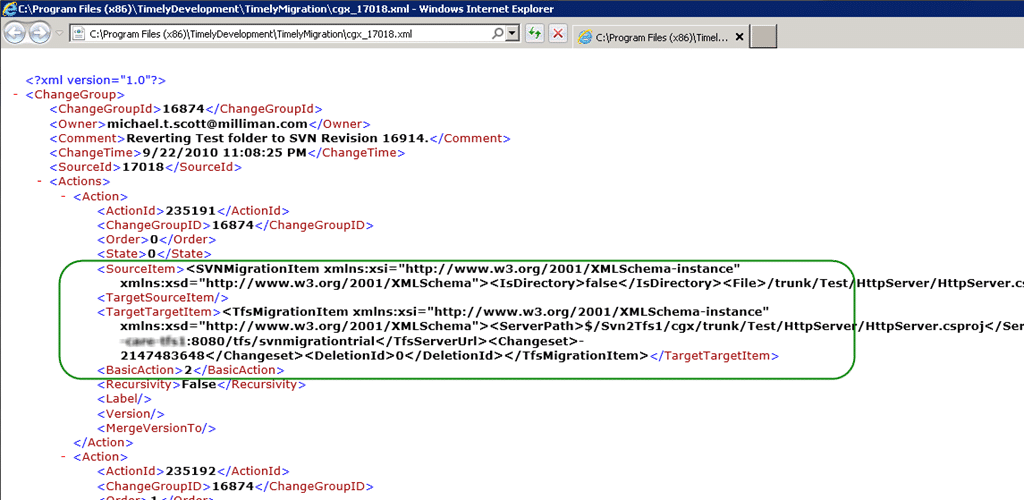
Figure: What the heck use is this!
So what I decided to do was install the Snagit 10 trial and use the “Capture Text” function.
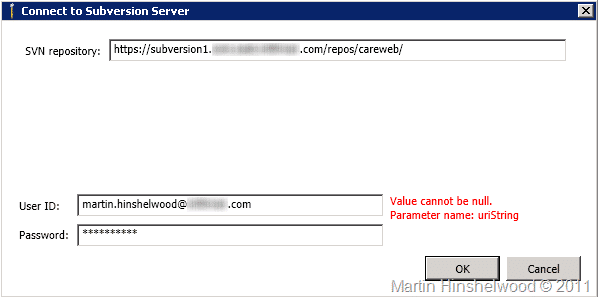
Figure: Snagit Capture text function gives you grab the entire vertical area in one go

Figure: Now I have it as a kind of notepad format
Taking this output, pasting it into Excel, creating the data as a table and ordering by “TFS Source” produces an interesting result.
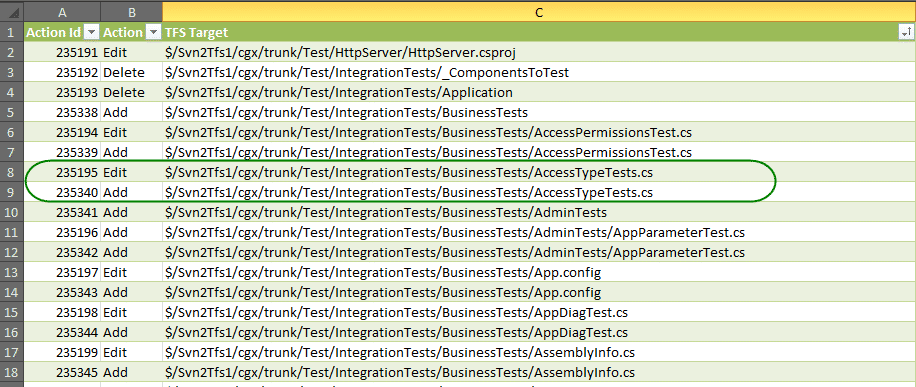
Figure: You can see the dups
Where you might ask, did these come from. Well, in the settings file there was an option for “ItemExistshandler” that for most cases can be set to “ChangeTpEdit”, the only problem is if the file is already an “Add” then you are going to get a conflict like this one.
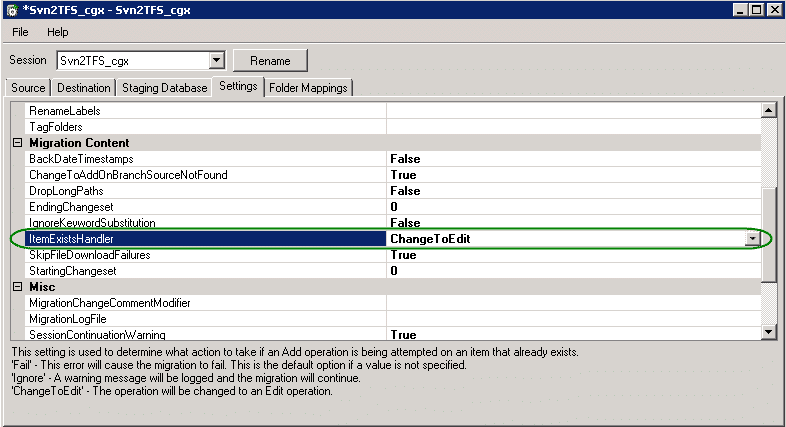
Figure: Item Exists Handler default to Change to Edit
While this is indeed desired behaviour, it can case this sort of issue when there are files that have slightly different casing when they are added.
- **Change the option to “Ignore” **
While this would remove the conflicts, it would poise the real risk of loosing data.

 Figure: Risky option, change setting to ignore Existing Items
- Remove each conflict (Recommended)
For each item in the list, determine which one is in conflict and remove it manually. This is likely to happen ever time a large number of changes is checked in or reorgs of code happen.
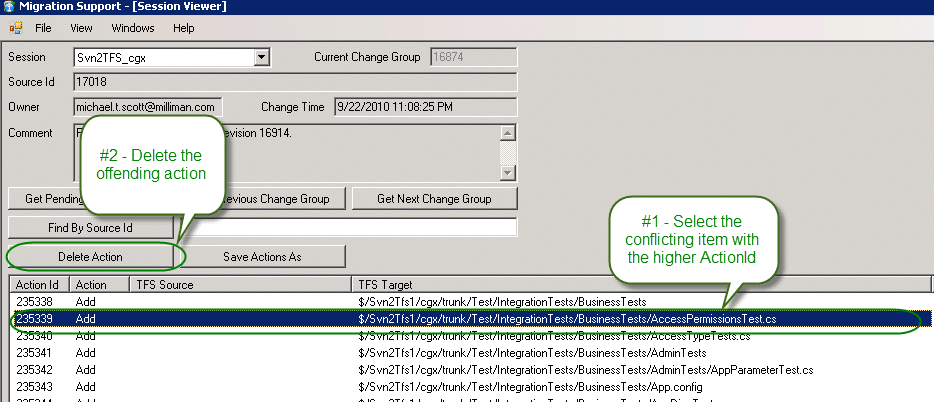
 Figure: Safe option, remove each bad change
It would be really nice if Timely could add the ability to view the conflicts only and be able to bulk apply the resolution as I am looking at 300+ conflicts in a single check-in. At least we are 68% of the way through this particular migration and the chances are (fingers crossed) that there will only be a few conflicts.
Let me know how you get on with your own migrations!
Smart Classifications
Each classification [Concepts, Categories, & Tags] was assigned using AI-powered semantic analysis and scored across relevance, depth, and alignment. Final decisions? Still human. Always traceable. Hover to see how it applies.
What to read next
TFS Integration Tools - Issue: TF10141 No Files checked in as a result of a TFS check-in failure
Explains how to resolve TFS Integration Tools check-in failures (TF10141), covering conflict identification, manual resolution steps, and …
One Team Project Collection to rule them all - Consolidating Team Projects
Step-by-step guide to consolidating multiple Team Projects and Collections in TFS 2012 using the TFS Integration Platform, covering …
Migrating data from FogBugz to TFS 2012 using the TFS Integration Platform
Step-by-step guide to migrating FogBugz data to TFS 2012 using a custom CSV adapter with the TFS Integration Platform, including setup, …
TFS Integration Tools - Issue: TF14009: Cannot merge source into target because the target is underneath source
Explains the TF14009 error in TFS when merging a source into a subfolder of itself, its causes during migration, and practical workarounds …
Detecting agile theatre with real delivery signals
Why Most Companies Operating Models Fail in Dynamic Markets
A concise comparison of Predictive and Adaptive Operating Models, explaining why traditional structures fail in dynamic markets and how …
Don’t Manage Dependencies, Remove Them
Explains why dependencies are a sign of poor system design and outlines steps to eliminate them by aligning teams, clarifying ownership, and …
The Estimation Trap: How Tracking Accuracy Undermines Trust, Flow, and Value in Software Delivery
Tracking estimation accuracy in software delivery leads to mistrust, fear, and distorted behaviours. Focus on customer value, flow, and …
Flow of Value vs Flow of Work – Misnomer or Useful Shorthand?
Compares “flow of value” and “flow of work” in Kanban, explaining why only validated outcomes count as value and stressing the need for …
Why Outsourcing DevOps Fails, and How Real Engineering Excellence Starts With Your Team
Avoid DevOps vendor lock-in, discover how true engineering excellence starts with partnership, not outsourcing. Ready to transform your …