When you are running a build you get a “TF215097 an error occurred while initializing a build for build definition” message and you don’t even get a build number.
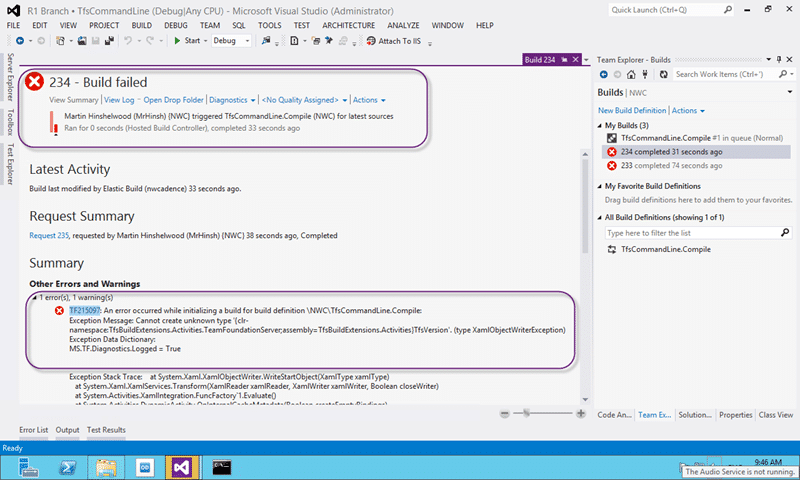
Figure: TF215097 an error occurred while initializing a build for build definition
And you get the following nasty long error.
TF215097: An error occurred while initializing a build for build definition NWCTfsCommandLine.Compile:
Exception Message: Cannot create unknown type '{clr-namespace:TfsBuildExtensions.Activities.TeamFoundationServer;assembly=TfsBuildExtensions.Activities}TfsVersion'. (type XamlObjectWriterException)
Exception Data Dictionary:
MS.TF.Diagnostics.Logged = True

Exception Stack Trace:    at System.Xaml.XamlObjectWriter.WriteStartObject(XamlType xamlType)
   at System.Xaml.XamlServices.Transform(XamlReader xamlReader, XamlWriter xamlWriter, Boolean closeWriter)
   at System.Activities.XamlIntegration.FuncFactory`1.Evaluate()
   at System.Activities.DynamicActivity.OnInternalCacheMetadata(Boolean createEmptyBindings)
   at System.Activities.Activity.InternalCacheMetadata(Boolean createEmptyBindings, IList`1& validationErrors)
   at System.Activities.ActivityUtilities.ProcessActivity(ChildActivity childActivity, ChildActivity& nextActivity, Stack`1& activitiesRemaining, ActivityCallStack parentChain, IList`1& validationErrors, ProcessActivityTreeOptions options, ProcessActivityCallback callback)
   at System.Activities.ActivityUtilities.ProcessActivityTreeCore(ChildActivity currentActivity, ActivityCallStack parentChain, ProcessActivityTreeOptions options, ProcessActivityCallback callback, IList`1& validationErrors)
   at System.Activities.ActivityUtilities.CacheRootMetadata(Activity activity, LocationReferenceEnvironment hostEnvironment, ProcessActivityTreeOptions options, ProcessActivityCallback callback, IList`1& validationErrors)
   at System.Activities.Validation.ActivityValidationServices.InternalActivityValidationServices.InternalValidate()
   at Microsoft.TeamFoundation.Build.Workflow.WorkflowHelpers.ValidateWorkflow(Activity activity, ValidationSettings validationSettings) in d:a1ddalmtfs_coreBuildWorkflowWorkflowHelpers.cs:line 392
   at Microsoft.TeamFoundation.Build.Hosting.BuildProcessCache.LoadFromXaml(String workflowXaml, TextExpressionImports textExpressionImports) in d:a1ddalmtfs_coreBuildMachineHostingBuildProcessCache.cs:line 136
   at Microsoft.TeamFoundation.Build.Hosting.BuildControllerWorkflowManager.PrepareRequestForBuild(WorkflowManagerActivity activity, IBuildDetail build, WorkflowRequest request, IDictionary`2 dataContext) in d:a1ddalmtfs_coreBuildMachineHostingBuildControllerWorkflowManager.cs:line 652
   at Microsoft.TeamFoundation.Build.Hosting.BuildWorkflowManager.TryStartWorkflow(WorkflowRequest request, WorkflowManagerActivity activity, BuildWorkflowInstance& workflowInstance, Exception& error, Boolean& syncLockTaken) in d:a1ddalmtfs_coreBuildMachineHostingBuildWorkflowManager.cs:line 628

 No zip file of logs was created because the archive operation failed: System.AggregateException: One or more errors occurred. ---> System.AggregateException: One or more errors occurred. ---> System.Exception: Getting list of logs to archive failed with Http reason: Not Found
   at Microsoft.TeamFoundation.Build.Hosting.BuildControllerWorkflowManager.ArchiveLogsInvoker.<archivelogs>d__5.MoveNext() in d:a1ddalmtfs_coreBuildMachineHostingBuildControllerWorkflowManager.cs:line 985
   --- End of inner exception stack trace ---
   --- End of inner exception stack trace ---
   at Microsoft.TeamFoundation.Build.Hosting.BuildControllerWorkflowManager.ArchiveLogsInvoker.End(IAsyncResult result) in d:a1ddalmtfs_coreBuildMachineHostingBuildControllerWorkflowManager.cs:line 954
   at Microsoft.TeamFoundation.Build.Hosting.OperationInvokerPool.EndInvoke(IAsyncResult result) in d:a1ddalmtfs_coreBuildMachineHostingOperationInvokerPool.cs:line 212
---> (Inner Exception #0) System.AggregateException: One or more errors occurred. ---> System.Exception: Getting list of logs to archive failed with Http reason: Not Found
   at Microsoft.TeamFoundation.Build.Hosting.BuildControllerWorkflowManager.ArchiveLogsInvoker.</archivelogs><archivelogs>d__5.MoveNext() in d:a1ddalmtfs_coreBuildMachineHostingBuildControllerWorkflowManager.cs:line 985
   --- End of inner exception stack trace ---
---> (Inner Exception #0) System.Exception: Getting list of logs to archive failed with Http reason: Not Found
   at Microsoft.TeamFoundation.Build.Hosting.BuildControllerWorkflowManager.ArchiveLogsInvoker.</archivelogs><archivelogs>d__5.MoveNext() in d:a1ddalmtfs_coreBuildMachineHostingBuildControllerWorkflowManager.cs:line 985< ---
<---
.
Applies to
- Team Foundation Server 2010
- Team Foundation Server 2012
- Team Foundation Service
Findings
If you delve into the error and exception log above it looks like it is failing to load a perticulat type
{clr-namespace:TfsBuildExtensions.Activities.TeamFoundationServer;assembly=TfsBuildExtensions.Activities}TfsVersion
This type is actually from the Community TFS Build Extensions project and not one of the built in assemblies. Either the built in build workflows have been changed to include new funcationality or this is a completely custom workflow that loads non standard components.
Solution
You need to load those assemblies into Source Control and set a reference to that location for your controller.
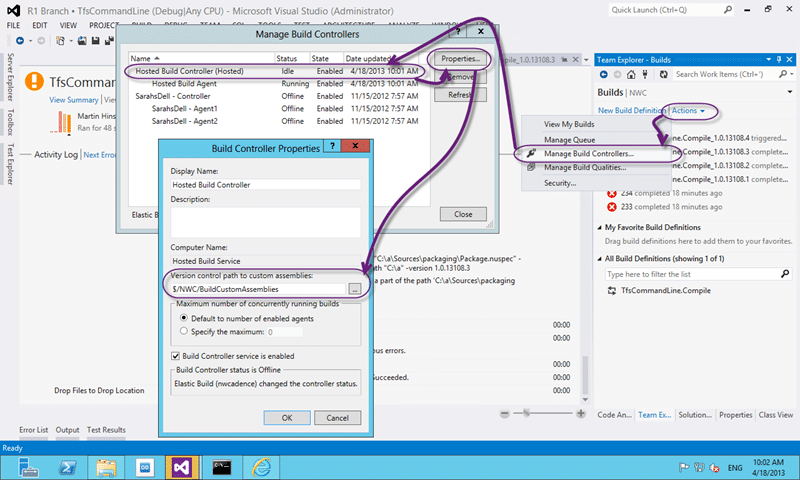
Figure: Set the version control path to custom assemblies path
To do this, go to your “Build” page in the new Team Explore. So Go to “Team Explorer| Build | Actions | Manage Build Controllers” and look at your list of Controllers. You should be able to figure out which controller your build is going through from your build settings and if you are on Team Foundation Service it will be called “Hosted Build Controller (Hosted)”.
Select your desired controller and click “Properties” to see the settings that are configured. The one that we care about is the “Version control path to custom assemblies”. Here we need to select a single source folder from which our controller will load any custom assemblies referenced.
Smart Classifications
Each classification [Concepts, Categories, & Tags] was assigned using AI-powered semantic analysis and scored across relevance, depth, and alignment. Final decisions? Still human. Always traceable. Hover to see how it applies.
What to read next
Access denied for orchestration plan on Build
Explains how to resolve TFS build errors caused by missing write permissions for the Project Collection Build Service on orchestration …
TFS 2012 - Issue: Stuck builds in Team Foundation Build with no build number
Explains how to resolve stuck builds in TFS 2012 where no build number is assigned, caused by IIS multiple site bindings, with steps to fix …
Unable to load task handler PowerShell for task VSBuild
Explains how to resolve the "Unable to load task handler PowerShell for task VSBuild" error in TFS vNext builds, covering PowerShell …
Team Foundation Build 2012 Issue - The target CleanWorkspacePackageTempDir does not exist
Explains how to resolve the "CleanWorkspacePackageTempDir does not exist" build error in Team Foundation Build 2012 for upgraded ASP.NET MVC …
Detecting agile theatre with real delivery signals
Why Most Companies Operating Models Fail in Dynamic Markets
A concise comparison of Predictive and Adaptive Operating Models, explaining why traditional structures fail in dynamic markets and how …
Don’t Manage Dependencies, Remove Them
Explains why dependencies are a sign of poor system design and outlines steps to eliminate them by aligning teams, clarifying ownership, and …
The Estimation Trap: How Tracking Accuracy Undermines Trust, Flow, and Value in Software Delivery
Tracking estimation accuracy in software delivery leads to mistrust, fear, and distorted behaviours. Focus on customer value, flow, and …
Flow of Value vs Flow of Work – Misnomer or Useful Shorthand?
Compares “flow of value” and “flow of work” in Kanban, explaining why only validated outcomes count as value and stressing the need for …
Why Outsourcing DevOps Fails, and How Real Engineering Excellence Starts With Your Team
Avoid DevOps vendor lock-in, discover how true engineering excellence starts with partnership, not outsourcing. Ready to transform your …