After a server migration Scheduled Backups gives a TF400998 when you try to reconfigure it. You may also see timeouts and errors when trying to add Team Foundation Console Users.
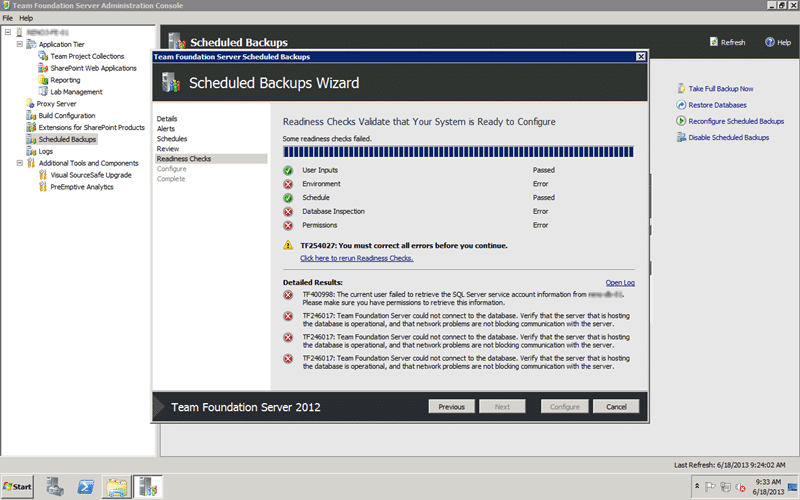
Figure: You get TF400998 and TF246017 when anything hits Scheduled Backup
Applies to
- Team Foundation Server 2012
- Team Foundation Server 2012.2 (QU2)
- Team Foundation Server 2012.3 (QU3)
- Team Foundation Server 2013
Findings
We had the Scheduled Backups configured for the old environment (const-dt-01 & const-at-01) that was in the old domain. We then did a full backup and restore of TFS to the new domain and followed the documentation for both a hardware and environment move.
It looks like there are a bunch of referenced, specifically in the “Scheduled Backups” tools that are left at the old server. If you just try to reconfigure you get the nasty errors above and the log below.
[Info   @16:26:10.509] ====================================================================
[Info   @16:26:10.510] Team Foundation Server Administration Log
[Info   @16:26:10.510] Version  : 11.0.60521.0
[Info   @16:26:10.510] DateTime : 06/18/2013 09:26:10
[Info   @16:26:10.510] Type     : Scheduled Backups
[Info   @16:26:10.510] User     : CONSTMrHinsh
[Info   @16:26:10.510] Machine  : CONST3-AT-01
[Info   @16:26:10.510] System   : Microsoft Windows NT 6.1.7601 Service Pack 1 (AMD64)
[Info   @16:26:10.510] ====================================================================
[Info   @16:30:26.252] -----------------------------------------------------
[Info   @16:30:26.252]
[Info   @16:30:26.252] +-+-+-+-+-| Running VerifySqlServiceAccountCanBeGrantedPermission: Verifying SQL service account is not a local account |+-+-+-+-+-
[Info   @16:30:26.252]
[Info   @16:30:26.252] +-+-+-+-+-| Verifying SQL service account is not a local account |+-+-+-+-+-
[Info   @16:30:26.252] Starting Node: SQLISNOTLOCAL
[Info   @16:30:26.252] NodePath : Container/Progress/SQLISNOTLOCAL
[Info   @16:30:26.268] Verify that account 'CONSTCONST3web' is not local service or local system.
[Info   @16:31:30.603] Node returned: Error
[Error  @16:31:30.603] TF400998: The current user failed to retrieve the SQL Server service account information from CONST-DT-01. Please make sure you have permissions to retrieve this information.
[Info   @16:31:30.604] Completed VerifySqlServiceAccountCanBeGrantedPermission: Error
[Info   @16:31:30.656] -----------------------------------------------------
[Info   @16:31:30.656]
[Info   @16:31:30.656] +-+-+-+-+-| Running VerifyCollectionDatabases: Verifying connection strings are valid |+-+-+-+-+-
[Info   @16:31:30.657]
[Info   @16:31:30.657] +-+-+-+-+-| Verifying connection strings are valid |+-+-+-+-+-
[Info   @16:31:30.657] Starting Node: BACKUPDBSREACHABLE
[Info   @16:31:30.657] NodePath : Container/Progress/BACKUPDBSREACHABLE
[Info   @16:31:30.657] Verifying connection strings to all backup databases
[Info   @16:31:30.658] Looking for database Tfs_Configuration on CONST3-DT-01
[Info   @16:31:30.699] Checking if database Tfs_Configuration on CONST3-DT-01 is online
[Info   @16:31:30.732] Looking for database Tfs_IMF on CONST3-DT-01
[Info   @16:31:30.760] Checking if database Tfs_IMF on CONST3-DT-01 is online
[Info   @16:31:30.790] Looking for database ReportServer on CONST-DT-01
[Info   @16:31:52.103] Node returned: Error
[Error  @16:31:52.103] TF246017: Team Foundation Server could not connect to the database. Verify that the server that is hosting the database is operational, and that network problems are not blocking communication with the server.
[Info   @16:31:52.103] Completed VerifyCollectionDatabases: Error
[Info   @16:31:52.117] -----------------------------------------------------
[Info   @16:31:52.117]
[Info   @16:31:52.117] +-+-+-+-+-| Running VerifySqlServerPermissionsGranted: Verifying TFS Job Agent has permissions to create and alter databases |+-+-+-+-+-
[Info   @16:31:52.121]
[Info   @16:31:52.121] +-+-+-+-+-| Verifying TFS Job Agent has permissions to create and alter databases |+-+-+-+-+-
[Info   @16:31:52.121] Starting Node: ALTERCREATEDATABASE
[Info   @16:31:52.121] NodePath : Container/Progress/ALTERCREATEDATABASE
[Info   @16:32:56.264] Node returned: Error
[Error  @16:32:56.264] TF246017: Team Foundation Server could not connect to the database. Verify that the server that is hosting the database is operational, and that network problems are not blocking communication with the server.
[Info   @16:32:56.264] Completed VerifySqlServerPermissionsGranted: Error
[Info   @16:32:56.264] -----------------------------------------------------
[Info   @16:32:56.264]
[Info   @16:32:56.264] +-+-+-+-+-| Running VerifySqlDatabasesPermissionsGranted: Verifying TFS Job Agent has permissions to backup databases, create tables, and execute stored procedures |+-+-+-+-+-
[Info   @16:32:56.268]
[Info   @16:32:56.268] +-+-+-+-+-| Verifying TFS Job Agent has permissions to backup databases, create tables, and execute stored procedures |+-+-+-+-+-
[Info   @16:32:56.268] Starting Node: BACKUPEXECUTECREATE
[Info   @16:32:56.268] NodePath : Container/Progress/BACKUPEXECUTECREATE
[Info   @16:32:56.268] Granting account CONSTCONST3web permissions to initiate database backups of Tfs_Configuration
[Info   @16:32:56.309] Granting account CONSTCONST3web permissions to initiate database backups of Tfs_IMF
[Info   @16:32:56.619] Granting account CONSTCONST3web permissions to initiate database backups of ReportServer
[Info   @16:33:17.634] Node returned: Error
[Error  @16:33:17.634] TF246017: Team Foundation Server could not connect to the database. Verify that the server that is hosting the database is operational, and that network problems are not blocking communication with the server.
[Info   @16:33:17.634] Completed VerifySqlDatabasesPermissionsGranted: Error
[Info   @16:33:17.634] -----------------------------------------------------
This then prevents us from being able to reconfigure however you can disable and reset.
Solution
If we instead click “Disable Scheduled Backup” and weight for the timout we get a “Network Path not found” exception when it tries to access the backup location but it has actually done the disable.
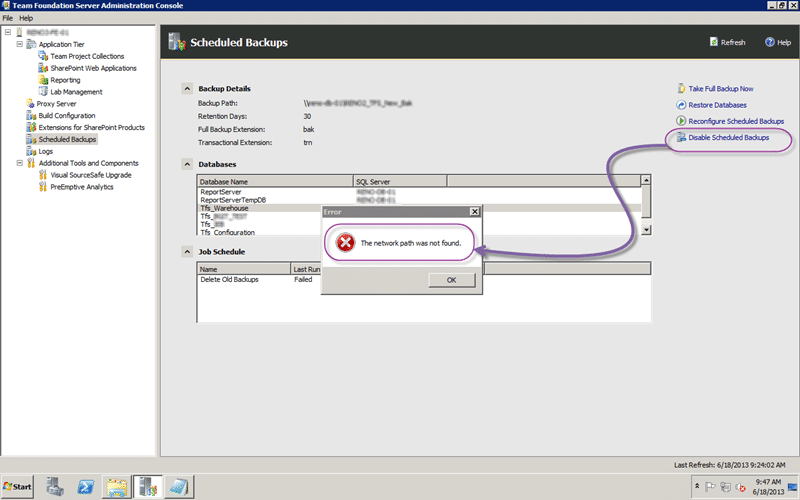
Figure: Disable results in path not found
If you hit the refresh button above the Scheduled Backup node will return to its un-configured state.
Smart Classifications
Each classification [Concepts, Categories, & Tags] was assigned using AI-powered semantic analysis and scored across relevance, depth, and alignment. Final decisions? Still human. Always traceable. Hover to see how it applies.
What to read next
TFS 2012 Update 1 - TF255430: the database was partially upgraded during a failed upgrade
Explains how to resolve Team Foundation Server 2012 upgrade failures caused by partial database upgrades, SQL connectivity issues, and …
In-Place upgrade of TFS 2008 to TFS 2010 with move to new domain
Step-by-step guide to upgrading Team Foundation Server 2008 to 2010, including in-place upgrade, build server update, and migrating to a new …
Issue [ TFS 2012.2 ] Detaching collection fails on SnapshotIdentities with object reference not set to an instance of an object
Explains how detaching a Team Project Collection in TFS 2012.x can fail due to orphaned identities, causing a NullReferenceException, and …
Active Directory Groups not Syncing with Team Foundation Server 2010
Explains why Active Directory groups may not sync with Team Foundation Server 2010, how to diagnose sync issues, and steps to resolve …
Detecting agile theatre with real delivery signals
Why Most Companies Operating Models Fail in Dynamic Markets
A concise comparison of Predictive and Adaptive Operating Models, explaining why traditional structures fail in dynamic markets and how …
Don’t Manage Dependencies, Remove Them
Explains why dependencies are a sign of poor system design and outlines steps to eliminate them by aligning teams, clarifying ownership, and …
The Estimation Trap: How Tracking Accuracy Undermines Trust, Flow, and Value in Software Delivery
Tracking estimation accuracy in software delivery leads to mistrust, fear, and distorted behaviours. Focus on customer value, flow, and …
Flow of Value vs Flow of Work – Misnomer or Useful Shorthand?
Compares “flow of value” and “flow of work” in Kanban, explaining why only validated outcomes count as value and stressing the need for …
Why Outsourcing DevOps Fails, and How Real Engineering Excellence Starts With Your Team
Avoid DevOps vendor lock-in, discover how true engineering excellence starts with partnership, not outsourcing. Ready to transform your …