When you try to detach a Team Project Collection in Team Foundation Server the process fails on SnapshotIdentities with an “object reference not set to an instance of an object” error. While this does not inhibit the execution of TFS there is likely a good reason that you wanted to detach and found this issue.
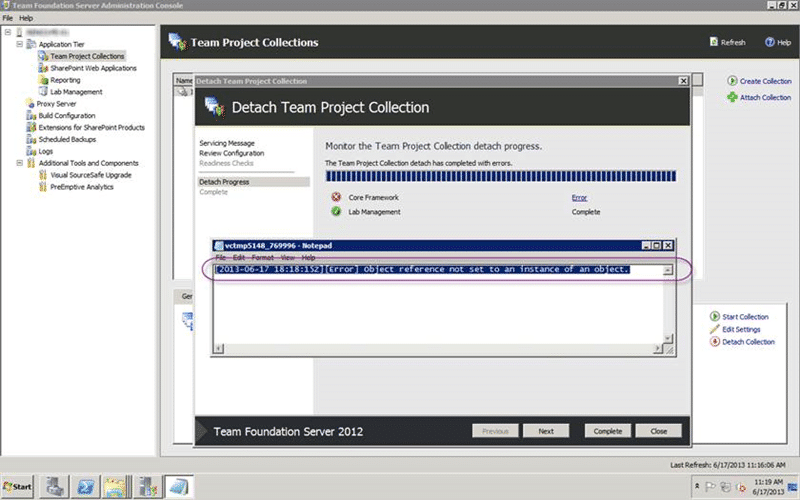
Figure: object reference not set to an instance of an object
In this case I was trying to move the Collection to another server and this is a blocking issue.
Applies To
- Team Foundation Server 2012
- Team Foundation Server 2012.1
- Team Foundation Server 2012.2
- Team Foundation Server 2012.3
- Team Foundation Server 2013 Preview
Findings
When you get these sorts of errors make sure that you look in the Event Log of the server and at the logs generated by TFS. In the event of an error there will be a link on the page that will open the relevant log in the Team Foundation Server Administration Console.
[11:16:24.010] ++ Executing - Operation: Snapshot, Group: Snapshot.TfsIdentities
[11:16:25.010] Executing step: Copy identities to collection database
[11:16:25.010]   Executing step: 'Copy identities to collection database' Identity.SnapshotIdentities (16 of 28)
[11:18:15.873]   [Error] Object reference not set to an instance of an object.
[11:18:15.877]   System.NullReferenceException: Object reference not set to an instance of an object.
[11:18:15.877]      at Microsoft.TeamFoundation.Framework.Server.IdentityTransferHandler.Transfer()
[11:18:15.877]      at Microsoft.TeamFoundation.Framework.Server.IdentityTransferHandler.Execute()
[11:18:15.877]      at Microsoft.VisualStudio.Services.Framework.IdentityStepPerformer.SnapshotIdentities(TeamFoundationRequestContext requestContext, ServicingContext servicingContext)
[11:18:15.877]      at Microsoft.TeamFoundation.Framework.Server.TeamFoundationStepPerformerBase.Microsoft.TeamFoundation.Framework.Server.IStepPerformer.PerformStep(String servicingOperation, String stepType, String stepData, ServicingContext servicingContext)
[11:18:15.877]      at Microsoft.TeamFoundation.Framework.Server.ServicingStepDriver.PerformServicingStep(ServicingStep step, ServicingContext servicingContext, ServicingStepGroup group, ServicingOperation servicingOperation, Int32 stepNumber, Int32 totalSteps)
[11:18:15.877] Step failed: Copy identities to collection database. Execution time: 110 seconds.
[11:18:15.883]   Clearing dictionary, removing all items.
In the log you can clearly see that the step that is failing is the “Snapshot.TfsIdentities”. What I believe that this does is create a package inside of the Collection database for the new TFS Instance that you are moving it to. This package needs to contain all of the Identities that have interacted with this TFS Instance. The likely cause of this error is that there are orphaned group memberships in the Configuration database that do not exist within the Collection.
I would suggest that this would be the result of a TFS server that has backed up without the use of a ‘marked transaction log’ and that backup restored at some point. If you have large databases and you don’t use the built in Scheduled Backups tool or the documented process to manually back up Team Foundation Server then you are leaving yourself open for this type of inconsistency.
To find out if your have any orphaned identities then you should run:
Warning Do not make any changes to any of your TFS Databases manually unless specifically instructed by the Product Team. If you do then you can no longer be supported by Microsoft.
SELECT  gm
FROM    tbl_GroupMembership gm
WHERE   gm.PartitionId = 1
    AND NOT EXISTS (
        SELECT  *
        FROM    tbl_Group g
        WHERE   g.PartitionId = 1
            AND g.Id = gm.MemberId
    )
    AND NOT EXISTS (
        SELECT  *
        FROM    tbl_Identity i
        WHERE   i.PartitionId = 1
            AND i.Id = gm.MemberId
    )
If you get results from this query then you have this problem and you should immediately raise a support ticket with Microsoft to get this fixed.
Solution
You need to remove all of the orphaned identities from your server in order to fix this. To achieve that you should work with Microsoft by raising a support ticket and cleaning the instance. If an invalid backup has been restored there are likely other things that need to happen to get into a supported state and changing the database yourself will not get you there.
Raise a ticket and get your server into a supported state…
Smart Classifications
Each classification [Concepts, Categories, & Tags] was assigned using AI-powered semantic analysis and scored across relevance, depth, and alignment. Final decisions? Still human. Always traceable. Hover to see how it applies.
What to read next
In-Place upgrade of TFS 2008 to TFS 2010 with move to new domain
Step-by-step guide to upgrading Team Foundation Server 2008 to 2010, including in-place upgrade, build server update, and migrating to a new …
TFS 2012 Update 1 - TF255430: the database was partially upgraded during a failed upgrade
Explains how to resolve Team Foundation Server 2012 upgrade failures caused by partial database upgrades, SQL connectivity issues, and …
TFS2012.2 - Issue: Object not set to instance of object with TF400898, TF53010 & TF30065
Explains causes and solutions for "Object reference not set to an instance of an object" errors (TF400898, TF53010, TF30065) in TFS 2012.2, …
Navigating the Complex World of Azure DevOps Data Migration
Learn key steps, common pitfalls, and best practices for migrating data from legacy TFS systems to Azure DevOps, including identity …
Detecting agile theatre with real delivery signals
Why Most Companies Operating Models Fail in Dynamic Markets
A concise comparison of Predictive and Adaptive Operating Models, explaining why traditional structures fail in dynamic markets and how …
Don’t Manage Dependencies, Remove Them
Explains why dependencies are a sign of poor system design and outlines steps to eliminate them by aligning teams, clarifying ownership, and …
The Estimation Trap: How Tracking Accuracy Undermines Trust, Flow, and Value in Software Delivery
Tracking estimation accuracy in software delivery leads to mistrust, fear, and distorted behaviours. Focus on customer value, flow, and …
Flow of Value vs Flow of Work – Misnomer or Useful Shorthand?
Compares “flow of value” and “flow of work” in Kanban, explaining why only validated outcomes count as value and stressing the need for …
Why Outsourcing DevOps Fails, and How Real Engineering Excellence Starts With Your Team
Avoid DevOps vendor lock-in, discover how true engineering excellence starts with partnership, not outsourcing. Ready to transform your …