When you use the release build plugin in Jenkins to create a new release the plugin inadvertently leaves your password in clear text in the log files. We need to be able to mask password in Jenkins when calling Team Explorer Everywhere (TEE) so that we meet security requirements.
As you can imagine working at a bank, they get a little…squirmy… when they see or hear about passwords being stored on viewable in the clear. If you are using TFS to do builds from Jenkins then you are likely using the command line tools that come with Team Explorer Everywhere.
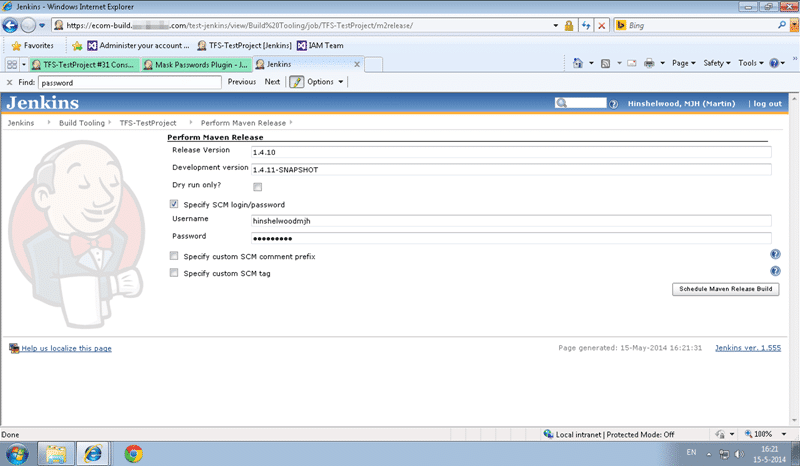
If you are also using the Release Plugin and you create a release build then you will see the SCM password that you enter written in the clear in the log. Bit of a shock to my banking colleagues I can tell you. So much so that they called “critical blocker” for the migration to TFVC.
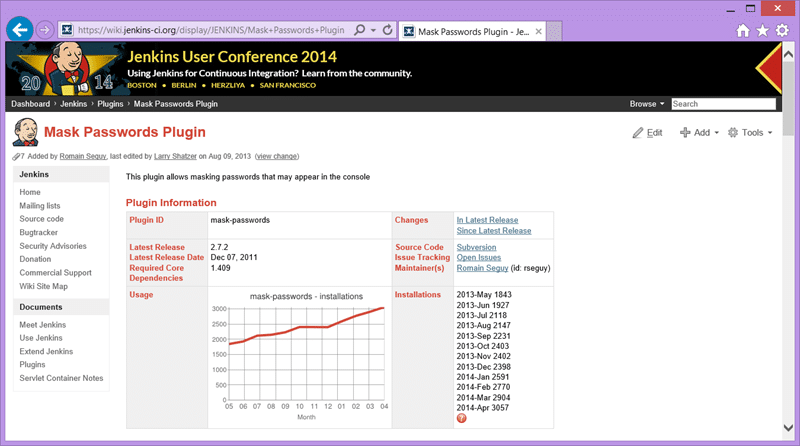
However during the… conversation… they did say that they had a plugin installed that was supposed to mask the passwords when you do a build. Armed with that knowledge, and little other knowledge of Jenkins, I dived in to find a solution. Maybe it just needed more configuration…
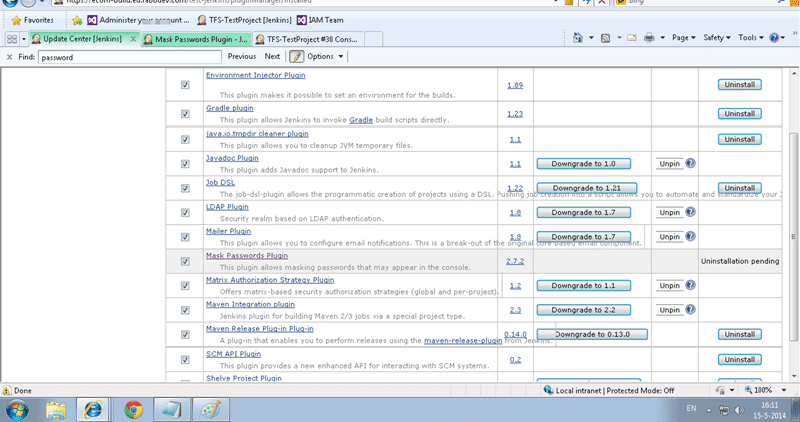
So I looked through the documentation and found that you can set variables for passwords and send the variable instead. The plugin will then mask it correctly…. So I thought… that’s for me!
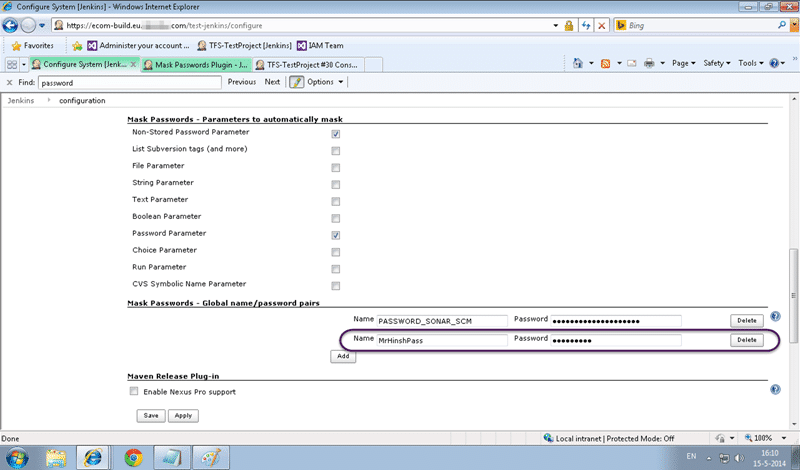
So I dutifully created a global password veriable called “MrHinshPas” (yes, I am testing with my own account) and once saved I should be able to use “$(MrHinshPass)” in places where I want the password replaced.
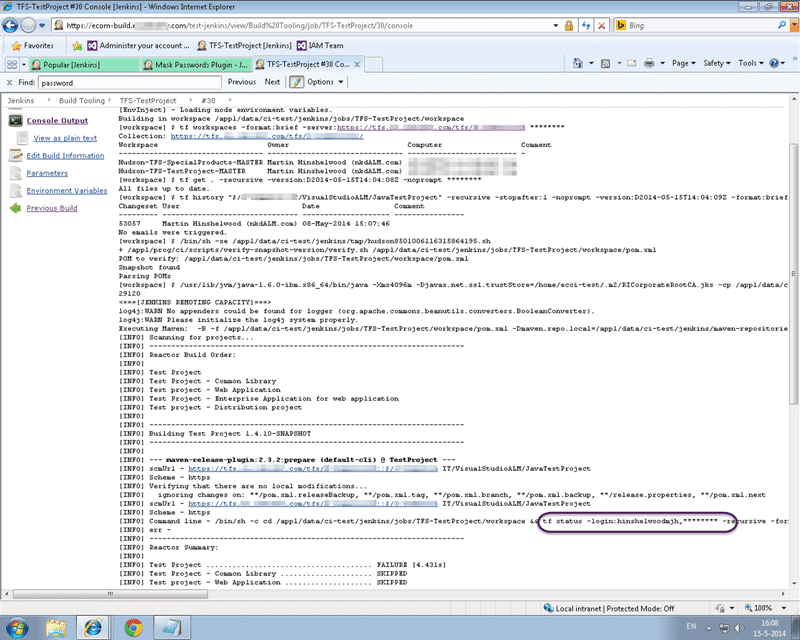
Running another build and, wohoo, the password gets replaced.
However why do I need to create a variable for this occurrence when it usually replaced things for other passwords in the list. So I went hunting around… I looked at server configuration. I looked at plugins and documentation.
Eventually I looked in the build configuration and I found this…
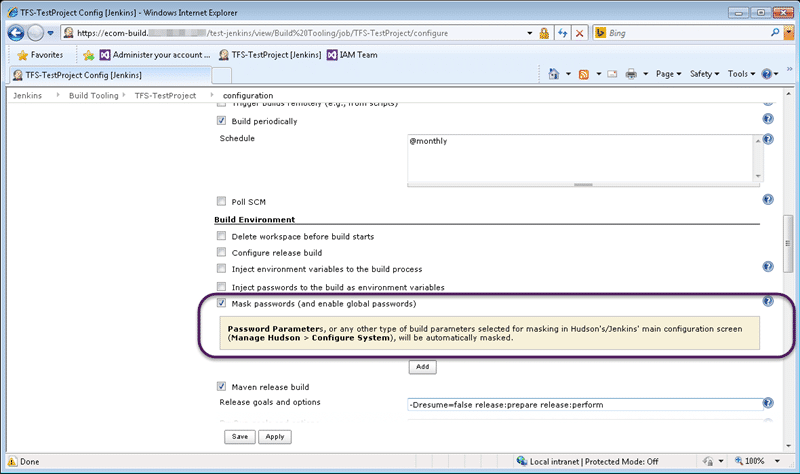
So for each specific job you can activate the “Mask passwords” option in the Build Environment section and all passwords are magically hidden in your builds. Awesome! How did I miss that…
Smart Classifications
Each classification [Concepts, Categories, & Tags] was assigned using AI-powered semantic analysis and scored across relevance, depth, and alignment. Final decisions? Still human. Always traceable. Hover to see how it applies.
What to read next
Maven release prepare fails with detected changes in Jenkins
Explains how to fix Maven release prepare failures in Jenkins with TFS by using .tfignore files to exclude generated files like …
Configuring Jenkins to talk to TFS 2013
Guide to integrating Jenkins with TFS 2013 using the Team Foundation Server plugin, covering installation, configuration, and key …
Maven release perform tries to do a Get to a workspace sub folder in TFS
Explains issues with Maven release perform in TFS workspaces, causes of build failures, and solutions for workspace mapping, concurrency, …
Unit Testing against the Team Foundation Server 2012 API
Explains how to unit test applications against the Team Foundation Server 2012 API, focusing on handling authentication for automated and …
Detecting agile theatre with real delivery signals
Why Most Companies Operating Models Fail in Dynamic Markets
A concise comparison of Predictive and Adaptive Operating Models, explaining why traditional structures fail in dynamic markets and how …
Don’t Manage Dependencies, Remove Them
Explains why dependencies are a sign of poor system design and outlines steps to eliminate them by aligning teams, clarifying ownership, and …
The Estimation Trap: How Tracking Accuracy Undermines Trust, Flow, and Value in Software Delivery
Tracking estimation accuracy in software delivery leads to mistrust, fear, and distorted behaviours. Focus on customer value, flow, and …
Flow of Value vs Flow of Work – Misnomer or Useful Shorthand?
Compares “flow of value” and “flow of work” in Kanban, explaining why only validated outcomes count as value and stressing the need for …
Why Outsourcing DevOps Fails, and How Real Engineering Excellence Starts With Your Team
Avoid DevOps vendor lock-in, discover how true engineering excellence starts with partnership, not outsourcing. Ready to transform your …
Why Outsourcing DevOps Fails, and How Real Engineering Excellence Starts With Your Team
Avoid DevOps vendor lock-in, discover how true engineering excellence starts with partnership, not outsourcing. Ready to transform your …
Why Big Bang Rewrites Fail: How Sustainable Change and Engineering Excellence Transform Legacy Systems
Ditch the Big Bang rewrite. Discover why sustainable, in-place change drives true engineering excellence and lasting transformation in your …
Are We Still Pretending Coding Was the Bottleneck?
AI exposes that coding was never the main bottleneck in software delivery; real constraints are in system flow, team practices, and …
Why Azure DevOps Wins for Governance, Security, and Scale, Right Out of the Box
Unlock seamless governance, security, and scale with Azure DevOps, integrated tooling that lets you deliver value, not just manage …
Should You Use One Project to Rule Them All in Azure DevOps?
Explores when to use a single Azure DevOps project versus multiple projects, detailing impacts on flow, visibility, governance, and team …
Stop Guessing: How to Make Work Visible and Drive Real Improvement with Azure DevOps Flow Metrics
Stop guessing, start making data-driven decisions in Azure DevOps. Discover tools, tips, and insights to make your work visible and your …