Installing InRelease 3 fails as you need elevated privileges to install InRelease
When you try to install InRelease as part of your Team Foundation Server 2013 infrastructure you are allowed to fill out all of the fields and then you get a “you need elevated privileges to perform this installation. You can achieve this by running a command prompt”.
![image[14]](http://nkdagility.com/files/2013/07/image14.png "image[14]")
Figure: For InRelease you need elevated privileges to perform this installation
Applies to
- InRelease 3
- Team Foundation Server 2013
Findings
I don’t know how this got past the testers but even though you are asked to elevate the privileges during the installation the installation will fail with the message that “you need elevated privileges to perform this installation”. It looks like this was built with user account control turned off! Never a good idea…
In order to bypass this you have two options. You can follow the instructions that are presented, open an elevated command prompt and then execute the MSI installer from there using the msiexec command.
Solution
Forts we need to open a command prompt
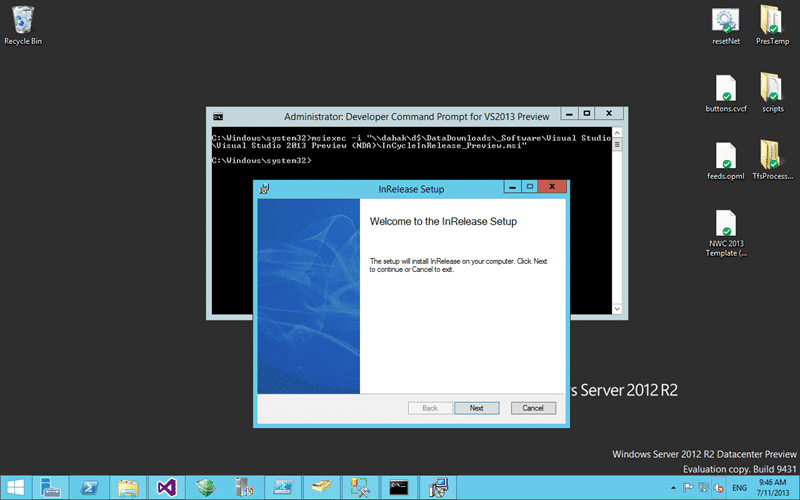
Figure: Execute MSIEXEC from an elevated command prompt
Once you have the command prompt open you need to execute the following command replacing your location to the MSI. You may want to put it in C:temp to make things easyer but I just copied the UNC path from a file explorer window.
msiexec -i "\dahakd$DataDownloads_SoftwareVisual StudioVisual Studio 2013 Preview (NDA)InCycleInRelease_Preview.msi"
Now that I have the installer running entirely elevated I can install with no problems…
Smart Classifications
Each classification [Concepts, Categories, & Tags] was assigned using AI-powered semantic analysis and scored across relevance, depth, and alignment. Final decisions? Still human. Always traceable. Hover to see how it applies.
What to read next
Installing Release Management Server for TFS 2013
Step-by-step guide to downloading, installing, and configuring Release Management Server for Team Foundation Server 2013, including offline …
Installing Release Management Client for Visual Studio 2013
Step-by-step guide to downloading, installing, and configuring the Release Management Client for Visual Studio 2013, including setup tips …
Detecting agile theatre with real delivery signals
Why Most Companies Operating Models Fail in Dynamic Markets
A concise comparison of Predictive and Adaptive Operating Models, explaining why traditional structures fail in dynamic markets and how …
Don’t Manage Dependencies, Remove Them
Explains why dependencies are a sign of poor system design and outlines steps to eliminate them by aligning teams, clarifying ownership, and …
The Estimation Trap: How Tracking Accuracy Undermines Trust, Flow, and Value in Software Delivery
Tracking estimation accuracy in software delivery leads to mistrust, fear, and distorted behaviours. Focus on customer value, flow, and …
Flow of Value vs Flow of Work – Misnomer or Useful Shorthand?
Compares “flow of value” and “flow of work” in Kanban, explaining why only validated outcomes count as value and stressing the need for …
Why Outsourcing DevOps Fails, and How Real Engineering Excellence Starts With Your Team
Avoid DevOps vendor lock-in, discover how true engineering excellence starts with partnership, not outsourcing. Ready to transform your …