If you follow the documentation for the new InRelease 3 for Team Foundation Server 2013 “TF400324: Team Foundation Services are not available from server” with a remote server error of 404.
- Update 2013-07-12 Removed Solution #1 as it causes more problems down the line
- Update 2013-07-12 Added Solution #2 from InCycle but DO NOT do what their documentation suggests or you might end up with an unstable TFS Server.
- Update 2013-07-12 Added Solution #3 which solves the problem in a supported manor with the TFS API.
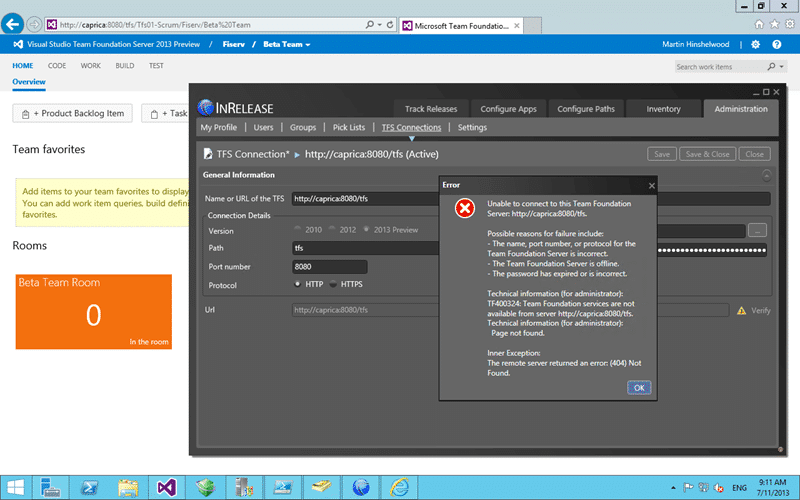
Figure: TF400324: Team Foundation Services are not available from server
Applies to
- InRelease 3
- Team Foundation Server 2013
Findings
This looks to be a mistake in the documentation for the product. When they say “Enter the URL for the TFS Server” you think that you should enter http://caprica:8080/tfs when in fact you should be entering the full path to the collection that you want to connect to.
Solution #1
You need to enter http://caprica:8080/tfs/[collection ] which you can get by copying it from the web access.
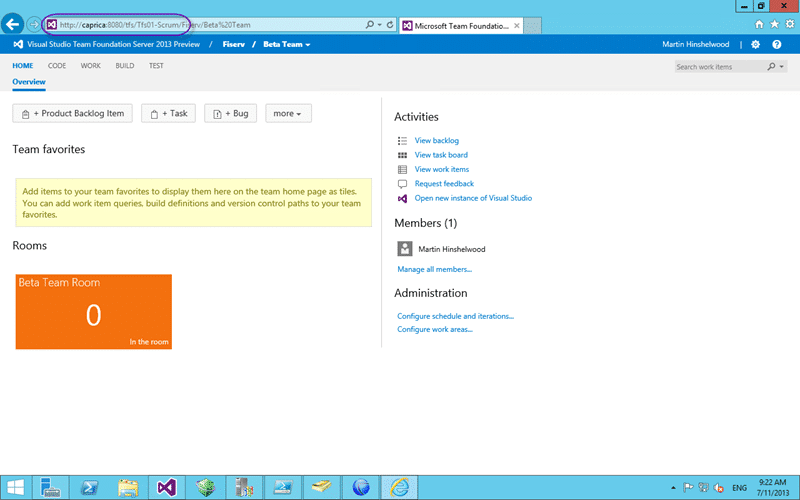
Figure: Use the full collection URL instead of the server
Now when you connect with http://caprica:8080/tfs/tfs01-scrum/ you should not get a 404 any more…
Solution #2 - Call Support
Warning Never update the database without explicit instructions from a member of the product team. You will likely end up with an unsupported instance if you much with the database.
At this time there is no solution for this. The solution provided on the InCycle page listed below will work but it will leave your TFS server in an unsupported state and may result in instabilities in your TFS instance down the road.
Raise a ticket with MSFT customer services and get your server into a supported state…
Solution #3 - Use PowerShell to update the TFS registery
I knew that if I worked at this long enough that I would find a solution that does not require that you edit the database. Here is a handy dandy PowerShell script that you can save as Set-DefaultCollection.ps1, double click to copy, and then execute.
 Param(
       [string] $tfscollection
       )
Add-Type -AssemblyName "Microsoft.TeamFoundation.Client, Version=11.0.0.0, Culture=neutral, PublicKeyToken=b03f5f7f11d50a3a"
Add-Type -AssemblyName "Microsoft.TeamFoundation.Common, Version=11.0.0.0, Culture=neutral, PublicKeyToken=b03f5f7f11d50a3a"
Add-Type -AssemblyName "Microsoft.TeamFoundation, Version=11.0.0.0, Culture=neutral, PublicKeyToken=b03f5f7f11d50a3a"
if ($tfscollection)
{
    #if collection is passed then use it and select all projects
    $tfs = [Microsoft.TeamFoundation.Client.TfsTeamProjectCollectionFactory]::GetTeamProjectCollection($CollectionUrlParam)
    $project = $(Read-Host -prompt "Project")
}
else
{
    #if no collection specified, open project picker to select it via gui
    $picker = New-Object Microsoft.TeamFoundation.Client.TeamProjectPicker([Microsoft.TeamFoundation.Client.TeamProjectPickerMode]::NoProject, $false)
    $dialogResult = $picker.ShowDialog()
    if ($dialogResult -ne "OK")
    {
        exit
    }
    $tfs = $picker.SelectedTeamProjectCollection
}
try
{
    $tfs.EnsureAuthenticated()
}
catch
{
    Write-Error "Error occurred trying to connect to project collection: $_ "
    exit 1
}
$regsvc = $tfs.ConfigurationServer.GetService("Microsoft.TeamFoundation.Framework.Client.ITeamFoundationRegistry");
Write-Host "Setting DefaultCollection to $($tfs.InstanceId)($($tfs.Name)) on $($tfs.ConfigurationServer.Uri)" -ForegroundColor Yellow
$regsvc.SetValue("/Configuration/DefaultCollection", $tfs.InstanceId)
This PowerShell will first ask you to select the collection that you would like to be the default and then apply that to TFS. You should then be able to connect InRelease correctly to TFS.
I still think that this is a silly requirement of the product and at the very least it should ask which collection that you want to be the default and set it for you…
Smart Classifications
Each classification [Concepts, Categories, & Tags] was assigned using AI-powered semantic analysis and scored across relevance, depth, and alignment. Final decisions? Still human. Always traceable. Hover to see how it applies.
What to read next
Detecting agile theatre with real delivery signals
Why Most Companies Operating Models Fail in Dynamic Markets
A concise comparison of Predictive and Adaptive Operating Models, explaining why traditional structures fail in dynamic markets and how …
Don’t Manage Dependencies, Remove Them
Explains why dependencies are a sign of poor system design and outlines steps to eliminate them by aligning teams, clarifying ownership, and …
The Estimation Trap: How Tracking Accuracy Undermines Trust, Flow, and Value in Software Delivery
Tracking estimation accuracy in software delivery leads to mistrust, fear, and distorted behaviours. Focus on customer value, flow, and …
Flow of Value vs Flow of Work – Misnomer or Useful Shorthand?
Compares “flow of value” and “flow of work” in Kanban, explaining why only validated outcomes count as value and stressing the need for …
Why Outsourcing DevOps Fails, and How Real Engineering Excellence Starts With Your Team
Avoid DevOps vendor lock-in, discover how true engineering excellence starts with partnership, not outsourcing. Ready to transform your …