
Team Foundation Build can be a difficult beast, but not usually because of itself. Although people do experience problems when adding solutions that have been around for a while with no build run, it really does do a fantastic job.
On occasion I have seen what I call a “Stuck Build” which is a build that never completes, this tends to only happen on builds setup on large codebases that have never been built before. It also usually also occurs at the point in the build after everything has been built and Team Foundation Build is trying to upload the data it has collected to Team Foundation Server.
Developers should always make sure that any builds they queue complete in a timely fashion.
I queued a build at 3:51. It is still there at 4:21. It seems stuck.
_
_
-George Gong, SSW
If you see a Queued build that never completes then there is probably a stuck build somewhere. George;s build has not even run yet, it is still waiting in the queue.
I created a new build for SSW.Website and now it stays in the queue for over 30 minutes.
But the TFS build controller is ok.
I have just installed the VS2010 RTM and Team Explorer. Did I miss something?
-Brite Cheng, SSW
![clip_image002[4]](/blob//articles/how-to-deal-with-a-stuck-or-infinitely-queued-build/images/Howtodealwithastuckorinfinitelyqueuedbui_D645-clip_image0024_-4-4.jpg)
![clip_image004[4]](/blob//articles/how-to-deal-with-a-stuck-or-infinitely-queued-build/images/Howtodealwithastuckorinfinitelyqueuedbui_D645-clip_image0044_-5-5.jpg)
![clip_image006[4]](/blob//articles/how-to-deal-with-a-stuck-or-infinitely-queued-build/images/Howtodealwithastuckorinfinitelyqueuedbui_D645-clip_image0064_-7-7.jpg)
Again, this build is queued, it never started. It is queued as there is another build running. Evan though we now have more than one build server queues will always exist. All it takes is for one more build than we have capacity for to be sent to the controller at the same time. Someone will always have to wait. But they should not have to wait for long. We should probably have something line http://buildmonitor.codeplex.com/ setup so we can quickly look and see what builds are running J but in the mean time you can run the “Build Notifications” application to see what builds are running.
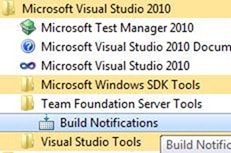
Figure: Where to find the build monitor on the Start menu
Sometimes a build can get Stuck. They usually get stuck when they are uploading assets into TFS. This could be a communication problem or purely a size problem, or a little of both. One thing to look at is how many data collectors you have running during the build and maybe reduce them to get a consistent pass.
You can log onto the server and kill the running build, but make sure it is stuck first… No build should take longer than 30 minutes (Unless it always does).
I would expect any developer to follow the process that comes next:
How to Debug a stuck build:
In this case there is a stuck build of SSW.Framework running:
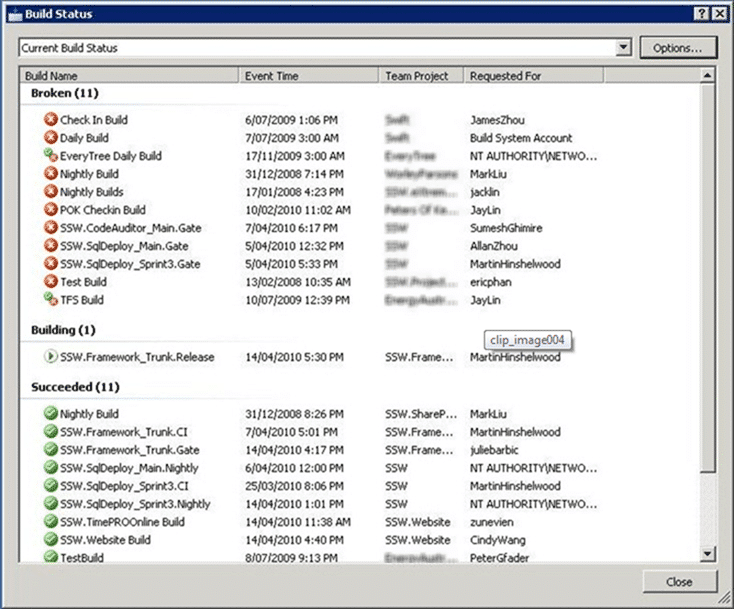
Figure: Build list
I can tell that it is stuck by looking at the running time:

Figure: A very stuck build
After cancelling the build, it did not free up the Build Service (stuck) so I need to restart the build service.
Launch the Admin Console on the build server and restart the build service
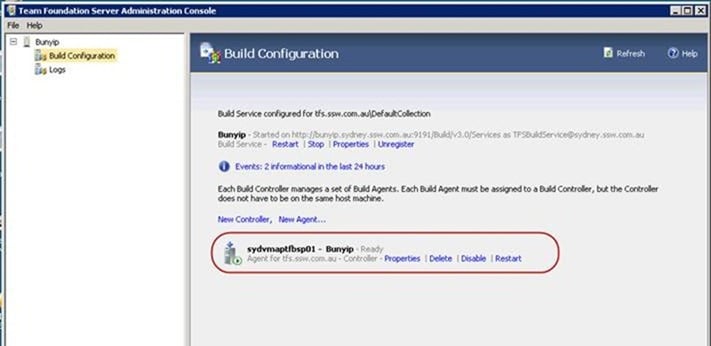
Figure: Restart the build service
Then we need to queue another build.
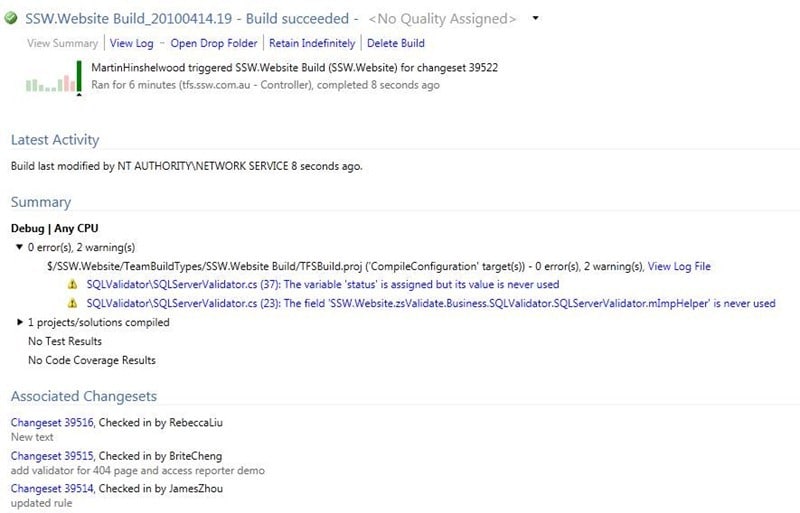
Figure: build is now successful
Done
Technorati Tags: TFBS ,TFS 2010
Smart Classifications
Each classification [Concepts, Categories, & Tags] was assigned using AI-powered semantic analysis and scored across relevance, depth, and alignment. Final decisions? Still human. Always traceable. Hover to see how it applies.
What to read next
Who broke the build?
Explains the importance of passing builds, common causes of build failures, how to identify issues and responsible users, and best practices …
TFS 2012 - Issue: Stuck builds in Team Foundation Build with no build number
Explains how to resolve stuck builds in TFS 2012 where no build number is assigned, caused by IIS multiple site bindings, with steps to fix …
Solution: Getting Silverlight to build on Team Foundation Build Services 2010
Step-by-step guide to resolving build failures when compiling Silverlight 3 projects with Team Foundation Build Services 2010, including …
Finding the problem on a partially succeeded build on Team Foundation Build Services 2010
Learn how to diagnose and resolve partially succeeded builds in Team Foundation Build Services 2010 by tracing test failures, identifying …
Ghost build controllers in Team Foundation Server
Learn how to identify and remove undeletable ghost build controllers in Team Foundation Server by updating build status in the database, …
Detecting agile theatre with real delivery signals
Why Most Companies Operating Models Fail in Dynamic Markets
A concise comparison of Predictive and Adaptive Operating Models, explaining why traditional structures fail in dynamic markets and how …
Don’t Manage Dependencies, Remove Them
Explains why dependencies are a sign of poor system design and outlines steps to eliminate them by aligning teams, clarifying ownership, and …
The Estimation Trap: How Tracking Accuracy Undermines Trust, Flow, and Value in Software Delivery
Tracking estimation accuracy in software delivery leads to mistrust, fear, and distorted behaviours. Focus on customer value, flow, and …
Flow of Value vs Flow of Work – Misnomer or Useful Shorthand?
Compares “flow of value” and “flow of work” in Kanban, explaining why only validated outcomes count as value and stressing the need for …
Why Outsourcing DevOps Fails, and How Real Engineering Excellence Starts With Your Team
Avoid DevOps vendor lock-in, discover how true engineering excellence starts with partnership, not outsourcing. Ready to transform your …
Detecting agile theatre with real delivery signals
Don’t Manage Dependencies, Remove Them
Explains why dependencies are a sign of poor system design and outlines steps to eliminate them by aligning teams, clarifying ownership, and …
The Estimation Trap: How Tracking Accuracy Undermines Trust, Flow, and Value in Software Delivery
Tracking estimation accuracy in software delivery leads to mistrust, fear, and distorted behaviours. Focus on customer value, flow, and …
Flow of Value vs Flow of Work – Misnomer or Useful Shorthand?
Compares “flow of value” and “flow of work” in Kanban, explaining why only validated outcomes count as value and stressing the need for …
Why Outsourcing DevOps Fails, and How Real Engineering Excellence Starts With Your Team
Avoid DevOps vendor lock-in, discover how true engineering excellence starts with partnership, not outsourcing. Ready to transform your …
Estimating Better in an Overloaded System Is a Poor Man’s Strategy
High work in progress (WIP) causes delays and unpredictability; improving estimates won’t help. Limiting WIP and focusing on flow is key to …