Software Development is not just a systematic process but a dynamic interplay of critical work that shapes the progress of your product. A Scrum team’s work can be classified into Sprint work and Refinement. To steer your Scrum Team towards success, it’s essential to understand, manage, and balance these two types of work. This article dives deep into the heart of Scrum team operations, offering clear-cut strategies and innovative visualisation techniques to help you understand and manage your Sprint work and Refinement processes effectively. Decode the intricacies of Scrum teamwork and unlock the path to achieving your product goals with increased efficiency.
TLDR;
This post analyses two types of work a Scrum Team typically undertakes: Sprint work and Refinement. Sprint work involves changes that lead to a tangible alteration in the product increment, while Refinement consists of activities that substantively alter the Product Backlog. Sprint Work adds direct value to the stakeholders, while Refinement sets the stage for future Sprint Work. The challenge lies in striking a balance between these types of work, ensuring an efficient workflow. To visualise this work, the article recommends using platforms like #AzureDevOps that offer mechanisms for tracking both Sprint Work and Refinement, ensuring seamless transparency.
The Intricacies of Sprint Work and Refinement
Every Scrum Team juggles two kinds of work - Sprint Work and Refinement. While they may seem different, they’re two sides of the same coin, intrinsically tied together.
Sprint Work involves anything that directly contributes to the Sprint Backlog. It could be discovery, development, validation, or delivery tasks that significantly change the state of the Product Increment. This work directly adds value to the stakeholders and propels the product forward.
On the other hand, Refinement is the work done against the Product Backlog. It could involve ideation, discovery, proofing, decomposition, sizing, or other activities that significantly change the Product Backlog. This is less direct value, but Refinement is critical to a Scrum Team’s success. It sets the stage for future Sprint Work by getting the Backlog Items “ready” for the Scrum Team to bring into the Sprint.
Refinement helps prepare for surprises by allowing the Scrum Team space to provide prerequisites and other inputs for the Backlog items before they are brought into the Sprint. It helps reduce the chance of unforeseen issues that could have been avoided. The challenge, however, is to prevent over-preparation that leads to unnecessary work – it’s all about finding the ‘Goldilocks zone’ of balance between too much and too little.
Visualising Refinement
Visualising this work plays a crucial role in keeping track of project progress. With its robust mechanisms, Azure DevOps is an excellent tool to help visualise without pulling all those backlog items that are not yet “ready” into the Sprint.
To track the refinement work in the Board, create a new column named ‘Refinement’ and map it to the “Approved” or “New” state, depending on the process used. This column will contain Backlog Items that need to be refined to “ready” before they are candidates for the Sprint.
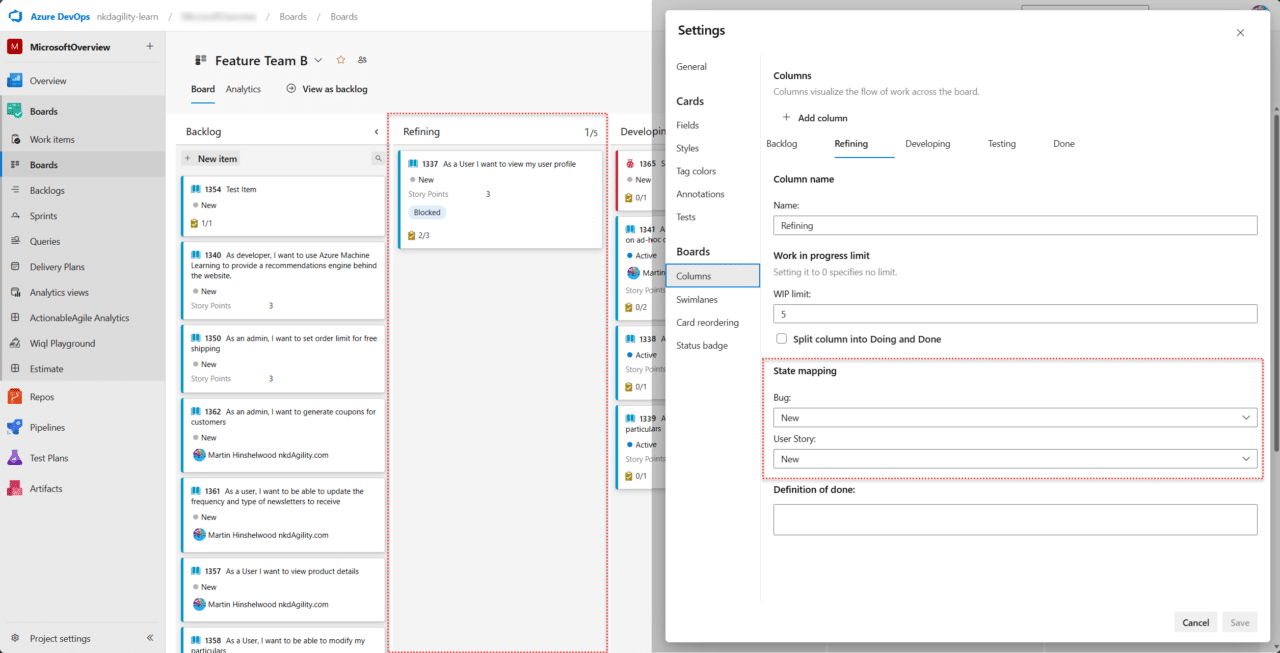
Azure DevOps Board showing Refining Column with Tasks
For the Taskboard, change the Iteration Path of the tasks to that of the current Sprint, which is the default for new items created within the context of a team. This change will display the task on the Taskboard and pull a shadow of the Backlog Item in for context for these tasks.
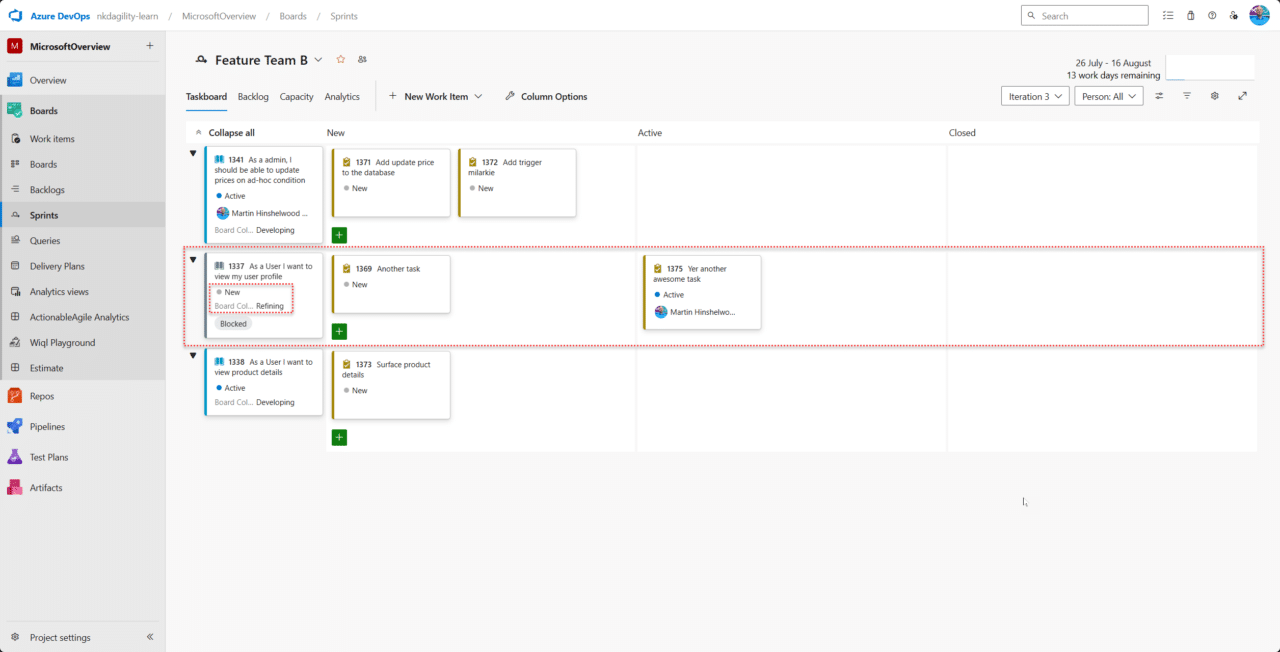
Azure DevOps Taskboard showing grey PBI not in Sprint with Tasks in Sprint.
These two capabilities are critical to being able to visualise the work that is happening while maintaining the separation of the transparencies of the Sprint and Product backlogs.
Conclusion
Understanding and managing the balance between Sprint Work and Refinement is critical for a Scrum Team’s success. By visualising these tasks effectively, your team can plan and execute tasks efficiently, avoiding unnecessary work and being prepared for potential roadblocks.
By dedicating enough time to Refinement, teams gain a comprehensive understanding of what’s necessary, preparing them to effectively manage upcoming tasks and potential challenges. Therefore, visualising all work in progress allows for smoother product management and promotes a thorough understanding of the product’s needs, fostering more informed, efficient, and successful Scrum operations.
#Agile #TeamWork #Productivity
Smart Classifications
Each classification [Concepts, Categories, & Tags] was assigned using AI-powered semantic analysis and scored across relevance, depth, and alignment. Final decisions? Still human. Always traceable. Hover to see how it applies.
What to read next
If your backlog is not refined then you are doing it wrong
Explains why regular backlog refinement is essential in Scrum, how to make backlog items ready for Sprint Planning, and ways to measure …
Mastering Agile: 3 Essential Strategies to Boost Your Team's Sprint Success
Learn three key Agile strategies: define clear completion criteria, avoid overcommitting in Sprints, and prioritise backlog refinement for …
The Importance of Visualizing Your Work in a Kanban Strategy
Explains how visualising work in Kanban boosts team clarity, transparency, and alignment, and offers steps to define workflows, avoid …
The Importance of Product Backlog Management in Today's Agile Landscape
Explains why effective product backlog management is vital in Agile, highlights common pitfalls, and offers practical tips to improve team …
Maximise Your Scrum Process: Leveraging Azure DevOps for Agile Success
Learn how to customise Azure DevOps to support Scrum teams, manage backlogs, plan sprints, and improve agile workflows with practical setup …
Understanding the Power of Kanban in Scrum
Explains how integrating Kanban with Scrum boosts transparency, limits work in progress, and improves workflow, helping teams identify …
Detecting agile theatre with real delivery signals
Why Most Companies Operating Models Fail in Dynamic Markets
A concise comparison of Predictive and Adaptive Operating Models, explaining why traditional structures fail in dynamic markets and how …
Don’t Manage Dependencies, Remove Them
Explains why dependencies are a sign of poor system design and outlines steps to eliminate them by aligning teams, clarifying ownership, and …
The Estimation Trap: How Tracking Accuracy Undermines Trust, Flow, and Value in Software Delivery
Tracking estimation accuracy in software delivery leads to mistrust, fear, and distorted behaviours. Focus on customer value, flow, and …
Flow of Value vs Flow of Work – Misnomer or Useful Shorthand?
Compares “flow of value” and “flow of work” in Kanban, explaining why only validated outcomes count as value and stressing the need for …
Why Outsourcing DevOps Fails, and How Real Engineering Excellence Starts With Your Team
Avoid DevOps vendor lock-in, discover how true engineering excellence starts with partnership, not outsourcing. Ready to transform your …
Why Most Companies Operating Models Fail in Dynamic Markets
A concise comparison of Predictive and Adaptive Operating Models, explaining why traditional structures fail in dynamic markets and how …
Don’t Manage Dependencies, Remove Them
Explains why dependencies are a sign of poor system design and outlines steps to eliminate them by aligning teams, clarifying ownership, and …
The Estimation Trap: How Tracking Accuracy Undermines Trust, Flow, and Value in Software Delivery
Tracking estimation accuracy in software delivery leads to mistrust, fear, and distorted behaviours. Focus on customer value, flow, and …
Kendall Guide - A System of Work for AI Adoption
Flow of Value vs Flow of Work – Misnomer or Useful Shorthand?
Compares “flow of value” and “flow of work” in Kanban, explaining why only validated outcomes count as value and stressing the need for …
Estimating Better in an Overloaded System Is a Poor Man’s Strategy
High work in progress (WIP) causes delays and unpredictability; improving estimates won’t help. Limiting WIP and focusing on flow is key to …
The Definition of Done is a Commitment to Quality
Defines the Definition of Done in Scrum as a clear, shared standard for quality, ensuring increments are releasable, transparent, and …
Why Your Definition of “Done” Is Holding Back Quality, Agility, and Trust, And How to Raise the Bar
Is your team’s “done” really done? Discover how a clear, objective definition of done boosts quality, agility, and trust in product …
Acceptance Criteria vs Definition of Done: Why Getting This Right Builds Trust and Delivers Quality Faster
Stop confusing acceptance criteria with definition of done, learn the crucial difference to boost quality, speed, and trust in your agile …
How to Evolve Your Definition of Done: Start Small, Grow Smarter, and Build Lasting Momentum
Unlock a smarter Definition of Done, start small, evolve standards, and build team momentum without overwhelm. Discover how progress drives …
Why Most Transformations Fail Without Honest Conversations
Most transformations fail without open, honest conversations that address real issues, making transparency and tough dialogue essential for …
Why Your Definition of Done Is the Secret Weapon for Real Business Impact and Agile Growth
Transform your definition of done into a strategic advantage, deliver real value, reduce risk, and drive business impact with every sprint.