After upgrading to TFS 2013.3 you get some reports of errors in MTM from your users. Specifically they get a “Could not find mappings for all states defined in ‘Test Suit’ work item type” error when connecting. I have also seen “TF400860: TestManagement: Version 19, MinVersion: 19” in some cases in the web access.
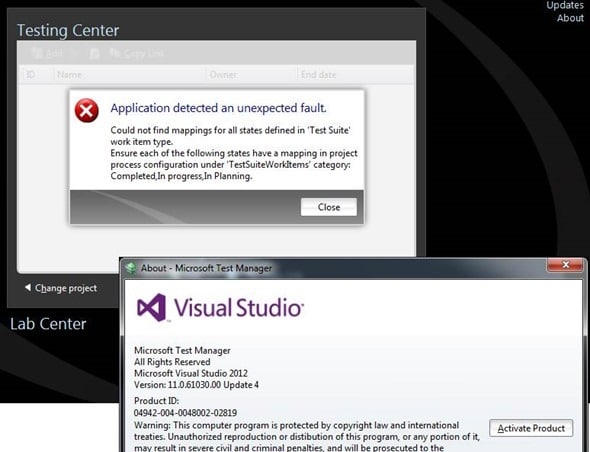
This should only happen if you have customised the Test Suit or Test Plan work items but as they have just been created by the upgrade process it is a little confusing as to why it does not work.
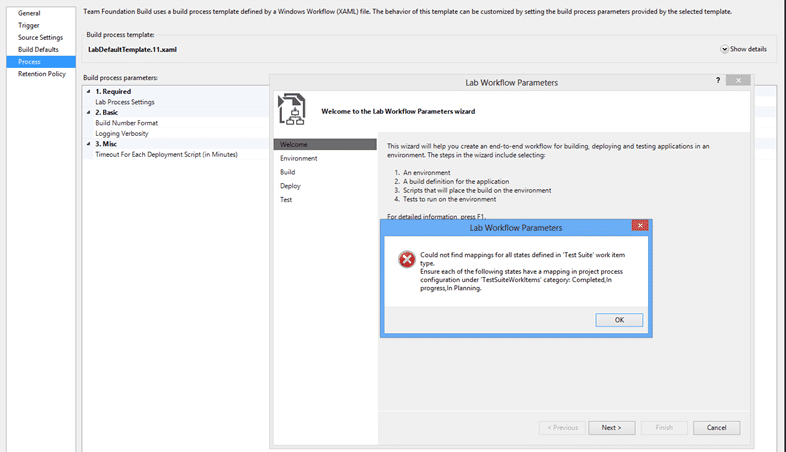
You might additionally find a similar error when trying to edit a Lab Template as it also queries the Test Data.
In these cases, if you look real closely at the error message you will see that while “Completed” and “In Planning” look good there is an issue with “In progress”. The test team in their infinite wisdom decided that if you have not customised anything that the system defaults to a hard coded set of process configuration for Tests. This sounds reasonable unless you factor in organisations that make silly customisations to their process template.
In case you have not figured it out yet, the “In process” state should be “In Process”. Yes, that’s a case sensitivity issue. When you are uploading work item types this is case-insensitive and is rationalised across work items. So if you have one work item in there with “In process” set and then you add another work item with “In Process” TFS will fix it for you on import. However the test teams hard coded the process configuration which is case sensitive.
I am pretty sure that the product team will go fix it, but for now you two solutions:
Solution 1: Fix the configuration of your process
You should be mindful to make sure that you get all of your casing right. In this case I would check all of my work items to make sure that they have the same case and that it is the correct and out-of-the-box “In Process” text.
Solution 2: Add a custom process configuration override
In your process configuration you need to add a little bit of customisation to continue to use the case you have configured.
    <TestSuiteWorkItems category="Microsoft.TaskCategory">
      <States>
        <State type="Proposed" value="In planning" />
        <State type="InProgress" value="In progress" />
        <State type="Complete" value="Completed" />
      </States>
    </TestSuiteWorkItems>
Once added you should not have an issue.
Conclusion
These entries are only required when connecting from older clients. From Visual Studio 2013.3 onwards this is a non-issue so it might be your chance to get all of your users to update to the latest and greatest.
Remember that this issue only affects older clients, and when you have miss typed the casing of the states in your custom process template. Most folks should not run into this and it is a simple fix if you do.
Smart Classifications
Each classification [Concepts, Categories, & Tags] was assigned using AI-powered semantic analysis and scored across relevance, depth, and alignment. Final decisions? Still human. Always traceable. Hover to see how it applies.
What to read next
You can't use WITADMIN on versions older than TFS 2010
Explains troubleshooting WITADMIN errors with TFS versions, highlighting the need for TFS 2010 SP1 or newer for compatibility with work item …
TFS2012.2 - Issue: Object not set to instance of object with TF400898, TF53010 & TF30065
Explains causes and solutions for "Object reference not set to an instance of an object" errors (TF400898, TF53010, TF30065) in TFS 2012.2, …
Process Template Upgrade #7 – Rename Work Items and Import new ones
Step-by-step guide to upgrading TFS process templates by renaming and importing work item types, preserving data, updating fields, …
Detecting agile theatre with real delivery signals
Why Most Companies Operating Models Fail in Dynamic Markets
A concise comparison of Predictive and Adaptive Operating Models, explaining why traditional structures fail in dynamic markets and how …
Don’t Manage Dependencies, Remove Them
Explains why dependencies are a sign of poor system design and outlines steps to eliminate them by aligning teams, clarifying ownership, and …
The Estimation Trap: How Tracking Accuracy Undermines Trust, Flow, and Value in Software Delivery
Tracking estimation accuracy in software delivery leads to mistrust, fear, and distorted behaviours. Focus on customer value, flow, and …
Flow of Value vs Flow of Work – Misnomer or Useful Shorthand?
Compares “flow of value” and “flow of work” in Kanban, explaining why only validated outcomes count as value and stressing the need for …
Why Outsourcing DevOps Fails, and How Real Engineering Excellence Starts With Your Team
Avoid DevOps vendor lock-in, discover how true engineering excellence starts with partnership, not outsourcing. Ready to transform your …