If, like me, you like to have changeable resource files in your application. Wither it is for changing the Theme, or interchanging templates you will need to take special care when using the
The new version of the TFS Sticky Buddy uses both!
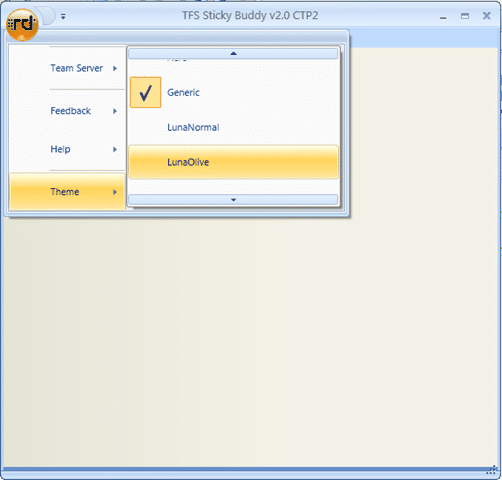
I am using the built in Infragistics theme system, and the first time you select a theme I am just adding a resource file that overrides the default:
1: Dim resourceDictionary As ResourceDictionary = ThemeManager.GetResourceSet(theme, ThemeManager.AllGroupingsLiteral)
2: If Not resourceDictionary Is Nothing Then
3: Application.Current.Resources.MergedDictionaries.Add(resourceDictionary)
4: End If
This causes an error in the ItemsControlRegionAdapter as WPF seams to redo the region adapters and you get a ItemsControlHasItemsSourceException. You need to change the code to the following (notice the commented out areas):
1: /// <summary>
2: /// Adapts an <see cref="ItemsControl"/> to an <see cref="IRegion"/>.
3: /// </summary>
4: /// <param name="region">The new region being used.</param>
5: /// <param name="regionTarget">The object to adapt.</param>
6: protected override void Adapt(IRegion region, ItemsControl regionTarget)
7: { //Modified by Martin Hinshelwood to allow resource file changes...
8: //if (regionTarget.ItemsSource != null || (BindingOperations.GetBinding(regionTarget, ItemsControl.ItemsSourceProperty) != null))
9: // throw new InvalidOperationException(Resources.ItemsControlHasItemsSourceException);
10:
11: //If control has child items, move them to the region and then bind control to region. Can't set ItemsSource if child items exist.
12: if (regionTarget.Items.Count > 0)
13: {
14: foreach (object childItem in regionTarget.Items)
15: {
16: region.Add(childItem);
17: }
18: //Control must be empty before setting ItemsSource
19: regionTarget.ItemsSource = null;
20: //regionTarget.Items.Clear();
21: }
22: regionTarget.ItemsSource = region.Views;
23: }
You will notice that I had to comment out the exception for existing controls as well as the Items.Clear (which is replaced by setting the ItemsSource to nothing). This solves the problem I I have not noticed any adverse reactions.
The second problem occurs when you do you second set of the theme. at this point you need to remove the existing theme:
1: If Not m_CurrentTheme Is Nothing Then
2: Application.Current.Resources.MergedDictionaries.Remove(m_CurrentTheme)
3: End If
When this happens the region management is redone and you get a further RegionNameExistsException from the RegionManager. Then can be solved by changing the code in the AttachNewRegion method:
1: /// <summary>
2: /// Attaches a region to an object and adds it to the region manager.
3: /// </summary>
4: /// <param name="regionTarget">The object to adapt. This is typically a container (i.e a control).</param>
5: /// <param name="regionName">The name of the region to register.</param>
6: /// <exception cref="ArgumentException">When regions collection already has a region registered using <paramref name="regionName"/>.</exception>
7: public void AttachNewRegion(object regionTarget, string regionName)
8: { //Modified by Martin Hinshelwood to allow resource file changes...
9: if (Regions.ContainsKey(regionName))
10: return; //throw new ArgumentException(string.Format(CultureInfo.InvariantCulture, Resources.RegionNameExistsException, regionName));
11:
12: IRegionAdapter regionAdapter = regionAdapterMappings.GetMapping(regionTarget.GetType());
13: IRegion region = regionAdapter.Initialize(regionTarget);
14:
15: Regions.Add(regionName, region);
16: }
So instead of bombing out when you try to add a region of the same name, it will just ignore it. Not ideal, but necessary.
Technorati Tags: WPF ALM TFS Custom WIT
Smart Classifications
Each classification [Concepts, Categories, & Tags] was assigned using AI-powered semantic analysis and scored across relevance, depth, and alignment. Final decisions? Still human. Always traceable. Hover to see how it applies.
What to read next
Advice on using XamRibbon with Composite WPF
Provides guidance and code examples for integrating Infragistics XamRibbon with Composite WPF, including custom region adapters for dynamic …
Creating a WPF Work Item Control
Learn how to build a custom WPF work item control for Visual Studio Team System, enabling WPF UI integration in work item forms using a …
Subversion to TFS 2010: The migration engine is unable to resolve a conflict where two changes have the same target item
Explains how to resolve case sensitivity conflicts when migrating from Subversion to TFS 2010, including tools and steps to handle duplicate …
The Evolution of My Journey with Azure DevOps: Lessons and Insights
Personal experiences and lessons on using Azure DevOps, covering its evolution, migration strategies, custom tools, and practical advice for …
Detecting agile theatre with real delivery signals
Why Most Companies Operating Models Fail in Dynamic Markets
A concise comparison of Predictive and Adaptive Operating Models, explaining why traditional structures fail in dynamic markets and how …
Don’t Manage Dependencies, Remove Them
Explains why dependencies are a sign of poor system design and outlines steps to eliminate them by aligning teams, clarifying ownership, and …
The Estimation Trap: How Tracking Accuracy Undermines Trust, Flow, and Value in Software Delivery
Tracking estimation accuracy in software delivery leads to mistrust, fear, and distorted behaviours. Focus on customer value, flow, and …
Flow of Value vs Flow of Work – Misnomer or Useful Shorthand?
Compares “flow of value” and “flow of work” in Kanban, explaining why only validated outcomes count as value and stressing the need for …
Why Outsourcing DevOps Fails, and How Real Engineering Excellence Starts With Your Team
Avoid DevOps vendor lock-in, discover how true engineering excellence starts with partnership, not outsourcing. Ready to transform your …