 Often you will receive rich information from your Product Owner (Customer) about tasks. That information can be in the form of Word documents, HTML Emails and Pictures, but you generally receive them in the context of an Email.
You need to keep these so your Team can refer to it later, and so you can send a “done” when the task has been completed. This preserves the “history” of the task and allows you to keep relevant partied included in any future conversation.
At SSW we keep the original email so that we can reply Done and delete the email .
But keeping it in your email does not help other members of the team if they complete the task and need to send the “done”.
Worse yet, the description field in Team Foundation Server 2010 (TFS 2010) does not support HTML and images, nor does the default task template support an “interested parties” or CC field. You can attach this content manually, but it can be time consuming.
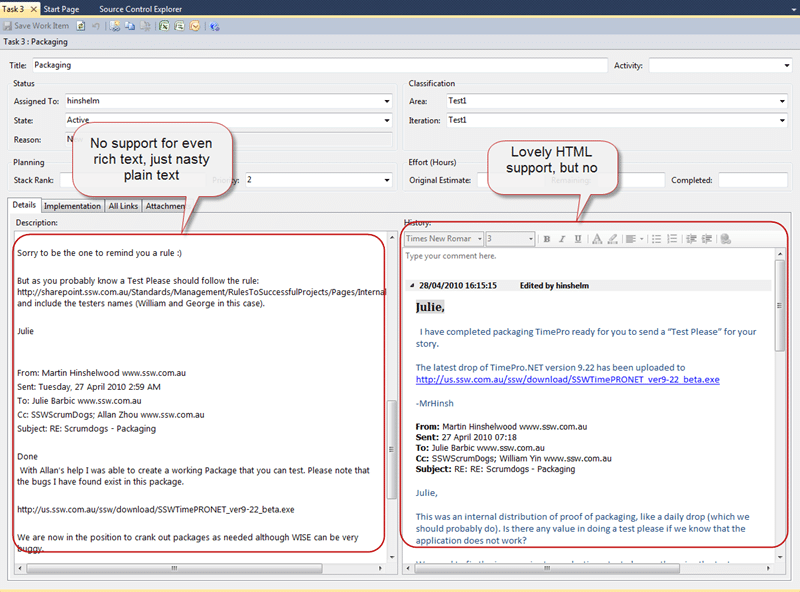
Figure: Description only supports plain text, and History supports HTML with no images
What should we do?
At SSW we always follow the rules, and it just so happened that we have rules to both achieve this, and to make it easier.
You should follow the existing Rules to Better Project Management and attach the email to your task so you can refer to and reply to it later when you close the task:
- Do you know what Outlook add-ins you need?
- Describe the work item request in an email
- Use Outlook Add-in to move the email to a TFS Work Item
When replying to an email with “done” you should follow:
- Do you update Team Companion template, so the email “subject” doesn’t change?
- Do you update Team Companion template, so you can generate a proper “done” mail?
Following these simple rules will help your Product Owner understand you better, and allow your teams to more effectively collaborate with each other.
An added bonus is that as we are keeping the email history in sync with TFS. When you “reply all” to the email all of the interested partied to the Task are also included. This notified those that may have been blocked by your task to keep up to date with its status.
This has been published as Do you know to ensure that relevant emails are attached to tasks in our Rules to Better Scrum using TFS .
What could we do better?
I would like to see this process automated so that we capture the information correctly in the task without the need to use email. This would require a change to the process template in Team Foundation Server to add an “Interested Parties” field.
Each reply to the email would need to be automatically processed into a Work Item. This could be done by adding a task identifier as the first item in the “Relates to” email header, and copying in an email address that you watch. This would then parse out the relevant information and add the new message to the history, update the “Interested parties” field and attach the Images.
Upon reflection, it may even be possible, but more difficult to do this using ONLY the History field and including some of the header information in there to the build a done email with history.
This would not currently deal with email “forks” well, but I think it would be adequate for our needs.
It would be nice if we could find time to implement this, but currently it is but a pipe dream. Maybe Microsoft could implement something in the next version of Team Foundation Server, and in the mean time we have a process that works well.
Technorati Tags: Scrum SSW Rules SSW TFS 2010 TFS 2008 SP 2010 TFS SharePoint
Smart Classifications
Each classification [Concepts, Categories, & Tags] was assigned using AI-powered semantic analysis and scored across relevance, depth, and alignment. Final decisions? Still human. Always traceable. Hover to see how it applies.
What to read next
Even Scrum should have detailed Task descriptions
Scrum tasks should include detailed descriptions so anyone can complete them, ensuring project continuity if team members are unavailable or …
Do you know that every user story should have an owner?
Assigning an owner to each user story in Scrum ensures clear responsibility, better communication, and accountability throughout the sprint …
Avoid the Bug as Task anti-pattern in Azure DevOps
Explains why treating bugs as tasks in Azure DevOps is an anti-pattern, its impact on transparency, quality, and planning, and offers …
TFS Event Handler for Team Foundation Server 2010
Explains how to create and customise event handlers for Team Foundation Server 2010, covering supported events for version control, builds, …
What does a poor scrum team look, act and feel like?
Explores signs of a poor scrum team, including autocratic leadership, dysfunctional product ownership, lack of trust, and organisational …
Detecting agile theatre with real delivery signals
Why Most Companies Operating Models Fail in Dynamic Markets
A concise comparison of Predictive and Adaptive Operating Models, explaining why traditional structures fail in dynamic markets and how …
Don’t Manage Dependencies, Remove Them
Explains why dependencies are a sign of poor system design and outlines steps to eliminate them by aligning teams, clarifying ownership, and …
The Estimation Trap: How Tracking Accuracy Undermines Trust, Flow, and Value in Software Delivery
Tracking estimation accuracy in software delivery leads to mistrust, fear, and distorted behaviours. Focus on customer value, flow, and …
Flow of Value vs Flow of Work – Misnomer or Useful Shorthand?
Compares “flow of value” and “flow of work” in Kanban, explaining why only validated outcomes count as value and stressing the need for …
Why Outsourcing DevOps Fails, and How Real Engineering Excellence Starts With Your Team
Avoid DevOps vendor lock-in, discover how true engineering excellence starts with partnership, not outsourcing. Ready to transform your …
The Definition of Done is a Commitment to Quality
Defines the Definition of Done in Scrum as a clear, shared standard for quality, ensuring increments are releasable, transparent, and …
Why Your Definition of “Done” Is Holding Back Quality, Agility, and Trust, And How to Raise the Bar
Is your team’s “done” really done? Discover how a clear, objective definition of done boosts quality, agility, and trust in product …
Acceptance Criteria vs Definition of Done: Why Getting This Right Builds Trust and Delivers Quality Faster
Stop confusing acceptance criteria with definition of done, learn the crucial difference to boost quality, speed, and trust in your agile …
How to Evolve Your Definition of Done: Start Small, Grow Smarter, and Build Lasting Momentum
Unlock a smarter Definition of Done, start small, evolve standards, and build team momentum without overwhelm. Discover how progress drives …
Why Most Transformations Fail Without Honest Conversations
Most transformations fail without open, honest conversations that address real issues, making transparency and tough dialogue essential for …
Why Your Definition of Done Is the Secret Weapon for Real Business Impact and Agile Growth
Transform your definition of done into a strategic advantage, deliver real value, reduce risk, and drive business impact with every sprint.