First, download the new Data Dude.
Download page
http://www.microsoft.com/downloads/details.aspx?FamilyID=bb3ad767-5f69-4db9-b1c9-8f55759846ed&displaylang=en
Setup
http://download.microsoft.com/download/0/a/e/0ae1153a-8798-474a-93e6-d19299f37c8b/setup.exe
Once you get it going the install is pretty easy. Things to watch out for are:
- Remove all previous versions before the install. This included any CTP or RC versions.
- You will NOT be able to upgrade your projects built with the CTP releases! You should however be able to upgrade any projects built with the RC.
Installation
Uninstall old GDR versions
If you have a previous version of the GDR installed, you will have to uninstall these first. You can do this via Add/Remove Programs or from the command line using:
· msiexec /X {DDF197C6-4507-3A19-A4B5-0E17CC931370}
Prerequisites
Before you start downloading and installing please check if the following pre-requisites are present on your machine!
- Visual Studio 2008 SP1 RTM (make sure this is the RTM not the beta of SP1, the GDR will not install with the beta release of SP1)
- Microsoft SQL Server Compact Edition 3.5 SP1 (this is normally included in the setup of VS 2008 SP1)
Installation
You can download the Visual Studio Team System 2008 Database Edition GDR from the following location:
- Setup
http://download.microsoft.com/download/0/a/e/0ae1153a-8798-474a-93e6-d19299f37c8b/setup.exe- Read Me
http://download.microsoft.com/download/0/a/e/0ae1153a-8798-474a-93e6-d19299f37c8b/Readme.mht- Documentation:
http://download.microsoft.com/download/0/a/e/0ae1153a-8798-474a-93e6-d19299f37c8b/Documentation.zip
Contains:- Visual Studio Team System 2008 Database Edition GDR User Manual
- Visual Studio Team System 2008 Database Edition GDR API Reference
Luckily I have just received a new install of Vista 64, so I have no previous versions to remove ;)
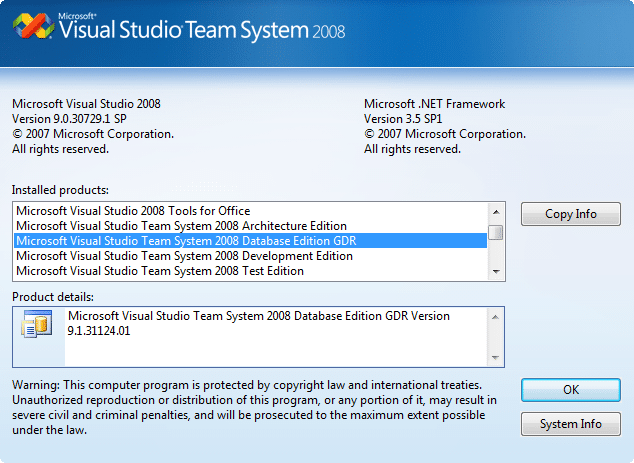
Once the install if finished you will see that the GDR has replaced the standard Database Edition in visual studio.
The “New Project” window will also have additional options and you can see the two new sort of project, “Database” and “Server”.
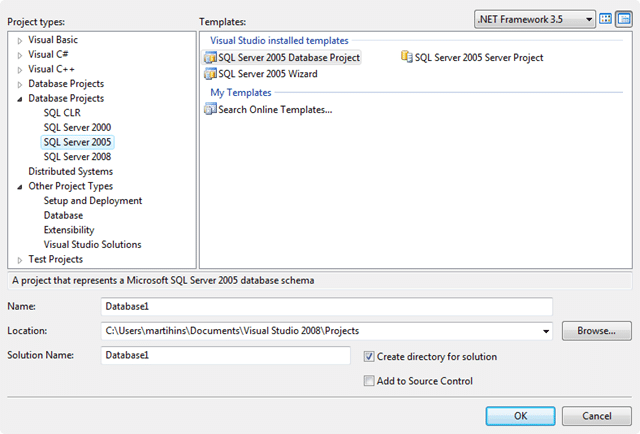
If you pick the “Wizard” you will be presented with a set of options for your project creation. Loads of people have documented what these options mean, so I will just give you a flavor with a wee video…
Please be patient with my videos as I am just getting to grips with this.
Technorati Tags: ALM VS 2008 TFS
Smart Classifications
Each classification [Concepts, Categories, & Tags] was assigned using AI-powered semantic analysis and scored across relevance, depth, and alignment. Final decisions? Still human. Always traceable. Hover to see how it applies.
What to read next
Visual Studio Team System 2008 Database Edition GDR has been released!
The new Database Edition GDR for Visual Studio Team System 2008 adds model-based SQL schema design, extensibility, provider support, and …
Data Dude R2 is out!
Visual Studio Team System 2008 Database Edition GDR R2 adds new features, improved SQL Server 2008 support, enhancements, and bug fixes for …
Do you know about the Visual Studio 2010 Database Projects Guidance?
Guidance on using Visual Studio 2010 Database Projects, covering project management, source control, deployment automation, integration, and …
Detecting agile theatre with real delivery signals
Why Most Companies Operating Models Fail in Dynamic Markets
A concise comparison of Predictive and Adaptive Operating Models, explaining why traditional structures fail in dynamic markets and how …
Don’t Manage Dependencies, Remove Them
Explains why dependencies are a sign of poor system design and outlines steps to eliminate them by aligning teams, clarifying ownership, and …
The Estimation Trap: How Tracking Accuracy Undermines Trust, Flow, and Value in Software Delivery
Tracking estimation accuracy in software delivery leads to mistrust, fear, and distorted behaviours. Focus on customer value, flow, and …
Flow of Value vs Flow of Work – Misnomer or Useful Shorthand?
Compares “flow of value” and “flow of work” in Kanban, explaining why only validated outcomes count as value and stressing the need for …
Why Outsourcing DevOps Fails, and How Real Engineering Excellence Starts With Your Team
Avoid DevOps vendor lock-in, discover how true engineering excellence starts with partnership, not outsourcing. Ready to transform your …