Visual Studio Team Foundation Server 2010 RC was released yesterday on MSDN. I am happy to report that today we successfully completed upgrading our production TFS 2010 Beta 2 server, to the new TFS 2010 RC. wow.
Updated: 11th February 2010– Added link to Brian Harry’s post
Updated: 12th February 2010 – Adam Cogan was not clear that there were two problems with snapshoting running servers.
The upgrade was smooth, let me tell you the steps:
note: If you are upgrading from TFS 2008 you can follow our Rules to better TFS 2010 Migration
- Snapshot the hyper-v server
There are two reasons why you should never do this while the server is running:- It’s Slow - Make sure you turn off your server before you take a snapshot. It took 15 minutes to get to 2% while the server was running, but turning it off had the whole operation completed in under 30 seconds. I think of this as very like the feature of Linux that let you recompile the kernel on the fly to avoid rebooting when adding drivers: Nice to have, but only if you have 10 hours to spare.
- It’s Dangerous - Brian Harry has an even better reason why you should never snapshot a running server .
- Uninstall Visual Studio Team Explorer 2010 Beta 2
You will need to uninstall all of the Visual Studio 2010 Beta 2 client bits that you have on the server. That’s a no brainer, but you can remove them early to streamline your installation process - Uninstall TFS 2010 Beta 2
- Install TFS 2010 RC
- Configure TFS 2010 RC
Pick the Upgrade option and point it at your existing “tfs_Configuration” database to load all of the existing settings - Test the server
All of our 52 developers are now up and running on TFS 2010 RC. Well…almost all. A couple of guys reported this problem even though they had previously connected to TFS 2010 Beta 2:
- If you get this error on the VS 2008 client after the upgrade, you should check whether you have KB74558 installed, if not you can download it manually or run diagnostics to ensure your entire system is up to date.
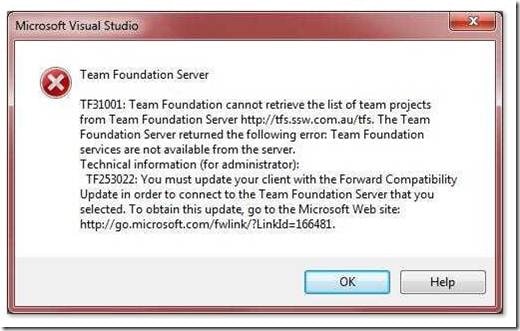 Figure: Error TF31001 or TF253022, but why is that link not clickable.
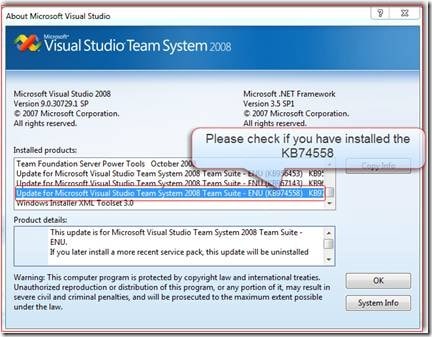 Figure: Check that you have the update so you can connect to TFS 2010 via “Help | About Microsoft Visual Studio”
I will be ironing out any other kinks tomorrow…
Next steps includes upgrading our build servers and moving all 52 developers over to Visual Studio 2010.
We were the first company on Beta 2 in production and I believe we are first on RC in production.
Need Help?

SSW was the first company in the world outside of Microsoft to deploy Visual Studio 2010 Team Foundation Server to production, not once , but twice .
Team Foundation Server
 SSW provides expert Visual Studio ALM guidance including installation, configuration and customisation through our four Microsoft Visual Studio ALM MVP’s in three countries; Australia, Beijing and the UK. They have experience deploying to small development shops all the way through to large blue chips.
Professional Scrum Developer Training
 SSW has six Professional Scrum Developer Trainers who specialise in training your developers in implementing Scrum with Microsoft’s Visual Studio ALM tools.
Technorati Tags: ALM TFS Admin SSW Scrum VS 2010 VS 2008 TFS 2010 TFS 2008 SP 2010 TFS SharePoint
Smart Classifications
Each classification [Concepts, Categories, & Tags] was assigned using AI-powered semantic analysis and scored across relevance, depth, and alignment. Final decisions? Still human. Always traceable. Hover to see how it applies.
What to read next
Upgrading from TFS 2010 RC to TFS 2010 RTM done
Step-by-step guide to upgrading from TFS 2010 RC to RTM, including backup, uninstall, install, configuration, SharePoint and build server …
Upgrading Team Foundation Server 2008 to 2010
Step-by-step guide to upgrading Team Foundation Server 2008 to 2010, covering database backup, migration, verification, compatibility, and …
Upgrading from the TFS 2013 Preview to TFS 2013 RC
Step-by-step guide to upgrading from TFS 2013 Preview to TFS 2013 RC, covering prerequisites, trial upgrades, installation, configuration, …
Upgrading to TFS 2015 in production - DONE
Step-by-step guide to upgrading a production TFS server to TFS 2015, including backup strategies, configuration tips, and handling common …
Detecting agile theatre with real delivery signals
Why Most Companies Operating Models Fail in Dynamic Markets
A concise comparison of Predictive and Adaptive Operating Models, explaining why traditional structures fail in dynamic markets and how …
Don’t Manage Dependencies, Remove Them
Explains why dependencies are a sign of poor system design and outlines steps to eliminate them by aligning teams, clarifying ownership, and …
The Estimation Trap: How Tracking Accuracy Undermines Trust, Flow, and Value in Software Delivery
Tracking estimation accuracy in software delivery leads to mistrust, fear, and distorted behaviours. Focus on customer value, flow, and …
Flow of Value vs Flow of Work – Misnomer or Useful Shorthand?
Compares “flow of value” and “flow of work” in Kanban, explaining why only validated outcomes count as value and stressing the need for …
Why Outsourcing DevOps Fails, and How Real Engineering Excellence Starts With Your Team
Avoid DevOps vendor lock-in, discover how true engineering excellence starts with partnership, not outsourcing. Ready to transform your …