Immediately after configuring the TFS Integration Tools you receive a TFS WIT invalid submission conflict type that states that the source item is invalid.
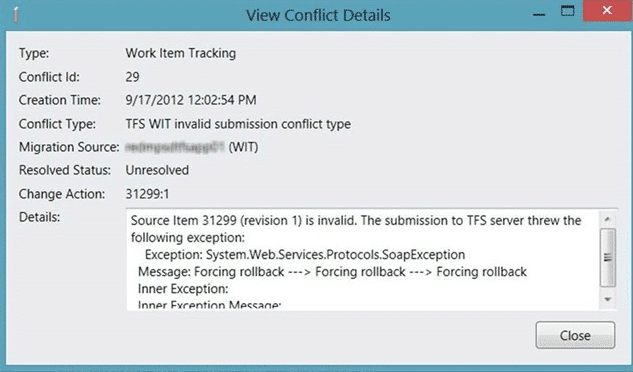
Figure: The source item is invalid
There is no further debug information.
Applies to
- TFS Integration Tools, version 2.2, March 2012
Findings
While this immediately looks like a problem with the configuration and can indeed be related to a configuration or date conversation issue if you have just installed the TFS Integration Tools there may be a simpler resolution.
The first thing to do is to enable TFS WIT bypass-rule submission rule in the configuration and make sure that your account is in the “Service Accounts Group”.
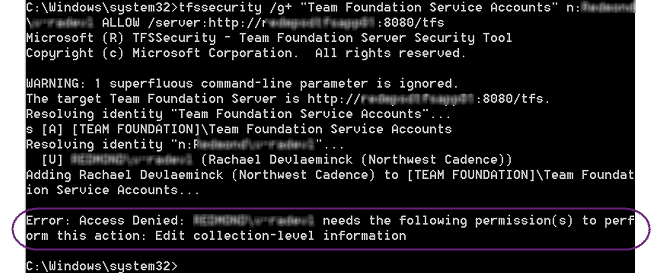
Figure: Access Denied
If however you get “Access denied” with you account not having “Edit collection-level information” then the account that you are using to access TFS does not have the correct permission.
Solution
You need to make sure that the account under which you are running the TFS Integration Tools is at least a “Collection Administrator” and preferably a “Team Foundation Administrator”. There are many things that the TFS Integration Tools do that requires this level of permission.
note: I recommend building and testing all of your scripts/configurations against a test server, or at the very least a throw-away collection before you work against production.
You should now be able to successfully run your configuration although I can’t guarantee further errors 
Smart Classifications
Each classification [Concepts, Categories, & Tags] was assigned using AI-powered semantic analysis and scored across relevance, depth, and alignment. Final decisions? Still human. Always traceable. Hover to see how it applies.
What to read next
TFS Integration Tools - Issue: TFS WIT bypass-rule submission is enabled
Explains how to resolve TFS Integration Platform errors caused by missing permissions for bypass-rule submission by adding accounts to the …
TFS Integration Tools – Issue: Error occurred during the code review of change group
Explains causes and solutions for the "Error occurred during the code review of change group" in TFS Integration Tools, including common …
Detecting agile theatre with real delivery signals
Why Most Companies Operating Models Fail in Dynamic Markets
A concise comparison of Predictive and Adaptive Operating Models, explaining why traditional structures fail in dynamic markets and how …
Don’t Manage Dependencies, Remove Them
Explains why dependencies are a sign of poor system design and outlines steps to eliminate them by aligning teams, clarifying ownership, and …
The Estimation Trap: How Tracking Accuracy Undermines Trust, Flow, and Value in Software Delivery
Tracking estimation accuracy in software delivery leads to mistrust, fear, and distorted behaviours. Focus on customer value, flow, and …
Flow of Value vs Flow of Work – Misnomer or Useful Shorthand?
Compares “flow of value” and “flow of work” in Kanban, explaining why only validated outcomes count as value and stressing the need for …
Why Outsourcing DevOps Fails, and How Real Engineering Excellence Starts With Your Team
Avoid DevOps vendor lock-in, discover how true engineering excellence starts with partnership, not outsourcing. Ready to transform your …