You should use nested PBI’s and never nested Tasks when you are using the Visual Studio 2012 Team Foundation Server Agile Planning Tools and here is why.
At some point you take your “Product Backlog Item” and break it down into sub items as part of your development process. This is part of the creation of a Plan to complete those Backlog Items and that plan reflects the best guess of the Team in what needs to be done to achieve those backlog items.
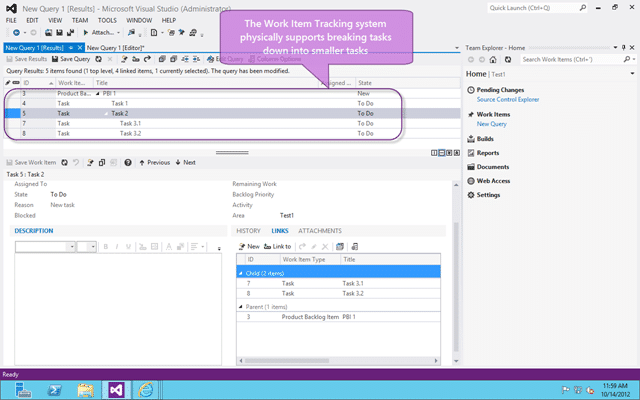
Figure: In Team Foundation Server you can have nested tasks
In the pursuit of this you may feel that it is a good idea to create nested tasks and using the Work Item Tracking in both Visual Studio and the Web Access you will be able to created these nested tasks.
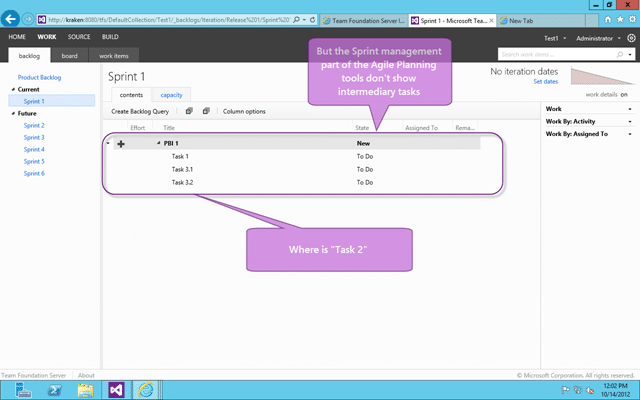
Figure: Agile Planning tools do not support nested tasks the way you think
However when you view the Sprint Backlog you don’t see the in-between nested tasks, instead you only see a flat list of tasks.
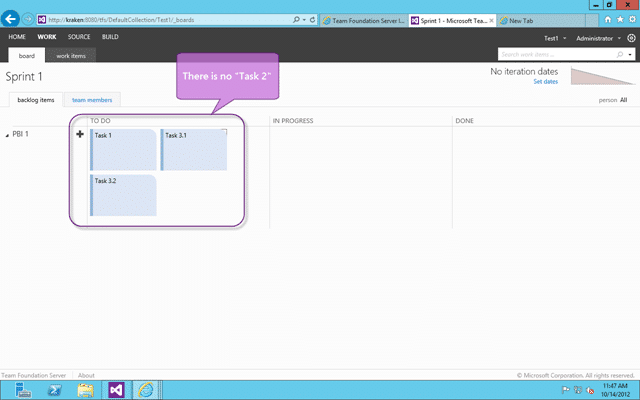
Figure: Agile Boards do not support nested tasks
In addition to the Agile Planning tools the Agile Boards also do not show the intermediary nested tasks.
Applies to
- Visual Studio 2012 Team Foundation Server
- Visual Studio 2012 Team Foundation Server Update 1
Steps to Reproduce
You can replicate this fairly easily by following these steps to reproduce:
- Add PBI called “PBI 1”
- Add child Task to “PBI 1” called “Task 1”
- Add child Task to “PBI 1” called ‘Task 2”
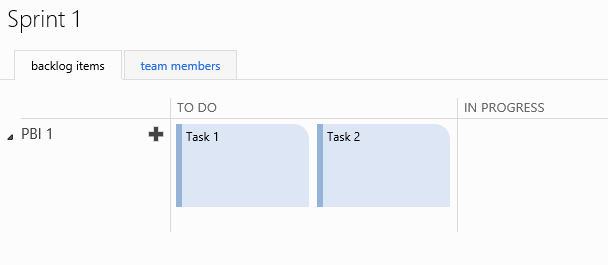 **Figure: Result as expected with “Task 1” and “Task 2” visible
** - Add child Task to “Task 2” called “Task 3”
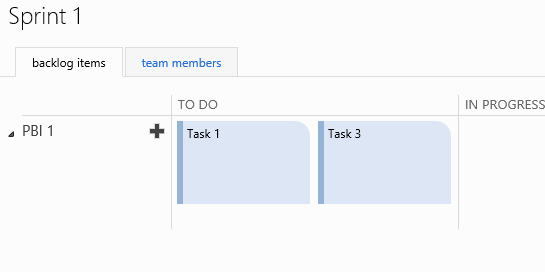 Figure: Not expected to see “Task 1” & “Task 3”
Findings
This is essentially us hitting up against the ideals of the tool. While the Work Item Tracking and Query system built into TFS is designed to handle and sort of work style the Agile Planning Tools are optimised to work with… well… and “agile” flow.
With almost 80% of companies saying that they “do agile” it only makes sense for Microsoft to concentrate on the biggest chunk of customers. If you are not in that 80% then you should take a look at Requirement management in the modern application lifecycle for solutions that will fit your needs while still maintaining the data integrity and reporting that is the cornerstone of TFS.
Do, or do not…. there is no try!
-Yoda
If however you are really trying this “agile” thing and are running into issues like this with the tool then you may need to change your workflow.
Solution
If it needs broken down then it is likely not a Task at all, but a Product Backlog Item masquerading as a Task. The best solution is to ask yourself when you are breaking down your “Product Backlog Items” if the unit you are breaking it down into may need broken down further. If it does then it is probably a “Product Backlog Item” and not a Task.
Now while stack ranking hierarchical work items makes life difficult and does lead to the dark side, it is supported by the Agile Planning tools and the Agile Boards.
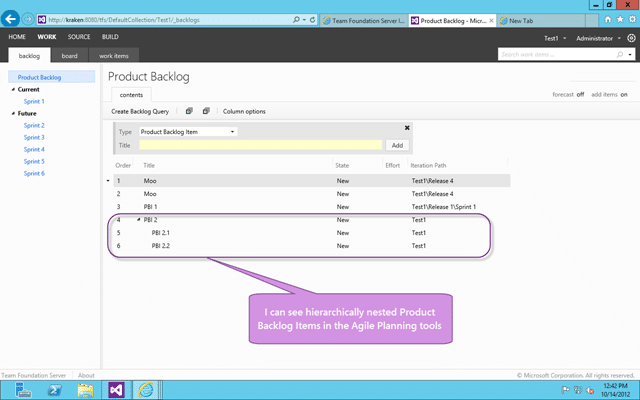
Figure: You can see nested PBI’s on the Agile Planning tools
You will find that when you try to drag the parent into a Sprint you will be prevented and you need to drag the individual PBI’s instead.
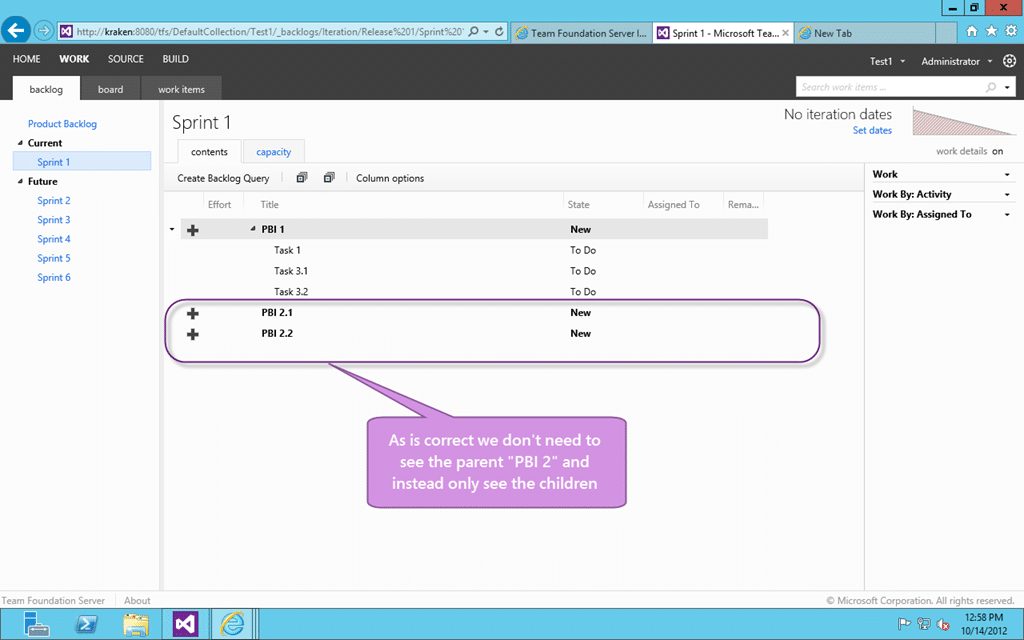
Figure: You can see correctly the parent is not listed
This is the same behaviour as we saw on the tasks, but it now makes sense as we no longer care about delivering the parent PBI.
If you break down a Product Backlog Item into more granular Product Backlog Items those sub items should reflect the entirety of the work that needs to be done to achieve the parent and thus rendering the parent superfluous for all but upstream reporting. If you break a Product Backlog Item down into Tasks those Tasks should represent the Development Teams best guess at what actions / work needs to be undertaken to complete that Product Backlog Item.
Smart Classifications
Each classification [Concepts, Categories, & Tags] was assigned using AI-powered semantic analysis and scored across relevance, depth, and alignment. Final decisions? Still human. Always traceable. Hover to see how it applies.
What to read next
You can't stack rank hierarchical work items?
Explains why stack ranking hierarchical work items is challenging in agile software development, highlighting issues with ordering, …
Avoid the Bug as Task anti-pattern in Azure DevOps
Explains why treating bugs as tasks in Azure DevOps is an anti-pattern, its impact on transparency, quality, and planning, and offers …
One Team Project to rule them all
Explains how to manage multiple teams and projects in Team Foundation Server using a single Team Project, with tips on Agile planning, …
TFS for cross team and cross business line work item tracking
Explains how to use a single Team Project and Team Field in TFS to streamline cross-team work item tracking, reporting, and collaboration …
Rethinking Backlog Management: Why a Flat Structure Boosts Agility and Value Delivery
Explains how using a flat backlog structure, rather than a hierarchy, improves agility, prioritisation, and value delivery in Scrum and …
Detecting agile theatre with real delivery signals
Why Most Companies Operating Models Fail in Dynamic Markets
A concise comparison of Predictive and Adaptive Operating Models, explaining why traditional structures fail in dynamic markets and how …
Don’t Manage Dependencies, Remove Them
Explains why dependencies are a sign of poor system design and outlines steps to eliminate them by aligning teams, clarifying ownership, and …
The Estimation Trap: How Tracking Accuracy Undermines Trust, Flow, and Value in Software Delivery
Tracking estimation accuracy in software delivery leads to mistrust, fear, and distorted behaviours. Focus on customer value, flow, and …
Flow of Value vs Flow of Work – Misnomer or Useful Shorthand?
Compares “flow of value” and “flow of work” in Kanban, explaining why only validated outcomes count as value and stressing the need for …
Why Outsourcing DevOps Fails, and How Real Engineering Excellence Starts With Your Team
Avoid DevOps vendor lock-in, discover how true engineering excellence starts with partnership, not outsourcing. Ready to transform your …
The Definition of Done is a Commitment to Quality
Defines the Definition of Done in Scrum as a clear, shared standard for quality, ensuring increments are releasable, transparent, and …
Why Your Definition of “Done” Is Holding Back Quality, Agility, and Trust, And How to Raise the Bar
Is your team’s “done” really done? Discover how a clear, objective definition of done boosts quality, agility, and trust in product …
Acceptance Criteria vs Definition of Done: Why Getting This Right Builds Trust and Delivers Quality Faster
Stop confusing acceptance criteria with definition of done, learn the crucial difference to boost quality, speed, and trust in your agile …
How to Evolve Your Definition of Done: Start Small, Grow Smarter, and Build Lasting Momentum
Unlock a smarter Definition of Done, start small, evolve standards, and build team momentum without overwhelm. Discover how progress drives …
Why Most Transformations Fail Without Honest Conversations
Most transformations fail without open, honest conversations that address real issues, making transparency and tough dialogue essential for …
Why Your Definition of Done Is the Secret Weapon for Real Business Impact and Agile Growth
Transform your definition of done into a strategic advantage, deliver real value, reduce risk, and drive business impact with every sprint.