As you may know, I have been having lots of problems with creating a Test Track Pro Adapter for the TFS Integration Platform. You may have been following my trials and tribulations in trying to get the data through.
It looks as if someone dropped the ball at Seapine when they wrote the query code for TTP. When you query the server to get a list of data the only control you have over the number of records that you get back is to use a “filter”. These filter are pre-setup and I have on on the production TTP system that will give me all of the data that I need to migrate. The problem is that it take around 15 minutes for the query to return the 3000+ records.
So, I first run the query as is and retrieve all of the records and suffer the long load.
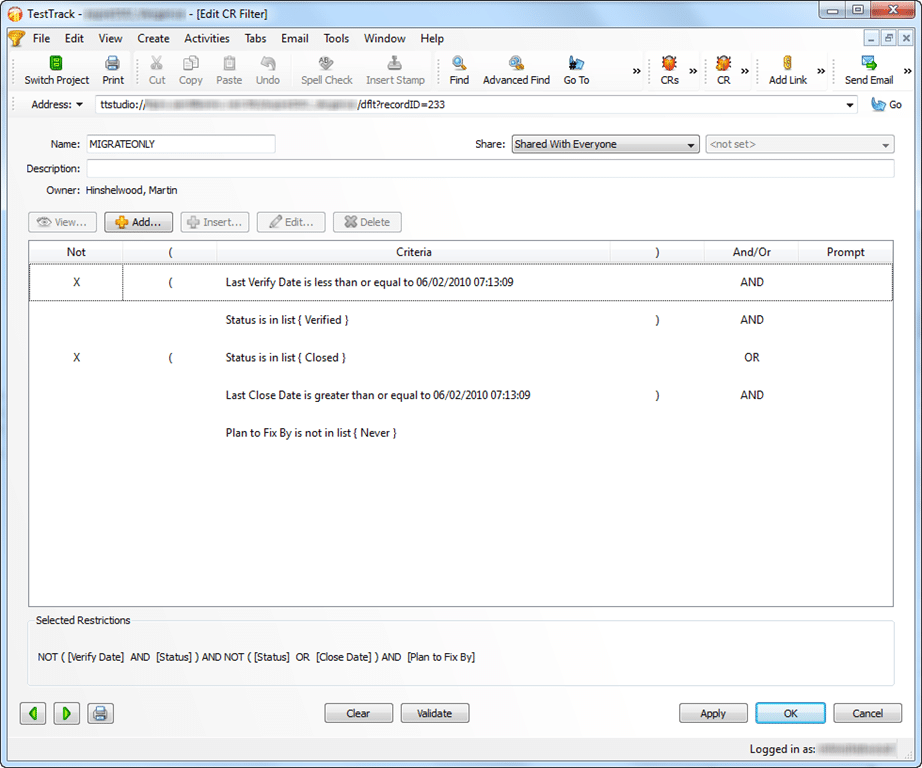
Figure: Initial Query loads the entire data set
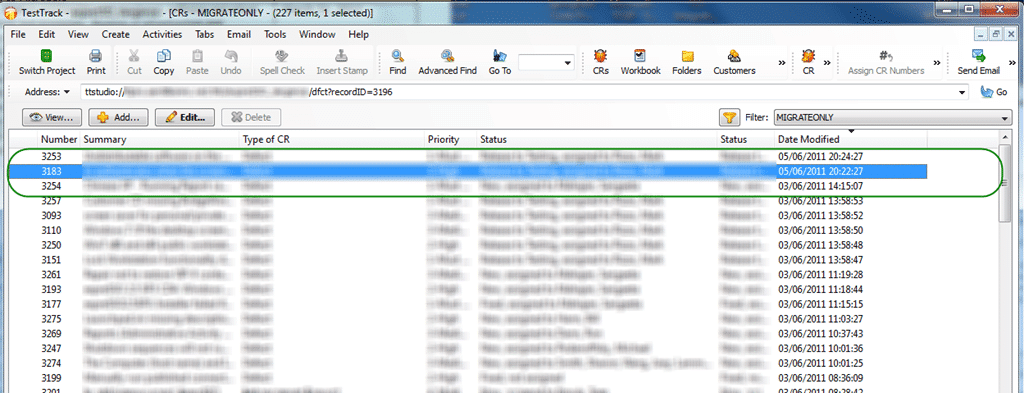
Figure: This produces a large data set, but check the top
Once the initial run is done, there is really no need to load the entire data set, just to find the two or three or sum records that have changed since the last run. I decided, just to be safe, to load the data from the last day, some ~25 records, as that is almost the balance between load and loss.
So lets add an additional filter for data in the last month…
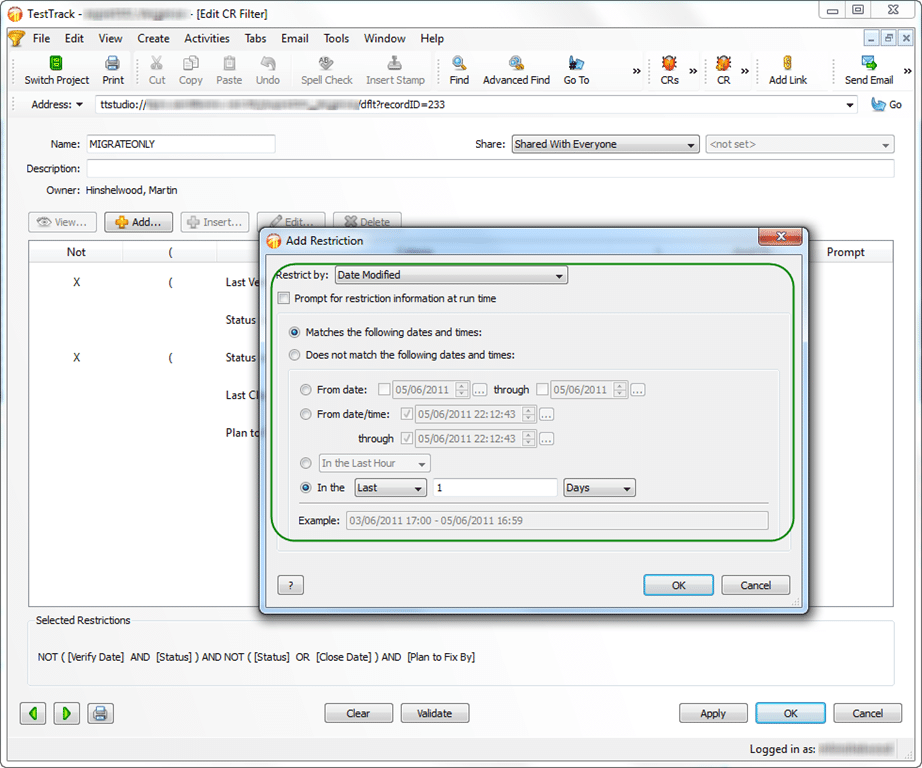
Figure: Only get data in the last Day
With my recent debugging efforts I was maybe looking more closely at things than I would normally, and I noticed that the most recent changes were not being displayed.
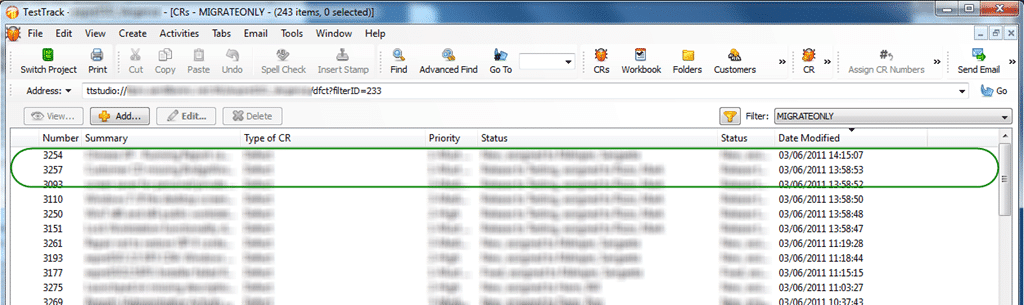
Figure: Where has my data gone
If you look closely you will see that the top two records have disappeared. What the heck!
If I change the query to be the last 24 hours instead of the last day then the data miraculously appears.
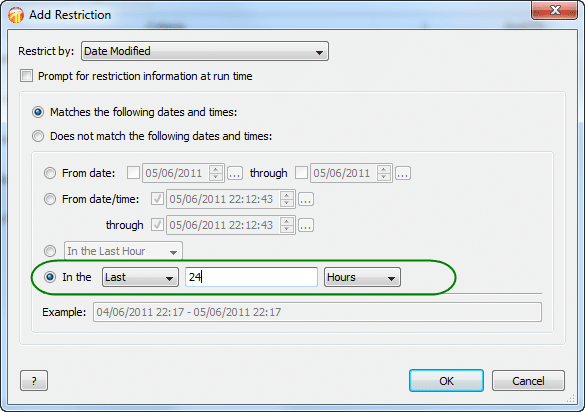
Figure: Last 24 hours works
In fact I just checked again and the data is now there! Oh, it has just gone midnight in Boston (where the TTP server is) and the data now appears.
You may now ask, “What is the problem? The data will eventually get into the list?”… well, by that time it is too late. Let me explain.
As part of the TFS Integration Platform there is something called a “High Water Mark” and in this case it is a Date. This stores the date of the last run of data so we can check which records to add and which to edit.
Me._highWaterMarkDelta.Reload()
'------------------------------------------------------
Dim context As TtpContext = GetTtpContext()
Dim raw As List(Of TtpDefectMigrationItem) = GetTtpRawData(context, viewName)
TraceManager.TraceInformation("Located {0} raw updates since {1} in {2} seconds", raw.Count, _highWaterMarkDelta.Value, Now.Subtract(_tstart).TotalSeconds)
Dim deltaNew = (From ri In raw Where ri.CreatedOn.CompareTo(_highWaterMarkDelta.Value) > 0).ToList
TraceManager.TraceInformation("Located {0} deltas as NEW in {1} seconds", deltaNew.Count, Now.Subtract(_tstart).TotalSeconds)
deltaNew = GetDeltaWorkflow(context, deltaNew)
TraceManager.TraceInformation("Updated {0} deltas with workflow in {1} seconds", deltaNew.Count, Now.Subtract(_tstart).TotalSeconds)
Dim changesNew As List(Of ChangeGroup) = GetChangeGroupsForAdds(deltaNew)
TraceManager.TraceInformation("Created {0} add change groups in {1} seconds", changesNew.Count, Now.Subtract(_tstart).TotalSeconds)
For Each c In changesNew
    c.Save()
Next
TraceManager.TraceInformation("Saved {0} add change groups in {1} seconds", changesNew.Count, Now.Subtract(_tstart).TotalSeconds)
Dim deltaEdit = (From ri In raw Where ri.ModifiedOn.CompareTo(_highWaterMarkDelta.Value) > 0 And Not ri.CreatedOn.CompareTo(_highWaterMarkDelta.Value) > 0).ToList
TraceManager.TraceInformation("Located {0} deltas as EDIT in {1} seconds", deltaEdit.Count, Now.Subtract(_tstart).TotalSeconds)
deltaEdit = GetDeltaWorkflow(context, deltaEdit)
TraceManager.TraceInformation("Updated {0} deltas with workflow in {1} seconds", deltaEdit.Count, Now.Subtract(_tstart).TotalSeconds)
Dim changesEdit As List(Of ChangeGroup) = GetChangeGroupsForEdits(deltaEdit)
TraceManager.TraceInformation("Created {0} edit change groups in {1} seconds", changesEdit.Count, Now.Subtract(_tstart).TotalSeconds)
For Each c In changesEdit
    c.Save()
Next
TraceManager.TraceInformation("Saved {0} edit change groups in {1} seconds", changesEdit.Count, Now.Subtract(_tstart).TotalSeconds)
'------------------------------------------------------
Me._highWaterMarkDelta.Update(DateTime.Now)
Me._changeGroupService.PromoteDeltaToPending()
Figure:
As you can see on lines 6 and 16 we do a query based on the High Water Mark to make sure that we only import data once, and that we can tell the difference between add and update.
-
If the date that the item was created is after the last high water mark then it is an add
-
If the date that the item was modified is after the last high water mark, while also not being in the previous category then it is an edit
So, if you are using “last day” in your query then by the time the data is returned in the query then all the dates are before the high water mark. Not good as all of this data gets missed and you will not get any updates after the first run.
The solution is to use the number of “hours” since, rather than days…
Smart Classifications
Each classification [Concepts, Categories, & Tags] was assigned using AI-powered semantic analysis and scored across relevance, depth, and alignment. Final decisions? Still human. Always traceable. Hover to see how it applies.
What to read next
A working Test Track Pro Adapter for the TFS Integration Platform
Describes building a working Test Track Pro Adapter for the TFS Integration Platform, detailing code changes, conflict handling, and …
Migrating data from FogBugz to TFS 2012 using the TFS Integration Platform
Step-by-step guide to migrating FogBugz data to TFS 2012 using a custom CSV adapter with the TFS Integration Platform, including setup, …
What to do after a servicing fails on TFS 2010
Guidance on troubleshooting failed servicing in TFS 2010, including schema version issues, recovery steps, and risks of database repair …
Active Directory Groups not Syncing with Team Foundation Server 2010
Explains why Active Directory groups may not sync with Team Foundation Server 2010, how to diagnose sync issues, and steps to resolve …
Technical Debt Management for Long-Term Quality
Explains how managing and repaying technical debt improves software quality, delivery speed, and long-term value by addressing both known …
Detecting agile theatre with real delivery signals
Why Most Companies Operating Models Fail in Dynamic Markets
A concise comparison of Predictive and Adaptive Operating Models, explaining why traditional structures fail in dynamic markets and how …
Don’t Manage Dependencies, Remove Them
Explains why dependencies are a sign of poor system design and outlines steps to eliminate them by aligning teams, clarifying ownership, and …
The Estimation Trap: How Tracking Accuracy Undermines Trust, Flow, and Value in Software Delivery
Tracking estimation accuracy in software delivery leads to mistrust, fear, and distorted behaviours. Focus on customer value, flow, and …
Flow of Value vs Flow of Work – Misnomer or Useful Shorthand?
Compares “flow of value” and “flow of work” in Kanban, explaining why only validated outcomes count as value and stressing the need for …
Why Outsourcing DevOps Fails, and How Real Engineering Excellence Starts With Your Team
Avoid DevOps vendor lock-in, discover how true engineering excellence starts with partnership, not outsourcing. Ready to transform your …
Detecting agile theatre with real delivery signals
Don’t Manage Dependencies, Remove Them
Explains why dependencies are a sign of poor system design and outlines steps to eliminate them by aligning teams, clarifying ownership, and …
The Estimation Trap: How Tracking Accuracy Undermines Trust, Flow, and Value in Software Delivery
Tracking estimation accuracy in software delivery leads to mistrust, fear, and distorted behaviours. Focus on customer value, flow, and …
Flow of Value vs Flow of Work – Misnomer or Useful Shorthand?
Compares “flow of value” and “flow of work” in Kanban, explaining why only validated outcomes count as value and stressing the need for …
Why Outsourcing DevOps Fails, and How Real Engineering Excellence Starts With Your Team
Avoid DevOps vendor lock-in, discover how true engineering excellence starts with partnership, not outsourcing. Ready to transform your …
Estimating Better in an Overloaded System Is a Poor Man’s Strategy
High work in progress (WIP) causes delays and unpredictability; improving estimates won’t help. Limiting WIP and focusing on flow is key to …