Have you ever, when developing a website, been frustrated when you get a different result when you deploy your application to http://site/ and http://site/app/ .

I don’t know about you, but it annoys the hell out of me. All that work in CSS and none of your images work when you run it in a different location. This would be especially frustrating when you are running multiple feature branches and need Kerberos interaction. The amount of work required to get Kerberos to work (SPN’s, URL’s, Delegation and AD) limits the number of sites you can have in an enterprise environment.
I have just two. I have a site for the latest candidate release and one to host all of my feature branches. As I am using TFS I identify my Feature with either a Requirement or Change Request Id and name everything after this.
Thus I have http://site/ and http://site-dev/1345 . This makes it easy to find and test, and my CI build at the ends of the day just overwrites the previous version.
This means that all of your css like this…
.down {
   padding-right:14px;
   background: url('/UI/Resources/Images/arrow_down.gif') no-repeat 100% 50%;
}
…will not work in one of your locations :( This makes me sad…
So, in order to cheer up your CSS, you can give it a little bit of .NET Omph…
The first thing you need to do is get .NET to handle ALL of your requests, and not just for the ASP.NET pages.
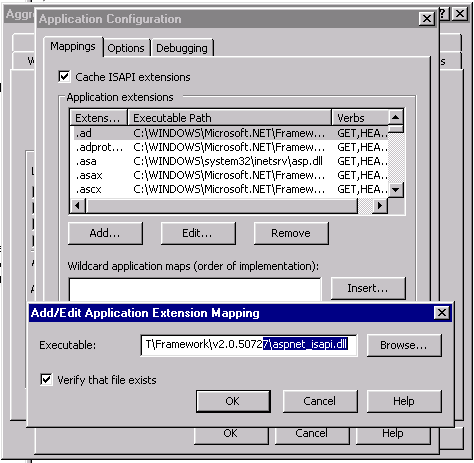
Add a “Wildcard application mapping” to the “aspnet_isapi.dll” and you are good to go…
To process the css we need an HttpHandler, this is dead easy to implement and action so:
Imports System.Web
Imports System.Text.RegularExpressions


Public Class CssHttpHandler
    Implements IHttpHandler

    Public ReadOnly Property IsReusable() As Boolean Implements System.Web.IHttpHandler.IsReusable
        Get
            Return False
        End Get
    End Property

    Public Sub ProcessRequest(ByVal context As System.Web.HttpContext) Implements System.Web.IHttpHandler.ProcessRequest
        context.Response.ContentType = "text/css"

        'Get the file from the query stirng
        Dim File As String = context.Request.FilePath

        ' Find the actual path
        Dim Path As String = context.Server.MapPath(File)

        'Limit to only css files
        If Not System.IO.Path.GetExtension(Path) = ".css" Then
            context.Response.End()
        End If

        'Make sure file exists
        If Not System.IO.File.Exists(Path) Then
            context.Response.End()
        End If


        ' Open the file, read the contents and replace the variables
        Using css As System.IO.StreamReader = New System.IO.StreamReader(Path)
            Dim cssText As String = css.ReadToEnd()

            ' Replace url's
            Dim rximg As New Regex("url('*(.+?)'*)")
            For Each m As Match In rximg.Matches(cssText)
                cssText = cssText.Replace(m.Groups(1).Value, HandleRootOperator(m.Groups(1).Value))
            Next

            context.Response.Write("/* Please use the ~ operator in front of all URL's. e.g. url('~/UI/Resources/Images/Image.gif') will be converted at runtime to point at the root of the application. */" & vbCrLf & cssText)
        End Using

    End Sub

    ' Methods
    Public Function HandleRootOperator(ByVal virtualUrl As String) As String
        If Not String.IsNullOrEmpty(virtualUrl) Then
            If virtualUrl.StartsWith("^~/", StringComparison.OrdinalIgnoreCase) Then
                Return ("^" & Me.applicationPath & virtualUrl.Substring(2))
            End If
            If virtualUrl.StartsWith("~/", StringComparison.OrdinalIgnoreCase) Then
                Return (Me.applicationPath & virtualUrl.Substring(1))
            End If
        End If
        Return virtualUrl
    End Function


    ' Fields
    Private applicationPath As String = IIf((HttpRuntime.AppDomainAppVirtualPath.Length > 1), HttpRuntime.AppDomainAppVirtualPath, String.Empty)


End Class
Now add the Handler to you web.config
<httpHandlers>
  <add verb="*" path="*.css" type="Company.System.Product.CssHttpHandler, Company.System.Product" />
</httpHandlers>
And you are done :)
Technorati Tags: .NET Windows CodeProject
Smart Classifications
Each classification [Concepts, Categories, & Tags] was assigned using AI-powered semantic analysis and scored across relevance, depth, and alignment. Final decisions? Still human. Always traceable. Hover to see how it applies.
What to read next
IHandlerFactory
Explains how to use a custom IHttpHandler and handler factory in ASP.NET to redirect old URLs to a new site, preserving links and SEO with …
Solution: Testing Web Services with MSTest on Team Foundation Build Services 2010
Explains how to configure MSTest for automated testing of web services on Team Foundation Build Services 2010, including handling dynamic …
Investigation - SEO permanent redirects for old URL’s?
Explains how to implement SEO-friendly permanent 301 redirects for old URLs to preserve search rankings, comparing IIS tools and custom …
Unity and ASP.NET
Explains how to use Unity for dependency injection in ASP.NET, enabling runtime component swapping without redeploying, with practical code …
Mastering Site Reliability: Insights from Azure DevOps on Building a Resilient Live Site Culture
Explore proven strategies from Azure DevOps for building resilient, reliable software systems, covering transparency, automation, telemetry, …
Detecting agile theatre with real delivery signals
Why Most Companies Operating Models Fail in Dynamic Markets
A concise comparison of Predictive and Adaptive Operating Models, explaining why traditional structures fail in dynamic markets and how …
Don’t Manage Dependencies, Remove Them
Explains why dependencies are a sign of poor system design and outlines steps to eliminate them by aligning teams, clarifying ownership, and …
The Estimation Trap: How Tracking Accuracy Undermines Trust, Flow, and Value in Software Delivery
Tracking estimation accuracy in software delivery leads to mistrust, fear, and distorted behaviours. Focus on customer value, flow, and …
Flow of Value vs Flow of Work – Misnomer or Useful Shorthand?
Compares “flow of value” and “flow of work” in Kanban, explaining why only validated outcomes count as value and stressing the need for …
Why Outsourcing DevOps Fails, and How Real Engineering Excellence Starts With Your Team
Avoid DevOps vendor lock-in, discover how true engineering excellence starts with partnership, not outsourcing. Ready to transform your …