Creating an event handler with the Team Foundation Server Event Handlers is very easy. You will need to inherit from the AEventHandler class which is part of RDdotNet .TeamFoundation.dll located in the install directory (I will make an SDK later).
Imports Microsoft.TeamFoundation.Client

Public MustInherit Class AEventHandler(Of TEvent)

    Public MustOverride Sub Run(ByVal EventHandlerItem As EventHandlerItem(Of TEvent), _                                 ByVal ServiceHost As ServiceHostItem, _                                ByVal TeamServer As TeamServerItem, _                                ByVal e As NotifyEventArgs(Of TEvent))
    Public MustOverride Function IsValid(ByVal EventHandlerItem As EventHandlerItem(Of TEvent), _                                         ByVal ServiceHost As ServiceHostItem, _                                         ByVal TeamServer As TeamServerItem, _                                         ByVal e As NotifyEventArgs(Of TEvent)) As Boolean  End Class
Both of the methods that the AEventHandler exposes have the same signature. Hear is what it all means…
| Name | Type | Description |
| EventHandlerItem | EventHandlerItem(Of TEvent) | The event handler item contains information about the handler. This includes an instance of the config data, the handler its self and a status property. The TEvent generic makes sure that everything is strongly types for the event that you are dealing with. |
| ServiceHost | ServiceHostItem | Base Address of the service, Event Type, Host Config data and a link to the service host object. |
| TeamServer | TeamServerItem | Config data for the team server as well as an instance of the Microsoft.TeamFoundation.TeamFoundationServer object |
| e | NotifyEventArgs(Of TEvent) | This object allows access to all of the event specific data including the event object, the event type, the TFS Identity object and the TFS Subscription object. |
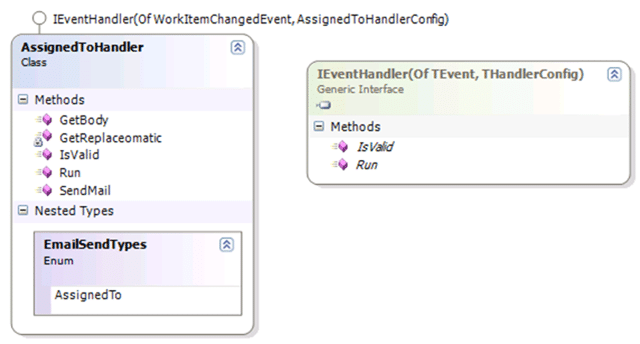
Lets look at the implementation that comes with the TFS Event Handler , the “AssignedToHandler”. The IsValid method denotes wither the handler will acrualy run at all:
    Public Overrides Function IsValid(ByVal EventHandlerItem As EventHandlerItem(Of WorkItemChangedEvent), _                                      ByVal ServiceHost As ServiceHostItem, _                                      ByVal TeamServer As TeamServerItem, _                                      ByVal e As NotifyEventArgs(Of WorkItemChangedEvent)) As Boolean         If e.Event Is Nothing Then             Return False         End If         Dim assignedName As String = WorkItemEventQuerys.GetAssignedToName(e.Event)
        If String.IsNullOrEmpty(assignedName) Then             Return False         Else             Return Not assignedName = WorkItemEventQuerys.GetChangedByName(e.Event)
        End If     End Function
This method initially checks to see if the event exists and then queries the assigned name from the event using a work item event query which consists of:
Return eventData.CoreFields.StringFields.Find(New Predicate(Of StringField)(AddressOf FindAssignedTo)).NewValue
All this does is search the String fields associated with the core work item bits to find the “System.AssignedTo” value. You could so this manually, but I have a number of queries there and you can add any number you wish.
The logic: If Event exists and assigned name is not empty then check that the assigned name is not the changed name.
So in English with all of the crap split out: Did the user assign the work item to himself? If not then send them an email!
The rest, as they say, is just logic. The “Run” method calls the “IsValid” and then sends an email if it is in fact valid, hardly rocket science.
Hopefully with this knowledge you will be able to make many many event handlers!
For the delayed CTP 1 of the TFS Event Handler I have changed the logic quite a lot but the same IsValid and Run methods exist. The parameters are, however slightly different. I have taken into account security and you will have to make your own connection to the TFS server using your own username and password. I have changed this to protect the security of the application as I want developers to be able to upload event handler assemblies and WF workflow without having to get access to the server. I ahve also changed it so the service that captures the events is not the same one that runs the handlers. This allows me to send the events between these services using MSMQ, thus giving the service some much needed redundancy.
Smart Classifications
Each classification [Concepts, Categories, & Tags] was assigned using AI-powered semantic analysis and scored across relevance, depth, and alignment. Final decisions? Still human. Always traceable. Hover to see how it applies.
What to read next
Team Server Event Handlers made easy
Explains a simple way for power users to create, upload, and manage custom event handlers for Team Foundation Server events using an admin …
Team Foundation Server 2010 Event Handling with Subscribers
Explains how to create and deploy server-side event subscribers in Team Foundation Server 2010 using the ISubscriber interface to handle and …
TFS Event Handler for Team Foundation Server 2010
Explains how to create and customise event handlers for Team Foundation Server 2010, covering supported events for version control, builds, …
New Event Handlers
Adds two event handlers for TFS: one emails users when assigned a work item, the other notifies users when work is reassigned. Includes …
TFS Event Handler in .NET 3.5 Part 2 - Handling Team Foundation Server Events
Guide to implementing a resilient Team Foundation Server event handler in .NET 3.5 using WCF, including service contracts, endpoints, …
Detecting agile theatre with real delivery signals
Why Most Companies Operating Models Fail in Dynamic Markets
A concise comparison of Predictive and Adaptive Operating Models, explaining why traditional structures fail in dynamic markets and how …
Don’t Manage Dependencies, Remove Them
Explains why dependencies are a sign of poor system design and outlines steps to eliminate them by aligning teams, clarifying ownership, and …
The Estimation Trap: How Tracking Accuracy Undermines Trust, Flow, and Value in Software Delivery
Tracking estimation accuracy in software delivery leads to mistrust, fear, and distorted behaviours. Focus on customer value, flow, and …
Flow of Value vs Flow of Work – Misnomer or Useful Shorthand?
Compares “flow of value” and “flow of work” in Kanban, explaining why only validated outcomes count as value and stressing the need for …
Why Outsourcing DevOps Fails, and How Real Engineering Excellence Starts With Your Team
Avoid DevOps vendor lock-in, discover how true engineering excellence starts with partnership, not outsourcing. Ready to transform your …