If you are using Windows Server 2012 R2 to test out the new vNext build agent then you may run into an error where it could not load file or assembly while configuring Build vNext Agent.
Download Team Foundation Server 2015 today
Microsoft has released a CTP of TFS 2015 that includes the vNext build system. You can download TFS 2015 and try it out today. Remember that this is not a go-live version and you should not install it in production.
I have been playing around with the new Build vNext Agent that Microsoft has been developing and I found that I was not able to register the Agent on Windows Server 2012 R2 when I had Visual Studio 2015 Preview installed. Before I installed Visual Studio I had no issues, but once on I got a “Could not load file or assembly” when trying to run the registration.
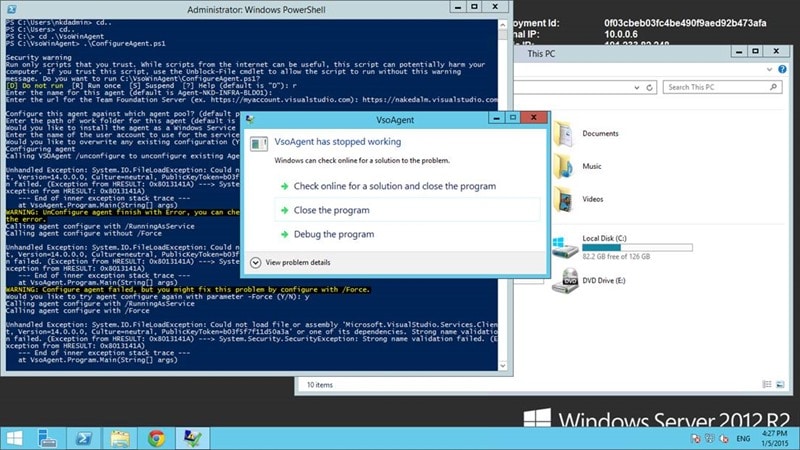
It looks like there is a version mismatch on the DLL.
Unhandled Exception: System.IO.FileLoadException: Could not load file or assembly 'Microsoft.VisualStudio.Services.Client, Version=14.0.0.0, Culture=neutral, PublicKeyToken=b03f5f7f11d50a3a' or one of its dependencies. Strong name validation failed. (Exception from HRESULT: 0x8013141A) ---> System.Security.SecurityException: Strong name validation failed. (Exception from HRESULT: 0x8013141A)

--- End of inner exception stack trace ---

at VsoAgent.Program.Main(String[] args)

WARNING: UnConfigure agent finish with Error, you can check logs under _diag folder, determine whether you can ignore the error.
I am fairly sure that this is a time limited error and once VS 2015 comes out of Preview, or the DLL versions settle down this will not be an issue, however to fix it for now we need to turn of Strong Naming for .NET at the command prompt.
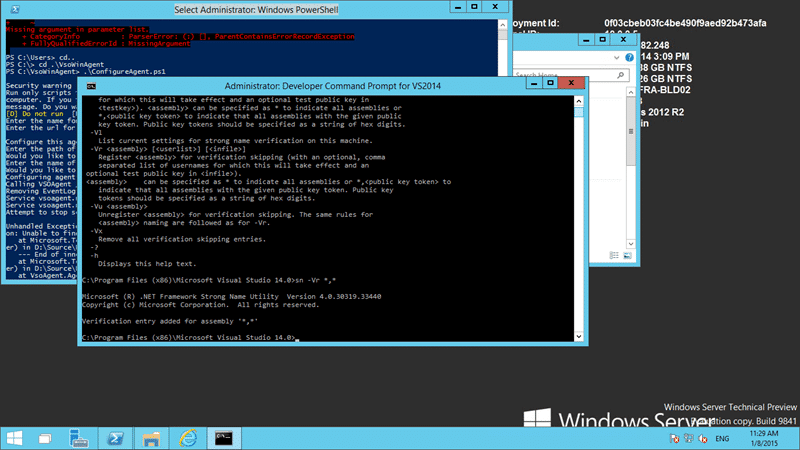
You need to run “sn -Vr *,*” on the server to disable strong signing. This should only be the case as part of the current preview program. I would expect this issue to go away with the next release, at least on Server 2012 R2.
This is only required when you are running Visual Studio 2015 Preview on the Build vNext Agent.
Smart Classifications
Each classification [Concepts, Categories, & Tags] was assigned using AI-powered semantic analysis and scored across relevance, depth, and alignment. Final decisions? Still human. Always traceable. Hover to see how it applies.
What to read next
Unable to load task handler PowerShell for task VSBuild
Explains how to resolve the "Unable to load task handler PowerShell for task VSBuild" error in TFS vNext builds, covering PowerShell …
Configure a Build vNext Agent
Learn how to set up a Build vNext Agent for Visual Studio Online or TFS 2015, including prerequisites, VM setup, agent configuration, and …
Using the Build vNext capabilities and demands system
Explains how to use Build vNext's capabilities and demands system in VSO/TFS 2015 to match build agents with required tools and …
Access denied for orchestration plan on Build
Explains how to resolve TFS build errors caused by missing write permissions for the Project Collection Build Service on orchestration …
Create a Build vNext build definition
Step-by-step guide to creating a Build vNext build definition in Visual Studio Online, covering task setup, options, triggers, variables, …
Detecting agile theatre with real delivery signals
Why Most Companies Operating Models Fail in Dynamic Markets
A concise comparison of Predictive and Adaptive Operating Models, explaining why traditional structures fail in dynamic markets and how …
Don’t Manage Dependencies, Remove Them
Explains why dependencies are a sign of poor system design and outlines steps to eliminate them by aligning teams, clarifying ownership, and …
The Estimation Trap: How Tracking Accuracy Undermines Trust, Flow, and Value in Software Delivery
Tracking estimation accuracy in software delivery leads to mistrust, fear, and distorted behaviours. Focus on customer value, flow, and …
Flow of Value vs Flow of Work – Misnomer or Useful Shorthand?
Compares “flow of value” and “flow of work” in Kanban, explaining why only validated outcomes count as value and stressing the need for …
Why Outsourcing DevOps Fails, and How Real Engineering Excellence Starts With Your Team
Avoid DevOps vendor lock-in, discover how true engineering excellence starts with partnership, not outsourcing. Ready to transform your …