Did you know that you can connect a Test Controller to Team Foundation Service? And if you can do that, can you create standard environments for automated deployment and testing against the cloud?
I did not realise that this was supported and I only stumbled across it as I was tinkering with my local Test Controller and saw my TF Service instance in the connection menu and wondered what would happen.
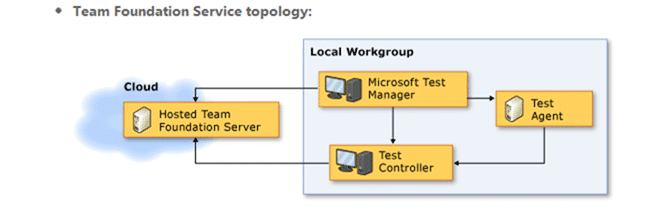
Figure: Connect a Test Controller to Team Foundation Service
To get the Test Controller you need to get a hold of the Agents ISO from the download site and run the install.
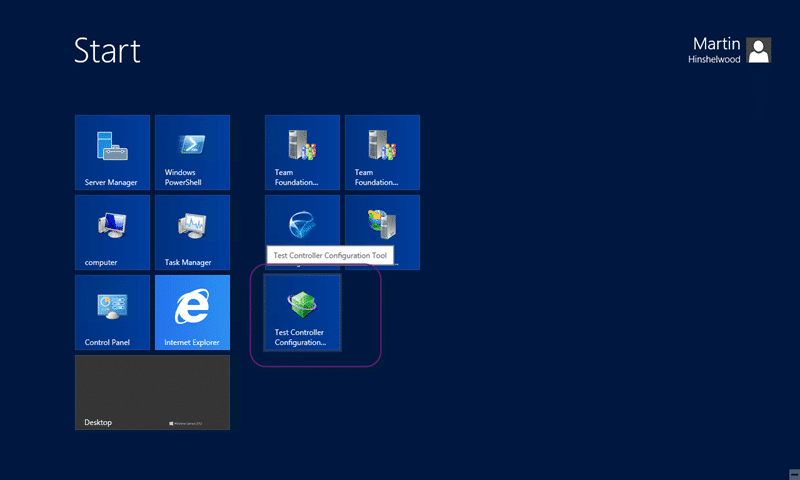
Figure: Run configuration to connect a Test Controller to Team Foundation Service
Once you have the agent installed you can then get on with the configuration. This is simple and the only surprise was that it worked.
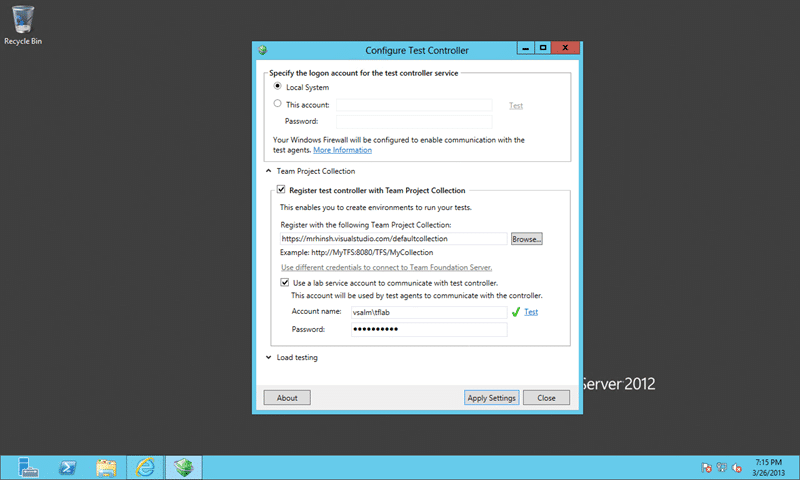
Figure: Configure to connect a Test Controller to Team Foundation Service
This is so simple it is ridicules. Just select your hosted Team Foundation Service environment from the ‘browse’ list. You will likely have to configure the additional account to talk to your local agents as the account that you use to connect to TFS does not have that permission.
Under the covers the controller will be detecting that it is TF Service which is why the “use different credentials to connect to Team Foundation Server” is disabled but that did confuse me for a while. That was until I remembered that the Build Controller automatically retrieves the Service Credentials from TF Service and this was likely doing the same. It is however not that obvious and as I am in a hotel on a hotel speed connection I battled with error messages for a while. But they were all in the tubes and not in the controller.
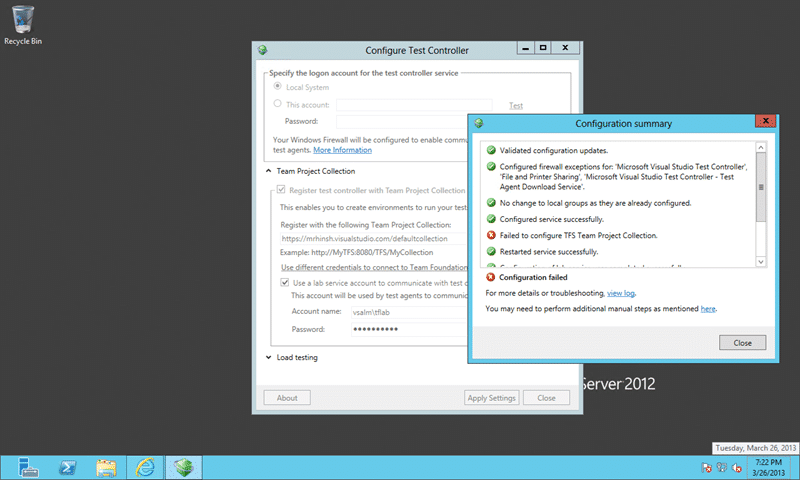
Figure: TF400324 Team Foundation services are not available from server
This however is a red hearing as you can see from the log:
E, 2013/03/26, 19:22:10.502, Microsoft.TeamFoundation.TeamFoundationServiceUnavailableException: TF400324: Team Foundation services are not available from server https://mrhinsh.visualstudio.com/defaultcollection.
Technical information (for administrator):
  The underlying connection was closed: An unexpected error occurred on a receive. ---> System.Net.WebException: The underlying connection was closed: An unexpected error occurred on a receive. ---> System.IO.IOException: Unable to read data from the transport connection: An existing connection was forcibly closed by the remote host. ---> System.Net.Sockets.SocketException: An existing connection was forcibly closed by the remote host
at System.Net.Sockets.Socket.Receive(Byte[] buffer, Int32 offset, Int32 size, SocketFlags socketFlags)
at System.Net.Sockets.NetworkStream.Read(Byte[] buffer, Int32 offset, Int32 size)
--- End of inner exception stack trace ---
at System.Net.Sockets.NetworkStream.Read(Byte[] buffer, Int32 offset, Int32 size)
at System.Net.FixedSizeReader.ReadPacket(Byte[] buffer, Int32 offset, Int32 count)
at System.Net.Security._SslStream.StartFrameHeader(Byte[] buffer, Int32 offset, Int32 count, AsyncProtocolRequest asyncRequest)
at System.Net.Security._SslStream.StartReading(Byte[] buffer, Int32 offset, Int32 count, AsyncProtocolRequest asyncRequest)
at System.Net.Security._SslStream.ProcessRead(Byte[] buffer, Int32 offset, Int32 count, AsyncProtocolRequest asyncRequest)
at System.Net.TlsStream.Read(Byte[] buffer, Int32 offset, Int32 size)
at System.Net.PooledStream.Read(Byte[] buffer, Int32 offset, Int32 size)
at System.Net.Connection.SyncRead(HttpWebRequest request, Boolean userRetrievedStream, Boolean probeRead)
--- End of inner exception stack trace ---
at System.Net.HttpWebRequest.GetResponse()
at Microsoft.TeamFoundation.Client.Channels.TfsHttpWebRequest.SendRequestAndGetResponse(HttpWebRequest webRequest, WebException& webException)
--- End of inner exception stack trace ---
Figure: TF400324 because The underlying connection was closed
Man I hate hotel connections and their flakiness.
However after a little perseverance and clicking at just the right time to get on the maintenance plunger cycle for the hotel WiFi and you are connected.
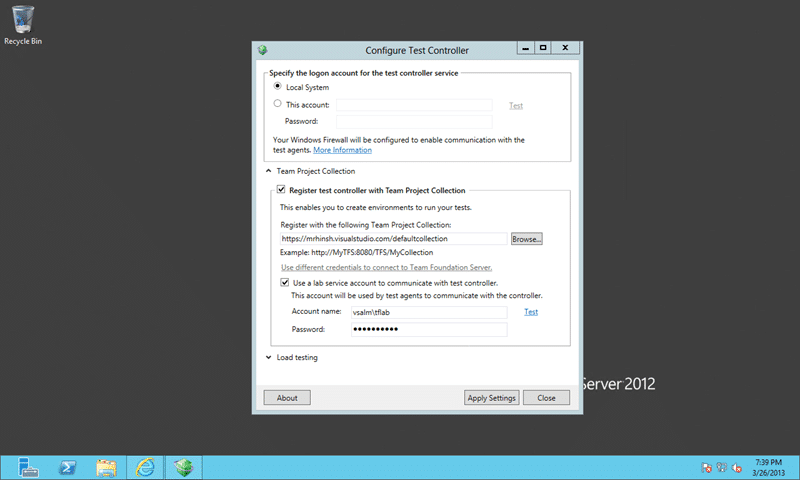
Figure: Configured to connect a Test Controller to Team Foundation Service
Now that we are configured we can head over to Microsoft Test Manager, switch to the Lab Centre and configure an environment.
What did you do with your environments connected to TF Service?
Smart Classifications
Each classification [Concepts, Categories, & Tags] was assigned using AI-powered semantic analysis and scored across relevance, depth, and alignment. Final decisions? Still human. Always traceable. Hover to see how it applies.
What to read next
Execute Tests with Release Management for Visual Studio 2013
Learn how to automate test execution during deployments using Release Management for Visual Studio 2013, including setup steps, environment …
Standard Environments for Automated Deployment and Testing
Explains how to set up and use Standard Environments in Visual Studio 2012 TFS for automated software deployment and testing, enabling …
Upgrade to Visual Studio 11 Team Foundation Service - Done
Explains migrating source control and work item tracking to Visual Studio 11 Team Foundation Service, highlighting cloud benefits, …
Create a Standard Environment for Release Management in Azure
Step-by-step guide to setting up a standard Azure environment for Release Management, including VMs, storage, networking, and Application …
Unit Testing against the Team Foundation Server 2012 API
Explains how to unit test applications against the Team Foundation Server 2012 API, focusing on handling authentication for automated and …
Detecting agile theatre with real delivery signals
Why Most Companies Operating Models Fail in Dynamic Markets
A concise comparison of Predictive and Adaptive Operating Models, explaining why traditional structures fail in dynamic markets and how …
Don’t Manage Dependencies, Remove Them
Explains why dependencies are a sign of poor system design and outlines steps to eliminate them by aligning teams, clarifying ownership, and …
The Estimation Trap: How Tracking Accuracy Undermines Trust, Flow, and Value in Software Delivery
Tracking estimation accuracy in software delivery leads to mistrust, fear, and distorted behaviours. Focus on customer value, flow, and …
Flow of Value vs Flow of Work – Misnomer or Useful Shorthand?
Compares “flow of value” and “flow of work” in Kanban, explaining why only validated outcomes count as value and stressing the need for …
Why Outsourcing DevOps Fails, and How Real Engineering Excellence Starts With Your Team
Avoid DevOps vendor lock-in, discover how true engineering excellence starts with partnership, not outsourcing. Ready to transform your …
Why Outsourcing DevOps Fails, and How Real Engineering Excellence Starts With Your Team
Avoid DevOps vendor lock-in, discover how true engineering excellence starts with partnership, not outsourcing. Ready to transform your …
Why Big Bang Rewrites Fail: How Sustainable Change and Engineering Excellence Transform Legacy Systems
Ditch the Big Bang rewrite. Discover why sustainable, in-place change drives true engineering excellence and lasting transformation in your …
Are We Still Pretending Coding Was the Bottleneck?
AI exposes that coding was never the main bottleneck in software delivery; real constraints are in system flow, team practices, and …
Why Azure DevOps Wins for Governance, Security, and Scale, Right Out of the Box
Unlock seamless governance, security, and scale with Azure DevOps, integrated tooling that lets you deliver value, not just manage …
Should You Use One Project to Rule Them All in Azure DevOps?
Explores when to use a single Azure DevOps project versus multiple projects, detailing impacts on flow, visibility, governance, and team …
Stop Guessing: How to Make Work Visible and Drive Real Improvement with Azure DevOps Flow Metrics
Stop guessing, start making data-driven decisions in Azure DevOps. Discover tools, tips, and insights to make your work visible and your …